
imessage
This does not work anymore
iPhone 11, iOS 16
This does not work anymore
iPhone 11, iOS 16
Hey there, and welcome to Apple Support Communities sandrine229,
We can certainly understand your concern and can help provide some insight.
We recommend checking out these step on what to do if you are having issues sending or receiving iMessages.
" If you have issues with Messages after you set up a new device
If you experience issues like conversations in Messages showing up as separate threads or sent messages appearing as green message bubbles instead of blue message bubbles when you set up a new device, update your settings using the following steps:
If you have issues when you try to receive a FaceTime call after you set up a new device, you can also update your FaceTime settings.
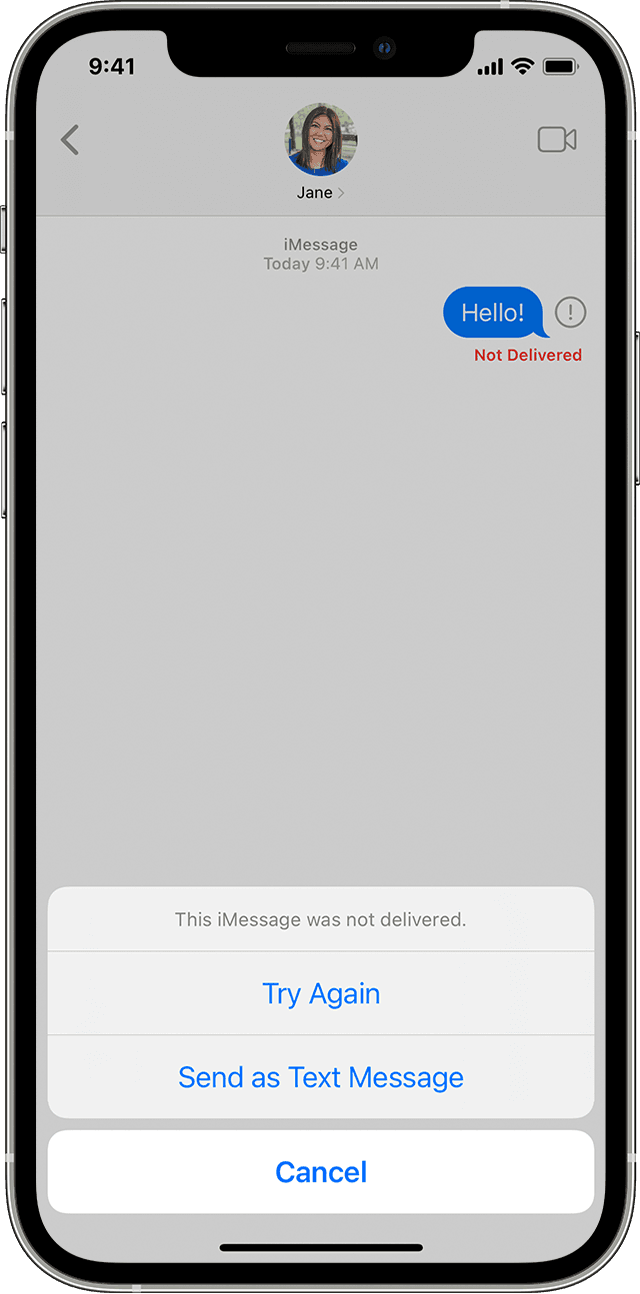
If you see a red exclamation point
If you try to send a message and you see  with an alert that says Not Delivered, follow these steps:
, then tap Try Again., then tap Send as Text Message. Messaging rates may apply. Contact your carrier for more information.You can set up Messages so that it automatically tries to send messages as an SMS when iMessage isn't available. Go to Settings > Messages, and turn on Send as SMS. "
For additional information, check out this link: If you can't send or receive messages on your iPhone or iPad - Apple Support
These steps will help ensure your device is working with ease and can fix common issues like the ones you’re experiencing.
Kindest regards!
Hey there, and welcome to Apple Support Communities sandrine229,
We can certainly understand your concern and can help provide some insight.
We recommend checking out these step on what to do if you are having issues sending or receiving iMessages.
" If you have issues with Messages after you set up a new device
If you experience issues like conversations in Messages showing up as separate threads or sent messages appearing as green message bubbles instead of blue message bubbles when you set up a new device, update your settings using the following steps:
If you have issues when you try to receive a FaceTime call after you set up a new device, you can also update your FaceTime settings.
If you see a red exclamation point
If you try to send a message and you see with an alert that says Not Delivered, follow these steps:
, then tap Try Again., then tap Send as Text Message. Messaging rates may apply. Contact your carrier for more information.You can set up Messages so that it automatically tries to send messages as an SMS when iMessage isn't available. Go to Settings > Messages, and turn on Send as SMS. "
For additional information, check out this link: If you can't send or receive messages on your iPhone or iPad - Apple Support
These steps will help ensure your device is working with ease and can fix common issues like the ones you’re experiencing.
Kindest regards!
imessage

