
How to know how much charge is left in my MagSafe Battery pack?
i plugged in my new pack and the orange light went off after 5 mins
also how do i know how much charge is left in it
[Re-Titled by Moderator]
i plugged in my new pack and the orange light went off after 5 mins
also how do i know how much charge is left in it
[Re-Titled by Moderator]
Hi mberger100,
How to use your MagSafe Battery Pack provides some insight into what the status light colors mean for your battery pack, along with how to check the charging status and battery level.
"While your MagSafe Battery Pack is charging, the status light might flash. If it flashes green, your battery pack is fully charged. If it flashes amber, your battery pack might need more time to charge."
"Check the charge
Make sure that your MagSafe-compatible iPhone is running iOS 14.7 or later. When you attach your MagSafe Battery Pack to your iPhone, it will automatically begin to charge your iPhone and a charging status will appear on the Lock screen.
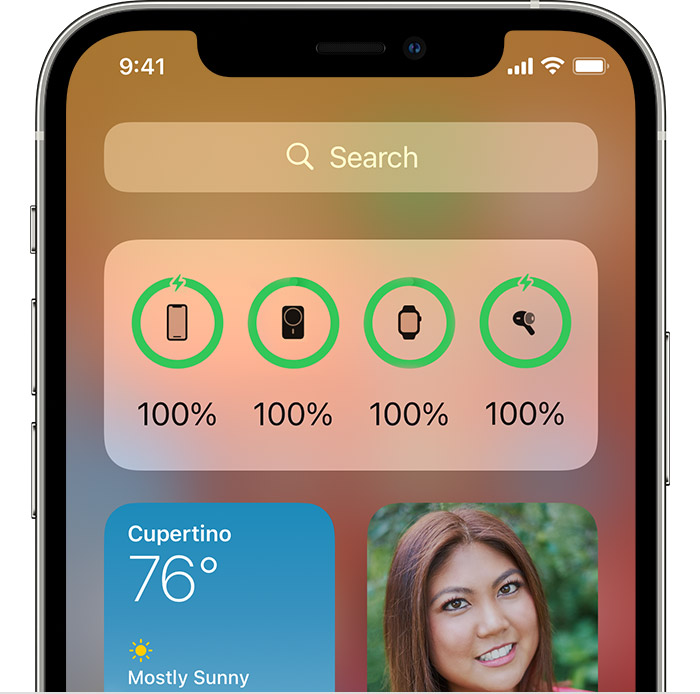
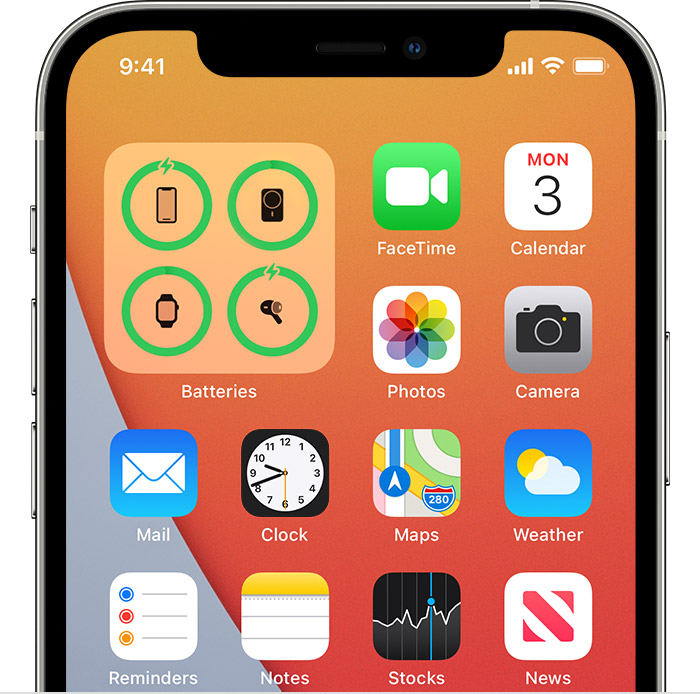
To see your charging status in Today View or on the Home Screen, add the Batteries widget:
Today View
Home Screen
When you're using your MagSafe Battery Pack to charge your iPhone, you might get a notification that says your iPhone will charge only up to 90%. To charge past 90%, open Control Center, press and hold the Low Power Mode icon, then tap Continue. "
If your iPhone is on iOS 14.7 or later and you're using a 20W or higher USB power adapter, please reach out to Apple Support: Get Support
Cheers!
Hi mberger100,
How to use your MagSafe Battery Pack provides some insight into what the status light colors mean for your battery pack, along with how to check the charging status and battery level.
"While your MagSafe Battery Pack is charging, the status light might flash. If it flashes green, your battery pack is fully charged. If it flashes amber, your battery pack might need more time to charge."
"Check the charge
Make sure that your MagSafe-compatible iPhone is running iOS 14.7 or later. When you attach your MagSafe Battery Pack to your iPhone, it will automatically begin to charge your iPhone and a charging status will appear on the Lock screen.
To see your charging status in Today View or on the Home Screen, add the Batteries widget:
Today View
Home Screen
When you're using your MagSafe Battery Pack to charge your iPhone, you might get a notification that says your iPhone will charge only up to 90%. To charge past 90%, open Control Center, press and hold the Low Power Mode icon, then tap Continue. "
If your iPhone is on iOS 14.7 or later and you're using a 20W or higher USB power adapter, please reach out to Apple Support: Get Support
Cheers!
How to know how much charge is left in my MagSafe Battery pack?

