Hi little_recess_,
It seems you're trying to change which email app opens when you click a link in Safari. It sounds like you might've already tried the steps below: Change the default web browser or email app on your iPhone, iPad, or iPod touch
"How to change your default web browser or email app
- Go to Settings and scroll down until you find the browser app or the email app.
- Tap the app, then tap Default Browser App or Default Mail App.
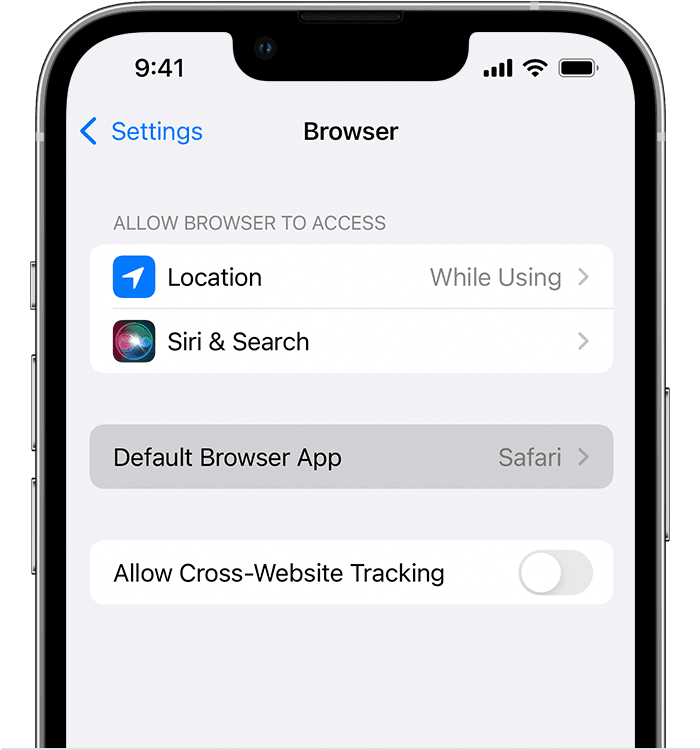
- Select a web browser or email app to set it as the default. A checkmark appears to confirm it's the default.
If you don't see the option to set a web browser or email app as your default, the developer might not support it. Contact the app developer to learn more.
If you delete a web browser app, your device will set Safari as the default browser app. If you delete the Safari app, your device will set one of your other web browser apps as the default. To use the Safari app again, you'll need to reinstall it on your device.
If you delete an email app, your device will set the Mail app as the default. If you delete the Mail app, your device will set one of your other email apps as the default. To use the Mail app again, you'll need to re-install it on your device."
Based on the above, if you've followed those steps but you're unable to set Outlook as the default email app, the app may not support it. In that case, you'd want to use the link above to check with the developer.
Thanks for using the Apple Support Communities.


