Hi andr2222,
Thanks for reaching out to Apple Support Communities with your question.
If your family can't share your Apple Music subscription, follow the steps below to check your Family Sharing settings:
"Check your Family Sharing settings
Make sure that you're using the same Apple ID for Family Sharing and Media & Purchases. And make sure that purchase sharing is turned on. Then ask your family members to check their settings too.
On your iPhone or iPad with iOS 16 or later
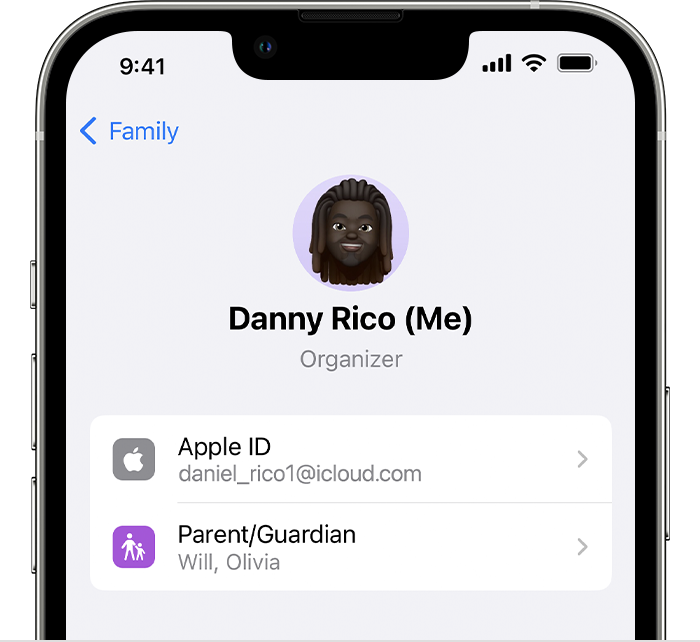
- Go to Settings > Family.
- Tap your name.
- Make a note of which Apple ID is listed.
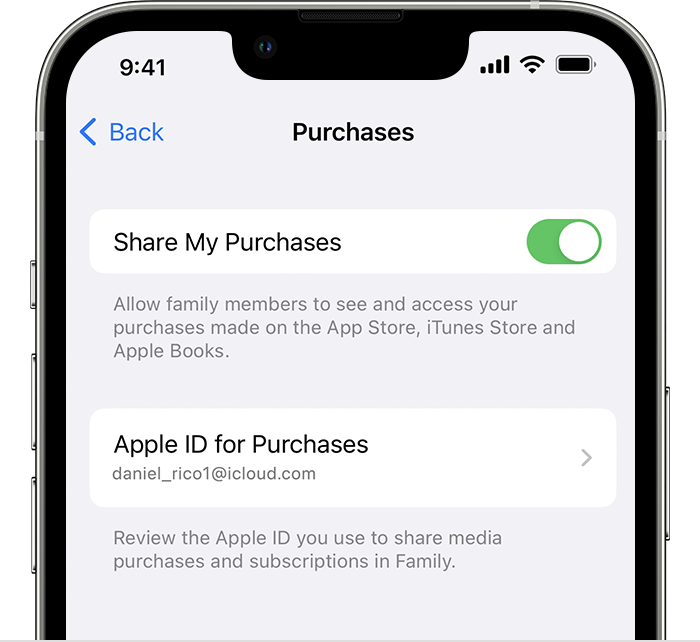
- Tap Purchases.
- Tap Apple ID for Purchases and make sure that you're signed in with with the same Apple ID that you use for Family Sharing. If not, tap Share using secondary Apple ID and enter the Apple ID and password for that Apple ID.
On your iPhone, iPad, or iPod touch with iOS 15 or earlier
- Go to Settings, tap your name, then tap Family Sharing.
- Tap your name.
- Make a note of which Apple ID is listed. You'll need to use this Apple ID to sign in later.
- Tap Back to go back to Family Sharing.
- Tap Purchase Sharing and make sure that Share Purchases with Family is turned on.
- Tap Back, then tap Apple ID.
- Tap Media & Purchases.
- Tap View Account.
- Sign in with your Apple ID. Make sure that you sign in with with the same Apple ID that you use for Family Sharing."
If you can't find your family's shared content
Cheers.


