Beats X not working straight out of the box.
Second pair of beats x not working straight out of the box. Very disappointing. How do I contact manufacturer?
[Re-Titled by Moderator]
Second pair of beats x not working straight out of the box. Very disappointing. How do I contact manufacturer?
[Re-Titled by Moderator]
Hello MiaHilfiger,
We'd like to learn more to see how we can help. Are your Beats not powering on at all or are they not connecting to your devices? If they aren't connecting, try these steps to see if they resolve the issue for you: If you can't connect to your wireless Beats product
If they aren't powering on or working as expected, make sure you've tried a reset with these steps:
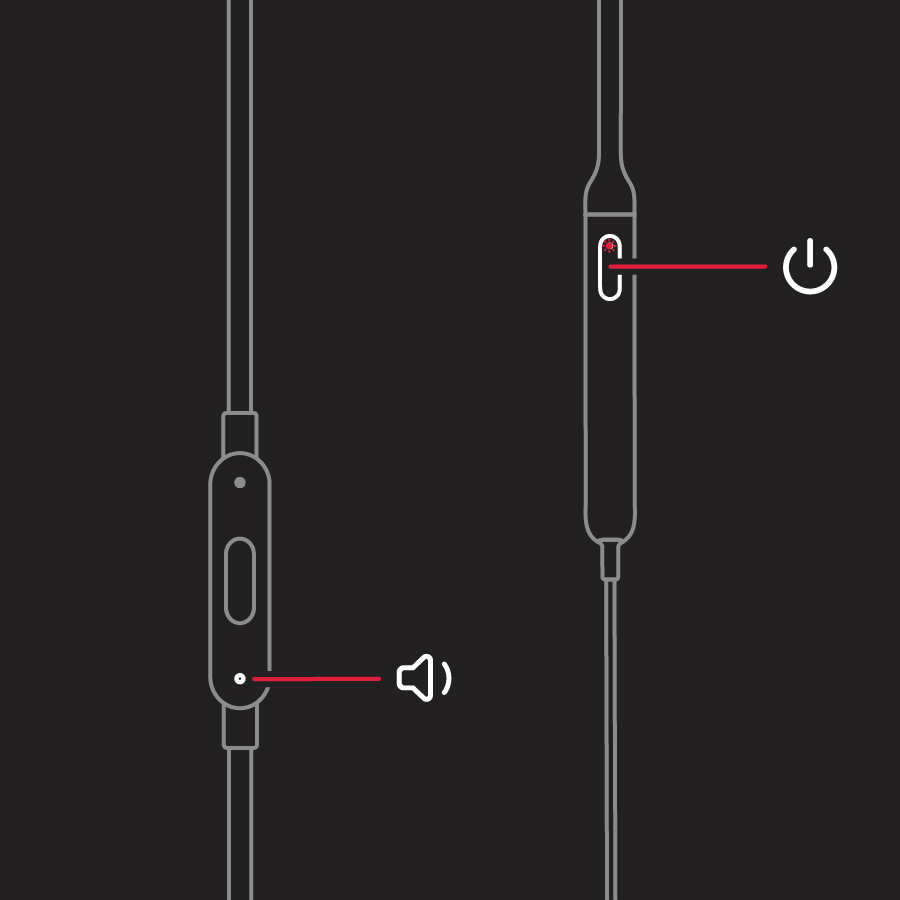
Reset BeatsX
1. Hold down both the power button and the volume down button for 10 seconds.
2. When the LED indicator light flashes, release the buttons. Your earphones are now reset and ready to be set up with your devices again.
You'll find this information here: Reset your Beats earphones
If none of the steps we've suggested seem to help, you can reach out to Apple Support directly to see what options they can offer: Contact - Official Apple Support
For more details about your service options, have a look at this link: Beats Repair & Service
Take care.
Hello MiaHilfiger,
We'd like to learn more to see how we can help. Are your Beats not powering on at all or are they not connecting to your devices? If they aren't connecting, try these steps to see if they resolve the issue for you: If you can't connect to your wireless Beats product
If they aren't powering on or working as expected, make sure you've tried a reset with these steps:
Reset BeatsX
1. Hold down both the power button and the volume down button for 10 seconds.
2. When the LED indicator light flashes, release the buttons. Your earphones are now reset and ready to be set up with your devices again.
You'll find this information here: Reset your Beats earphones
If none of the steps we've suggested seem to help, you can reach out to Apple Support directly to see what options they can offer: Contact - Official Apple Support
For more details about your service options, have a look at this link: Beats Repair & Service
Take care.
Hi MiaHilfiger,
Since you're getting that red light, try plugging your Beats into power for 30 to 60 mins. Then try again to pair. If still not able to, then you'll want to reach out to the place of purchase. Or, you can contact Apple Support for service options.
All the best!
I’ve already done that multiple times and they still do not work.
they only have indicator light that they are charged and when I reset they stay on red
Beats X not working straight out of the box.