Email arrival sound Classic Ding not working

In 2007 when first bought iPhone the email arrival sound Ding was best part of experience. Of course lot of time since then so untold new sounds added Ding is now in Classic category but still available (not removed) but as fully selected fails to give its sound upon email arrivals which are many with dozen+ email accounts hitting.


therefore why does classic ding sound fail to happen? Did some iOS upgrade disable and deprecate classic ding? How to revive it?

iPhone 7, iOS 15

Posted on Dec 29, 2022 4:41 AM

Reply
3 replies

Dec 30, 2022 8:30 AM in response to dhb210

Hello dhb210,


Welcome to Apple Support Communities! It sounds like you need help with an alert not sounding. We completely understand why you'd reach out, and are happy to help.


Do other sounds have this issue? What happens if you try another sound?


This may help too:


  1. Open the Settings app
  2. Tap "Notifications"
  3. Scroll down and tap on "Email" 
  4. Ensure that you have "Allow Notifications" enabled
  5. Go back to the home screen of your Settings app
  6. Tap on "General"
  7. Tap on "Background App Refresh"
  8. Ensure that it is enabled for "Email"
  9. Close the Settings app and open the Edison Mail app
  10. Tap the menu icon in the top left
  11. Tap the "Settings button in the bottom left
  12. Tap "Notifications" 
  13. Ensure that you have the notifications you would like to receive enabled.
  14. You can also change the notification sound by clicking on "Notification Sound"


Use notifications on your iPhone or iPad


Please have a look and let us know if this helps! 


Cheers! 

Dec 30, 2022 10:29 AM in response to merlinapple

I will understand that your answer is that Ding is not deprecated or disabled or removed by iOS updates over 10+ yrs and that Ding should be working perfectly and that this is Apple’s official policy statement.


Thank you. I did not hear this before and need this coming from Apple directly to be clear about it. Plz confirm this again for clarity.


next


I did 1-7 but 8 is impossible.


firstly, in 3 there is no Email. There is Mail. I thought this was a minor discrepancy so I went ahead and made it to 7 but not 8


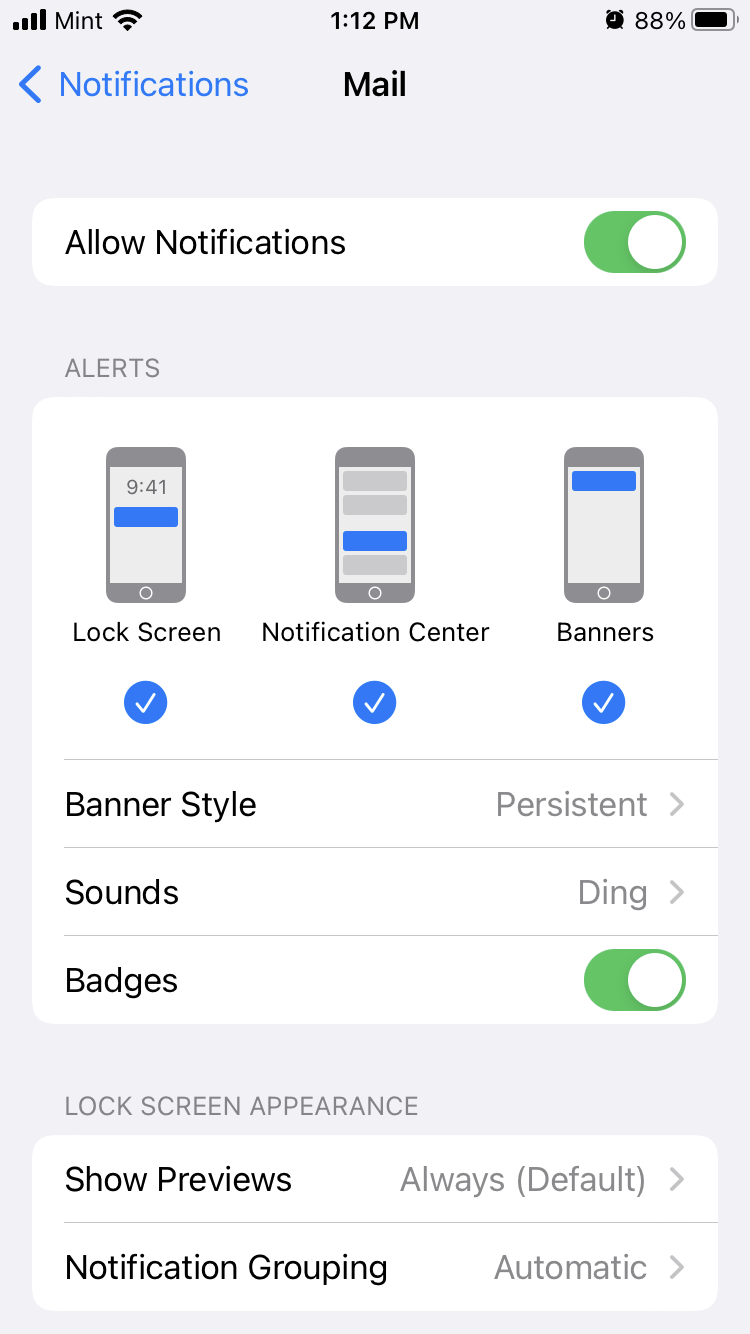
below image shows the Mail sound setting as Ding and notifications on as you direct in 4


In 8 there is no Mail and also no Email.


below plz find image showing the M’s in the listing. No Mail. Under E’s btw is only eBay which is not applicable


interesting you have me seeing this list first time ever because seeing whole there seems to be everything else here though — even I apps I downloaded but never used ever after initial download. And this in some cases has been years.


(Are all those green checks slowing down my phone? Should I remove the ones I never use?)


yes I have tried other email sounds (Aurora in top tier category, recent not old Classic category) and email arrivals make zero sounds no matter what sound is selected.


please still help as email arrivals still make zero sounds but the test of Aurora made its sound just like test of Ding makes its ding.


problem persists even after your 1-7 completed


I have never heard of Edison Mail and I will never install it


This thread has been closed by the system or the community team. You may vote for any posts you find helpful, or search the Community for additional answers.

Email arrival sound Classic Ding not working

Welcome to Apple Support Community
A forum where Apple customers help each other with their products. Get started with your Apple Account.
