Adding Music to MacBook Pro for HD

I recently (September) purchased a new Macbook Pro. The music from my old iMAC magically appeared on my new MacBook. However, not all of it transferred. I copied the music files from my iMAC onto a USB and copied the files from there to the Macbook Pro. I've tried the "import" in the Music app without any luck. Nothing happens. The files are .wma files.

MacBook Pro 13″, macOS 12.6

Posted on Dec 30, 2022 2:28 PM

Reply

Similar questions

1 reply

Dec 31, 2022 6:52 PM in response to jwwjcw

Hello jwwjcw,


Thank you for reaching out in Apple Support Communities. There's a feature called, "Sync Library" that provides a seamless experiencing in syncing your music content to the new MacBook Pro. We recommend to verify that this feature is turned on for both computers. This way your music library will update on the new Mac. Here's how:


How to turn on Sync Library on your Mac
1. Open the Apple Music app.
2. In the menu bar, choose Account and make sure that you're signed in with the same Apple ID that
you use with your Apple Music subscription.
3. Choose File > Library > Organize Library. Then select Consolidate files.
4. Choose Music > Settings or Music > Preferences.
5. Click the General tab.
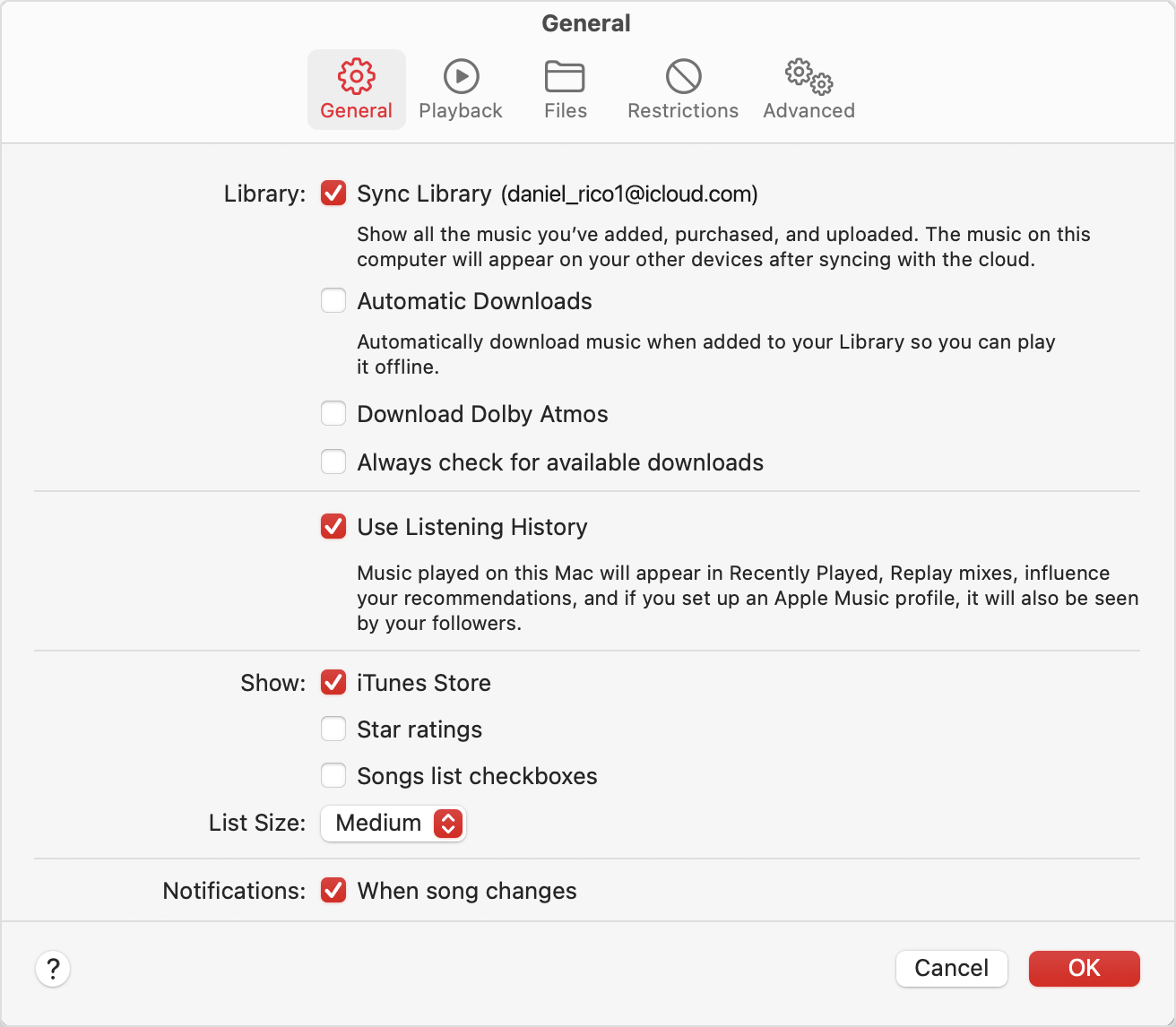
6. Select Sync Library.
Preferences showing Sync Library turned on

7. Click Ok.
8. Wait for your music library to sync. To check the status, go to the bottom of the sidebar and click
Updating Cloud Library.
9. Turn on Sync Library on your other devices.

Following these steps can help and is outlined here for you to reference: Use Sync Library to access your music library across your devices


Kind regards.


This thread has been closed by the system or the community team. You may vote for any posts you find helpful, or search the Community for additional answers.

Adding Music to MacBook Pro for HD

Welcome to Apple Support Community
A forum where Apple customers help each other with their products. Get started with your Apple Account.