Corrupt email

Attached is an email I received this morning. Opening the first time it appeared normal. Opened the second time and it now looks like rubbish, just letters and numbers. I had this happen before but can’t remember how I remedied it. Any advice is appreciated. Only happened to this one email.

iPad, iPadOS 16

Posted on Jan 1, 2023 10:10 AM

Reply
Question marked as Top-ranking reply

Posted on Jan 2, 2023 1:10 PM

Hello Staci77,


Thank you for reaching out to Apple Support Communities, and we'll be happy to help in any way we can. We understand you're having issues with email displaying incorrectly on your iPad. Have you tried restarting your iPhone? This simple step resolves a multitude of issues: Restart your iPad


"How to restart an iPad without a Home button

  1. Press and hold either volume button and the top button until the power off slider appears.
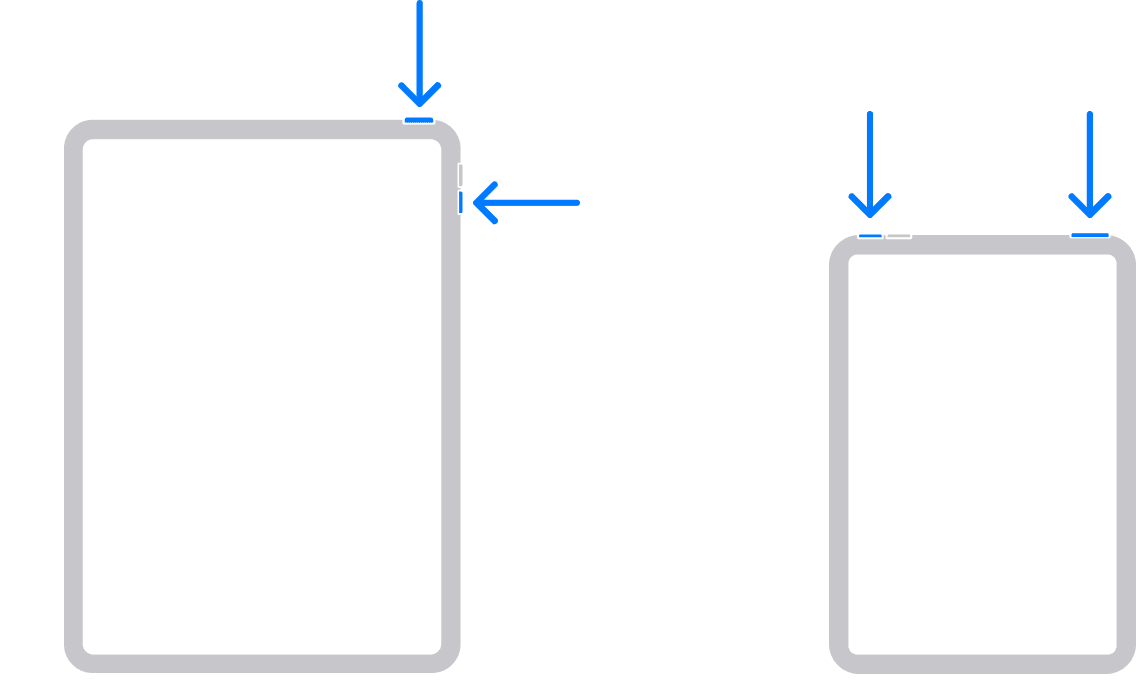
  2. Drag the slider, then wait 30 seconds for your device to turn off. If your device is frozen or unresponsive, force restart your device.
  3. To turn your device back on, press and hold the top button until you see the Apple logo.

How to restart an iPad with a Home button

  1. Press and hold the top button until the power off slider appears.

  2. Drag the slider, then wait for 30 seconds for your device to turn off. If your device is frozen or unresponsive, force restart your device.
  3. To turn your device back on, press and hold the top button until you see the Apple logo.

"


If that doesn't resolve the issue, does your iPad need updating to iPadOS 16.2? Do you have a recent backup for the data in your iPad in iCloud or your computer? If not, we recommend that you create one as described here: How to back up your iPhone, iPad, and iPod touch 


Then update your iPadOS as outlined here: Update your iPhone or iPad


We hope this helps.


Cheers!



5 replies
Question marked as Top-ranking reply

Jan 2, 2023 1:10 PM in response to Staci77

Hello Staci77,


Thank you for reaching out to Apple Support Communities, and we'll be happy to help in any way we can. We understand you're having issues with email displaying incorrectly on your iPad. Have you tried restarting your iPhone? This simple step resolves a multitude of issues: Restart your iPad


"How to restart an iPad without a Home button

  1. Press and hold either volume button and the top button until the power off slider appears.

  2. Drag the slider, then wait 30 seconds for your device to turn off. If your device is frozen or unresponsive, force restart your device.
  3. To turn your device back on, press and hold the top button until you see the Apple logo.

How to restart an iPad with a Home button

  1. Press and hold the top button until the power off slider appears.

  2. Drag the slider, then wait for 30 seconds for your device to turn off. If your device is frozen or unresponsive, force restart your device.
  3. To turn your device back on, press and hold the top button until you see the Apple logo.

"


If that doesn't resolve the issue, does your iPad need updating to iPadOS 16.2? Do you have a recent backup for the data in your iPad in iCloud or your computer? If not, we recommend that you create one as described here: How to back up your iPhone, iPad, and iPod touch 


Then update your iPadOS as outlined here: Update your iPhone or iPad


We hope this helps.


Cheers!


Jan 3, 2023 5:03 AM in response to Rob_H1

It appears that it corrupted through my MSN.com account. I deleted that account and left my Hotmail account active. Confusing but I used both for synch purposes. For the purpose of this email I will shorten explanation.

This fixed the issue. Now the email is formatted correctly.

Now keeping my fingers crossed all my IOS devices will synch my emails accordingly.

thanks for everyone’s help. Will add info in new becomes available.

Jan 2, 2023 7:32 PM in response to Staci77

Thank you for the reply Staci77!


You have taken some excellent steps so far.


To help us isolate this issue, does this occur with a specific sender or anyone that sends you an email? Does it appear like this if you open the same email on another device? If you're using a third-party mail account, try opening this email on the mail provider's website.


Keep us posted on the results.

This thread has been closed by the system or the community team. You may vote for any posts you find helpful, or search the Community for additional answers.

Corrupt email

Welcome to Apple Support Community
A forum where Apple customers help each other with their products. Get started with your Apple Account.