How do I search for a specific photo album?

On my iPad or iPhone, how do I SEARCH or FIND or GO TO a ‘specific’ photo album (title) I’ve created. I have too many albums to scroll through each time I want to ADD TO or access an individual album.

iPad Pro, 12.9-inch, 6th Gen, Wi-Fi

Posted on Jan 3, 2023 10:46 AM

Reply
1 reply

Jan 4, 2023 1:56 PM in response to underwhelmed2

Hi underwhelmed2,


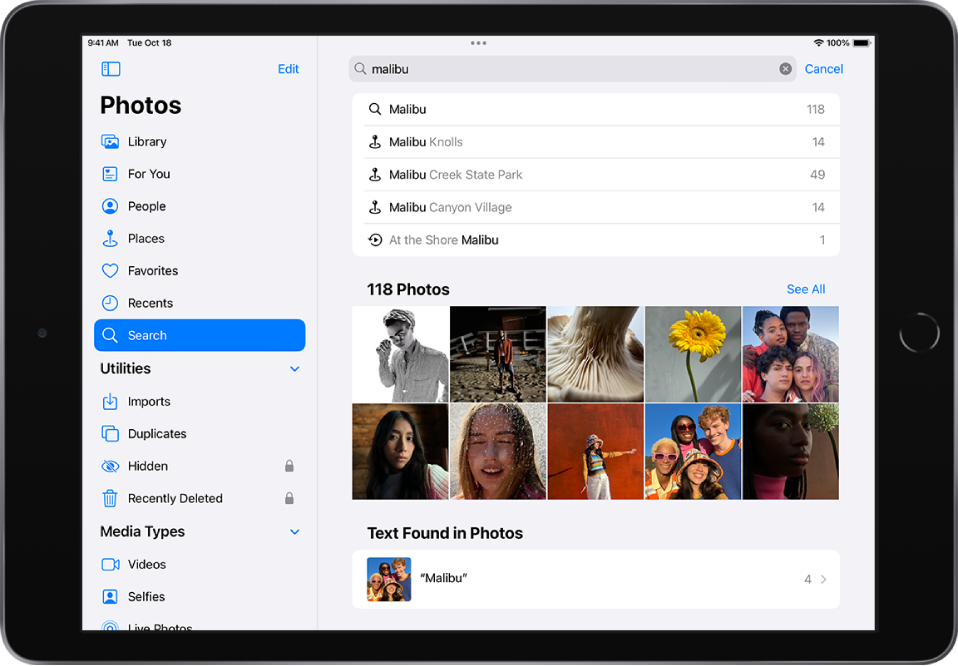
We'll be glad to help you out with searching your albums. There is a search function within Photos that will allow you to do this. This article explains how to use this feature: Search in Photos on iPad


"Photos is open in landscape orientation. At the left side of the screen the sidebar displays the Photos, For You, Albums, and Search buttons; Search is selected. At the top of the screen is a search field; a location and dates are entered in the search field. Below the search field suggested search results are listed. A grid of photos yielded from the search terms are in the middle of the screen. At the top left of the grid of photos, the total number of photos in the search result is listed. At the top right of the grid of photos is a See All button.

Swipe from the left edge of the screen or tap the Show Sidebar button to show the sidebar, then tap Search. View photos in the suggested categories, or use the search field at the top of the screen to search by any of the following:

"


That should allow you to search for your albums.


Cheers!

This thread has been closed by the system or the community team. You may vote for any posts you find helpful, or search the Community for additional answers.

How do I search for a specific photo album?

Welcome to Apple Support Community
A forum where Apple customers help each other with their products. Get started with your Apple Account.