Face ID

After the Covid I can’t get the Face ID to see my face when I am wearing my mask!

I have to always use the password even when I am in class the iPhones from the X (10) until the 14 Pro Max I wish the iPhone 15 got the Touch ID and Face ID enable

iPhone XR, iOS 16

Posted on Jan 3, 2023 4:51 PM

Reply
Question marked as Top-ranking reply

Posted on Jan 3, 2023 4:59 PM

Have you tried these tips? Make sure your mask isn’t too high or close to your eyes for your face to be recognised.

Use Face ID while wearing a mask with iPhone 12 and later

With iOS 15.4 and later, you can use Face ID with a mask to unlock your iPhone while wearing a mask.

If you're wearing a face mask or potentially other face coverings, Face ID with a mask can analyze the unique characteristics around your eyes. When using Face ID with a mask, you can still use Face ID to authenticate apps, unlock your iPhone, and use Apple Pay.

This feature is available on iPhone 12 and later with iOS 15.4 and later.


How to set up Face ID to work with face masks

  1. Make sure that your iPhone has iOS 15.4 or later.
  2. Open Settings, then tap Face ID & Passcode.
  3. Scroll down and turn on Face ID with a Mask.
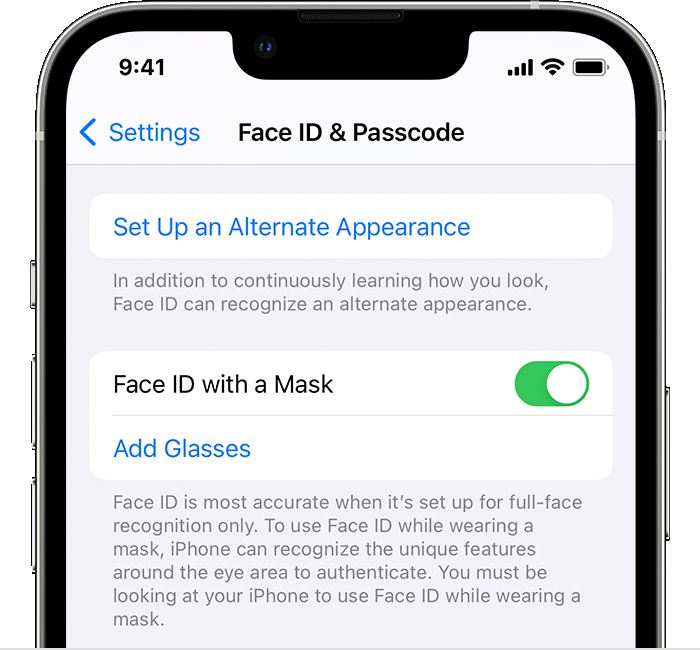

4.When prompted, tap Use Face ID with a Mask. Follow the onscreen instructions to set up Face ID using the same face scan process.

You can also unlock your iPhone with your Apple Watch while wearing a mask.

**If you wear a face mask too high or too close to your eyes, your iPhone may fail to unlock with Face ID. This feature requires your eyes to be unblocked.**


How to use Face ID when you're wearing glasses and a face mask

If you wear glasses, you can improve the accuracy of Face ID with a mask by setting it up with your glasses on. You can do this when you first set up Face ID or later. You can add up to four pairs of glasses with Face ID.

  1. Open the Settings app, then tap Face ID & Passcode.
  2. Scroll down and tap Add Glasses.
  3. Tap Continue when prompted, then follow the onscreen instructions.

To use Face ID with a mask, Face ID must clearly see your eyes and the areas around the eyes. Face ID with a mask is not designed to work with sunglasses.



1 reply
Question marked as Top-ranking reply

Jan 3, 2023 4:59 PM in response to kayven11y

Have you tried these tips? Make sure your mask isn’t too high or close to your eyes for your face to be recognised.

Use Face ID while wearing a mask with iPhone 12 and later

With iOS 15.4 and later, you can use Face ID with a mask to unlock your iPhone while wearing a mask.

If you're wearing a face mask or potentially other face coverings, Face ID with a mask can analyze the unique characteristics around your eyes. When using Face ID with a mask, you can still use Face ID to authenticate apps, unlock your iPhone, and use Apple Pay.

This feature is available on iPhone 12 and later with iOS 15.4 and later.


How to set up Face ID to work with face masks

  1. Make sure that your iPhone has iOS 15.4 or later.
  2. Open Settings, then tap Face ID & Passcode.
  3. Scroll down and turn on Face ID with a Mask.


4.When prompted, tap Use Face ID with a Mask. Follow the onscreen instructions to set up Face ID using the same face scan process.

You can also unlock your iPhone with your Apple Watch while wearing a mask.

**If you wear a face mask too high or too close to your eyes, your iPhone may fail to unlock with Face ID. This feature requires your eyes to be unblocked.**


How to use Face ID when you're wearing glasses and a face mask

If you wear glasses, you can improve the accuracy of Face ID with a mask by setting it up with your glasses on. You can do this when you first set up Face ID or later. You can add up to four pairs of glasses with Face ID.

  1. Open the Settings app, then tap Face ID & Passcode.
  2. Scroll down and tap Add Glasses.
  3. Tap Continue when prompted, then follow the onscreen instructions.

To use Face ID with a mask, Face ID must clearly see your eyes and the areas around the eyes. Face ID with a mask is not designed to work with sunglasses.


This thread has been closed by the system or the community team. You may vote for any posts you find helpful, or search the Community for additional answers.

Face ID

Welcome to Apple Support Community
A forum where Apple customers help each other with their products. Get started with your Apple Account.