iCloud email aliases

I have set up one email alias for my iCloud account. It works fine except for one situation: If I use it to receive a verification code, often the code will not arrive, sometimes the code will arrive after many tries to “resend code,” and sometimes an email will come in and quickly disappear. If it disappears, it is not to be found in any trash can—either in the Mail app or in iCloud.com. Any suggestions?

iMac 27″ 5K, macOS 13.1

Posted on Jan 9, 2023 10:31 AM

Reply
Question marked as Top-ranking reply

Posted on Jan 16, 2023 11:23 AM

Hello nick_h2,


Thought I would pass along a workaround that allowed me to deal with this problem. In my previous post, I mentioned how my verification code emails from a specific online account to my iCloud email address would sometimes arrive and then quickly disappear with no trace. Today I needed to make some personal info updates to this same online account and the same thing happened, but the incoming emails would not "stick." They would arrive with a FROM and a TITLE, but no content, and then quickly disappear--even though my Preferences were set to download any remote content.


So I set up a Rule to forward any emails from that particular online account to another folder. iCloud Mail did this, and the incoming email was transferred to the specified folder along with its remote content. My only guess as to what's going on is that iCloud thinks these particular verification emails are spam and deletes them rather than sending them to the Junk folder.


Hope this will help anyone else who runs into this problem.


Best regards,

dl68


3 replies
Question marked as Top-ranking reply

Jan 16, 2023 11:23 AM in response to dl68

Hello nick_h2,


Thought I would pass along a workaround that allowed me to deal with this problem. In my previous post, I mentioned how my verification code emails from a specific online account to my iCloud email address would sometimes arrive and then quickly disappear with no trace. Today I needed to make some personal info updates to this same online account and the same thing happened, but the incoming emails would not "stick." They would arrive with a FROM and a TITLE, but no content, and then quickly disappear--even though my Preferences were set to download any remote content.


So I set up a Rule to forward any emails from that particular online account to another folder. iCloud Mail did this, and the incoming email was transferred to the specified folder along with its remote content. My only guess as to what's going on is that iCloud thinks these particular verification emails are spam and deletes them rather than sending them to the Junk folder.


Hope this will help anyone else who runs into this problem.


Best regards,

dl68


Jan 12, 2023 7:03 AM in response to nick_h2

nick_h2, thanks for taking the time to respond.


Yes, I think I understand the various methods of receiving verification codes for two-factor authentication. In this particular case, I set up an online account with just a username, which is an iCloud email alias, and a randomly generated password. Later I decided that I should add my iPhone number to the account so that I could get text notifications from this particular account. This account requires a verification code in order to make any changes to a personal profile. So I requested to add a mobile number and got the "request a verification code" screen which said that a code had been sent to my username, i.e., my iCloud alias email address. But nothing happened. I clicked the "resend code" button multiple times but got no code. In one instance, I got just the title of a verification code email, but there was no content and it disappeared from the inbox almost immediately. After this happened, I checked my junk and trash folders, but there was nothing there. I also sent an email to the alias address, and it worked fine.


The next day I decided to try again. I requested a verification code and got nothing. I clicked "resend code" and got an email to the alias email account that had a title but no content. I clicked the third time and finally got an email with a verification code. I used it and was able to make changes to my online account.


Bottom line, I'm all set, but these glitches make me leery of an iCloud alias; however, as I said before, emails to this address from private sources have all worked fine. So I guess I'm good.


Thanks again for your reply,

dl68



Jan 11, 2023 12:05 PM in response to dl68

Hello dl68,


We want to help clarify, are you getting this code using the steps below?


Get a verification code and sign in with two-factor authentication and try multiple ways. We've listed one example below:


Get a text or phone call
If you don’t have a trusted device handy, you can have a verification code sent to your trusted phone number as a text message or phone call.
1. Click Didn't get a verification code on the sign in screen.
2. Choose to have the code sent to your trusted phone number.
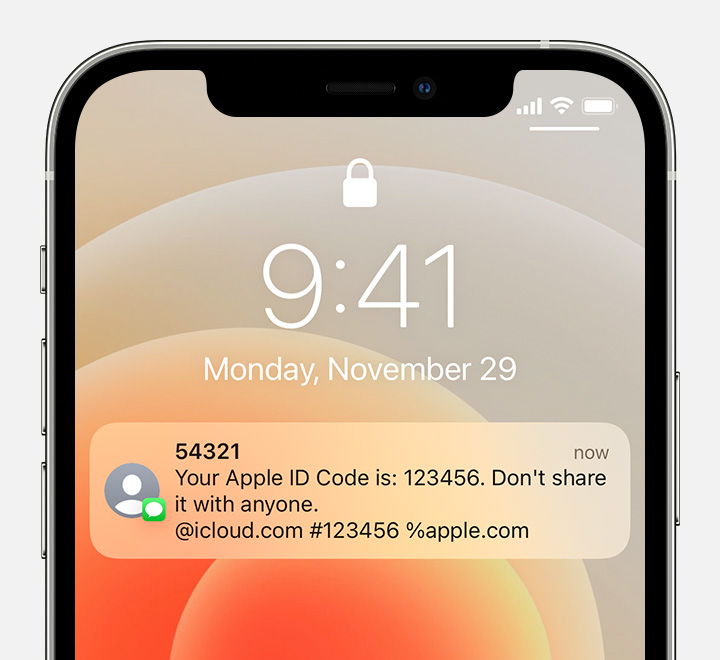
3. You'll get a text message or phone call from Apple with your verification code. This text message might include an additional domain validation line. This line includes the @ symbol, the website name, and your code (for example: @icloud.com #123456 %apple.com).
Receive a text message with your verification code and a domain validation line

4. Enter the code on your other device to complete sign in.

We hope this helps.


Cheers.

This thread has been closed by the system or the community team. You may vote for any posts you find helpful, or search the Community for additional answers.

iCloud email aliases

Welcome to Apple Support Community
A forum where Apple customers help each other with their products. Get started with your Apple Account.