Weather app on Apple Watch 8

My watch defaults to Lawndale for weather. I can’t remove it because it’s not on my list of cities. I had my watch set to current location which listed Lawndale. The only way around this was to set my watch to the city I’m in.

HOW DO I REMOVE LAWNDALE!

Posted on Jan 9, 2023 3:56 PM

Reply
Question marked as Top-ranking reply

Posted on Jan 9, 2023 5:04 PM

This is going to take a few different steps but I believe that I can help you with this.


First, find the Weather app on your phone and open it.

- In the lower right-hand corner there are three horizontal lines, click there.

- Are your preferred cities listed? If not, search for a new city, click on the city when it appears in the suggestions. When that city opens, click "Add" in the upper right corner of the screen.

- Are there any cities listed that you want to get rid of? If so, click on the three dots in the upper right corner and then choose "Edit List" and delete the unwanted ones.


Secondly, the Weather app on your watch can mirror your iPhone.

  • Let's double check that! In the Watch app on your phone, open it and scroll down to the W's and you'll find "Weather". Click on it and make sure that "Mirror my iPhone" is checked (this is how I run mine, but it's up to you)
  • While your in here, you will see that there is an option to select a default city, click on the current city. Is your preferred city showing up in the list? If so, sweet! Click on it.


Hopefully this will get the Weather that you're 'watching' onto your watch ;-)

14 replies
Question marked as Top-ranking reply

Jan 9, 2023 5:04 PM in response to Waterysquash

This is going to take a few different steps but I believe that I can help you with this.


First, find the Weather app on your phone and open it.

- In the lower right-hand corner there are three horizontal lines, click there.

- Are your preferred cities listed? If not, search for a new city, click on the city when it appears in the suggestions. When that city opens, click "Add" in the upper right corner of the screen.

- Are there any cities listed that you want to get rid of? If so, click on the three dots in the upper right corner and then choose "Edit List" and delete the unwanted ones.


Secondly, the Weather app on your watch can mirror your iPhone.

  • Let's double check that! In the Watch app on your phone, open it and scroll down to the W's and you'll find "Weather". Click on it and make sure that "Mirror my iPhone" is checked (this is how I run mine, but it's up to you)
  • While your in here, you will see that there is an option to select a default city, click on the current city. Is your preferred city showing up in the list? If so, sweet! Click on it.


Hopefully this will get the Weather that you're 'watching' onto your watch ;-)

Jan 10, 2023 7:41 PM in response to Waterysquash

Now I'm curious where your watch thinks it's at, obviously sunny places (except that somewhere in California they had major weather issues).


I went into the Compass on my watch and then in the upper left corner, I clicked on the 3 horizontal lines.

I took a screenshot of the Latitude and Longitude that was showing. Do you know how to do a screen shot on your watch? It comes in handy for this next trick.

I opened the picture (on my phone) and copied the Latitude and pasted it into the search bar in Apple Maps (on the phone). I went back to the picture and grabbed the longitude, pasted it into maps.

Hit enter. My watch thinks that I'm at home and it's right!
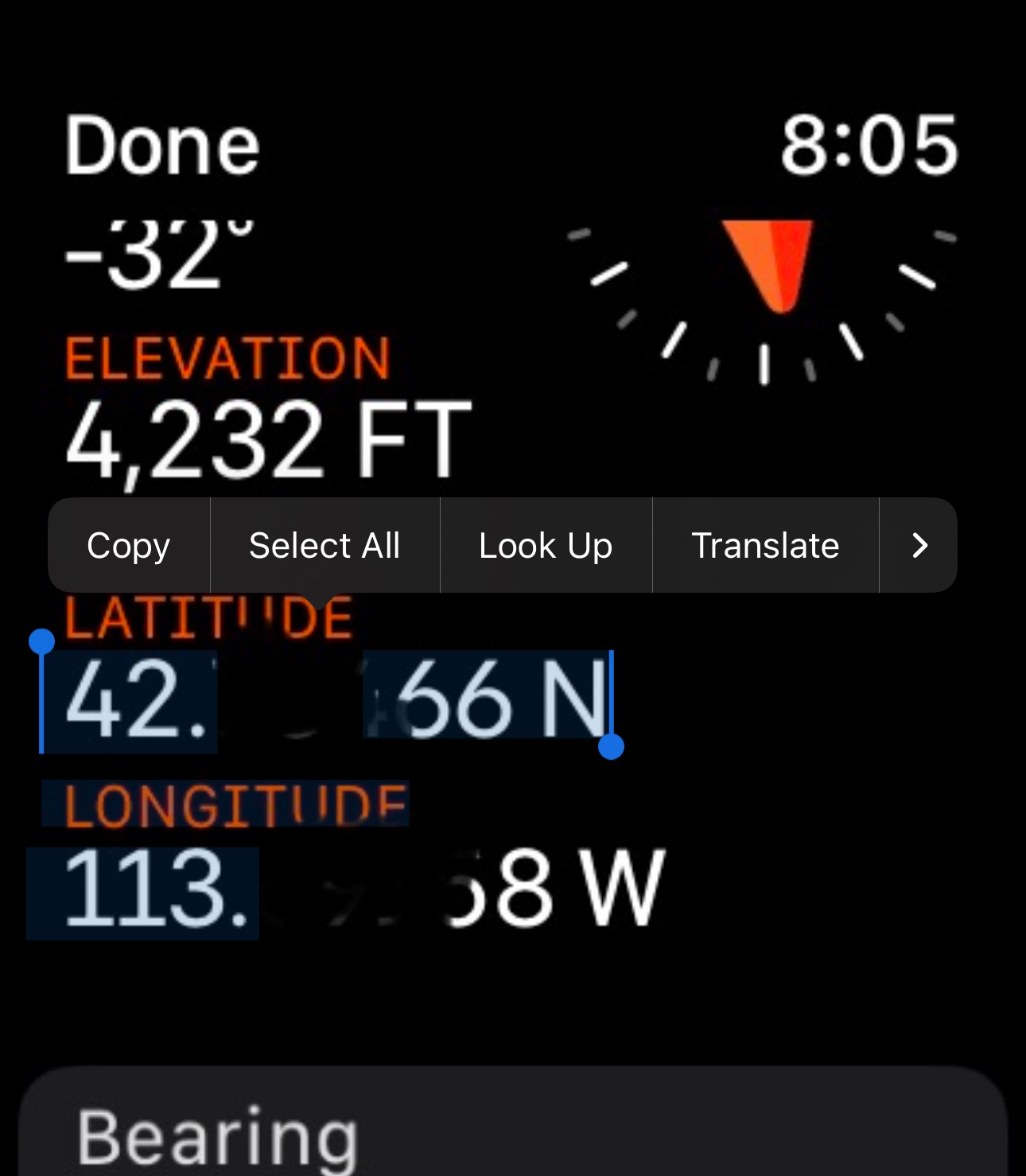

Can you try that? Unless the coordinates come back being in California, you don't need to post a screenshot like this one.


I'm also beginning to think that you should check through these settings:

Phone:

General > Settings > Maps = While Using

General > Settings > Compass > Location = While Using the App and also Precise Location = On

Settings > GPS & Maps = While Using the App


Watch:

Settings > Privacy & Security > Location Services = On

(I can't find another something that I thought I saw before I began typing this reply. Maybe it'll come to me later).


There has GOT to be something somewhere that's causing you this grief. We're going to find it ;-)



Jan 11, 2023 5:55 AM in response to Waterysquash

And now we know!


Since all the settings seem to be correct, I believe that it's time to do a factory reset and try it again. If it doesn't correct itself after the reset, then I'm inclined to think that there could be something wrong with the GPS in the Watch.


A factory reset of a watch isn't as intense and scarey as it is on a phone, back it up first though. When you backup your phone, it also grabs a backup of the watch.


Backup:

In your phone, go to Settings, > [Your Name], > iCloud, > iCloud Backup, > "Backup Up Now"


Watch Reset:

  • Using Phone - Open the Watch App, > General, > Reset, > "Erase Apple Watch Content & Settings"
  • Using Watch - Settings, > General, > Reset, > "Erase All Content and Settings"


Pairing instructions:

Set up and pair your Apple Watch with iPhone - Apple Support


During this process of restoring, it'll ask you if you want to use the backup, select the one you just did.


Hopefully the repairing will go off without a hitch. Mine paired very easily! Come back here if you need help.


Please let me know if the reset fixes the problem.


And... After it's rocking and rolling in Florida (not California), I can teach you how to take a screen shot of your watch screen ;-)


Jan 9, 2023 6:40 PM in response to bmurphy315

bmurphy315,


It MIGHT be better if you can start your own help thread. My watch is a Series 8 and some of what you have written seems different from how things are on my watch (possibly due to your Ultra). I believe that you might get better help by starting a different thread.


One thing that I'm curious about though...


In your phone, open settings (Gear Icon), > Privacy & Security, > Location Services and check something for me:

  1. Watch Faces - is it set on "While Using"?

Jan 10, 2023 5:49 AM in response to Waterysquash

Ok. Are you in Lawndale?


I just followed your steps on my watch 8 and I can left side 2 out of 3 of them.

The two that I can slide are the cities I've added (Rupert & Burley).

The one that I can't slide also says "Rupert" except that it's not actually the town of Rupert, it's "Rupert" based on my location and I live 9 miles away from town.


I believe that it's showing you Lawndale based on where you're at with your watch (location based).


Oh hey! Did you happen to read the question that I asked bmurphy315, the one that pertained to "While Using"? Can you check that too?


Let me know...


Jan 9, 2023 5:37 PM in response to Pilerman

I just got the Apple Watch Ultra a few days ago and had to do a force restart today on the watch. I noticed the same thing for my weather. On my iPhone under Settings, Privacy & Security, Location Services is turned on, and Weather has Always selected and below that Precise Location is turned on. Then on my iPhone under the Watch app under Weather, I have Current Location as my default city and below that I have mirror my phone. Then under my Apple Watch under Settings, Weather, and then selecting Default City it shows a green check mark for Current Location. The situation is when you either force restart or shut down your watch using the various types of shut downs/restarts that when the Apple Watch re-powers that you have a different city selected and even have different cities (Cupertino, NYC, etc.) listed under the Weather app on your Apple Watch when you didn’t have them on that list before you restarted your watch. So every time you power your watch on again, you have to manually delete those cities and have your default location selected when it should’ve been selected anyways when you restarted your watch? If anyone has an answer, it would be much appreciated.

This thread has been closed by the system or the community team. You may vote for any posts you find helpful, or search the Community for additional answers.

Weather app on Apple Watch 8

Welcome to Apple Support Community
A forum where Apple customers help each other with their products. Get started with your Apple Account.