Outlook calendar on Apple Watch

I have to use Outlook calendar on my new Apple Watch. Email works and phone and watch are syncing. But the watch Outlook screen shows only one day of events and I cannot look forward to future days. The Apple calendar does look forward but it cannot sync with my employers outlook server for security reasons. Anyone able to see Outlook data for more than one day?

Posted on Jan 9, 2023 4:09 PM

Reply

Similar questions

5 replies

Jan 12, 2023 2:55 PM in response to Ultrawatchowner

Hi Ultrawatchowner,


Thanks for posting in Apple Support Communities.


With Outlook calendar currently only showing the current day, try change how the events are viewed.


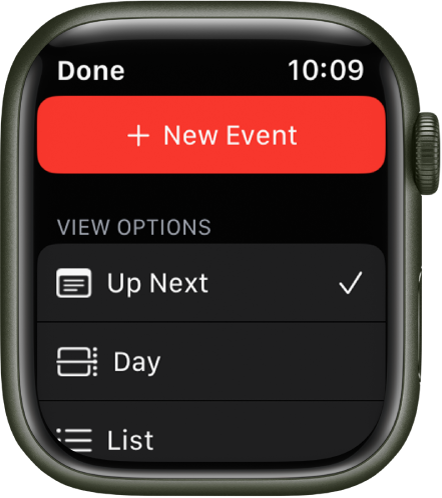
"To switch views, open the Calendar app  on your Apple Watch, tap the More button, then tap an option.

  • Up Next: Shows your upcoming events for the week.
  • Day: Shows just the events for this day.
  • List: Shows all your events from the last two weeks through the next two years.

To see another day, swipe left or right if you’re in Day view; if you’re in List view or Up Next view, turn the Digital Crown.

To jump back to the current day and time, tap the current time in the top-right corner of the display."

Calendar screen showing a New Event button at the top and three view options below—Up Next, Day, and List.


You can find these details in Check and update your calendar on Apple Watch.


Regards.


This thread has been closed by the system or the community team. You may vote for any posts you find helpful, or search the Community for additional answers.

Outlook calendar on Apple Watch

Welcome to Apple Support Community
A forum where Apple customers help each other with their products. Get started with your Apple Account.