Hi LivingstonAl,
Thanks for contacting Apple Support Communities!
We understand that your email isn't showing your Mailboxes as you'd expect and your Contacts app only opens to one contact, correct?
Has your Mail Default Account changed? You can go to Settings > Mail > Default Account to check. If you switch your Default Account to another account, do you still experience the same behavior? This resource will show you how to manage your email if you need it: Organize email in mailboxes on iPhone - Apple Support
"Organize your mail with mailboxes
You can choose which mailboxes to view, reorder your mailboxes, create new ones, or rename or delete mailboxes. (Some mailboxes can’t be changed.)
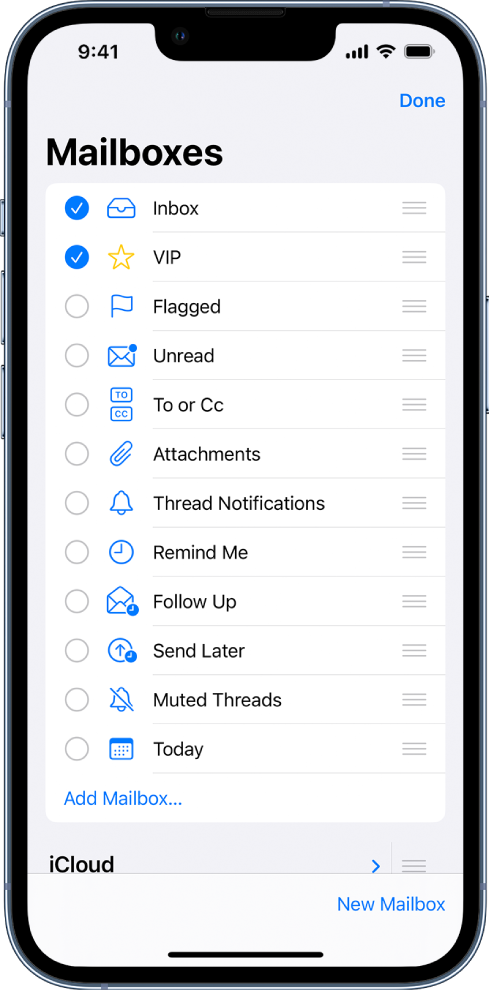
To organize your mailboxes, tap  in the upper-left corner, tap Edit, then do any of the following:
- View mailboxes: Select the checkboxes next to the mailboxes you want to include in the mailboxes list.
- Reorder mailboxes: Touch and hold
 next to a mailbox until it lifts up, then drag it to the new position.
 - Create a new mailbox: Tap New Mailbox in the lower-right corner, then follow the onscreen instructions.
- Rename a mailbox: Tap the mailbox, then tap the title. Delete the name, then enter a new name.
- Delete a mailbox: Tap the mailbox, then tap Delete Mailbox."
What do you have set as your Default Account for your Contacts? Is it associated with the same email account?
We look forward to your reply.
Cheers!


