How do I find transferred music files in my iTunes?

I just moved my phone data from android to iPhone and I had a bunch of music on my android that has transferred in file format and are in different folders labelled after the website/app I downloaded them from but when I try look on iTunes for downloaded music from my iPhone I cannot find them.

Same with on Spotify as they have an option to turn on local files but none of my audio files turn up.

What do I do?

iPhone 12

Posted on Jan 13, 2023 12:44 AM

Reply
Question marked as Top-ranking reply

Posted on Jan 15, 2023 4:39 PM

Hello sen27,


Some content needs to be moved from Android to iOS manually, such as music, books, and PDFs.


Please check out the information in this link, which explains that process and may help: Move content manually from your Android device to your iPhone, iPad, or iPod touch


Music

When you switch to an iPhone, iPad, or iPod touch, you can bring your music with you. Just use a computer to transfer the music. If you use a streaming music app, go to the App Store, get the app, then sign in with your user name and password. If you use Apple Music, just sign in on your iPhone, iPad, or iPod touch.

To move music from your Android device to your iPhone, iPad, or iPod touch using a computer:

1. Connect your Android device to your computer and find your music. On most devices, you can find these files in Music. On a Mac, install Android File Transfer, open it, then go to Music.
2. Select the songs that you want to move and drag them to a folder on your computer.
3. Disconnect your Android device and connect your iPhone, iPad, or iPod touch to your computer.
4. On a Mac with macOS Mojave or earlier, or on a PC, open iTunes and click Songs. On a Mac with macOS Catalina or later, open Music.
5. Open the folder where you put your songs and drag them to the Songs section in the Music app or iTunes Library.
6. In the Finder or iTunes, select your iPhone, iPad, or iPod touch and click Music. You can choose to sync your entire library or select only the songs or artists that you just added
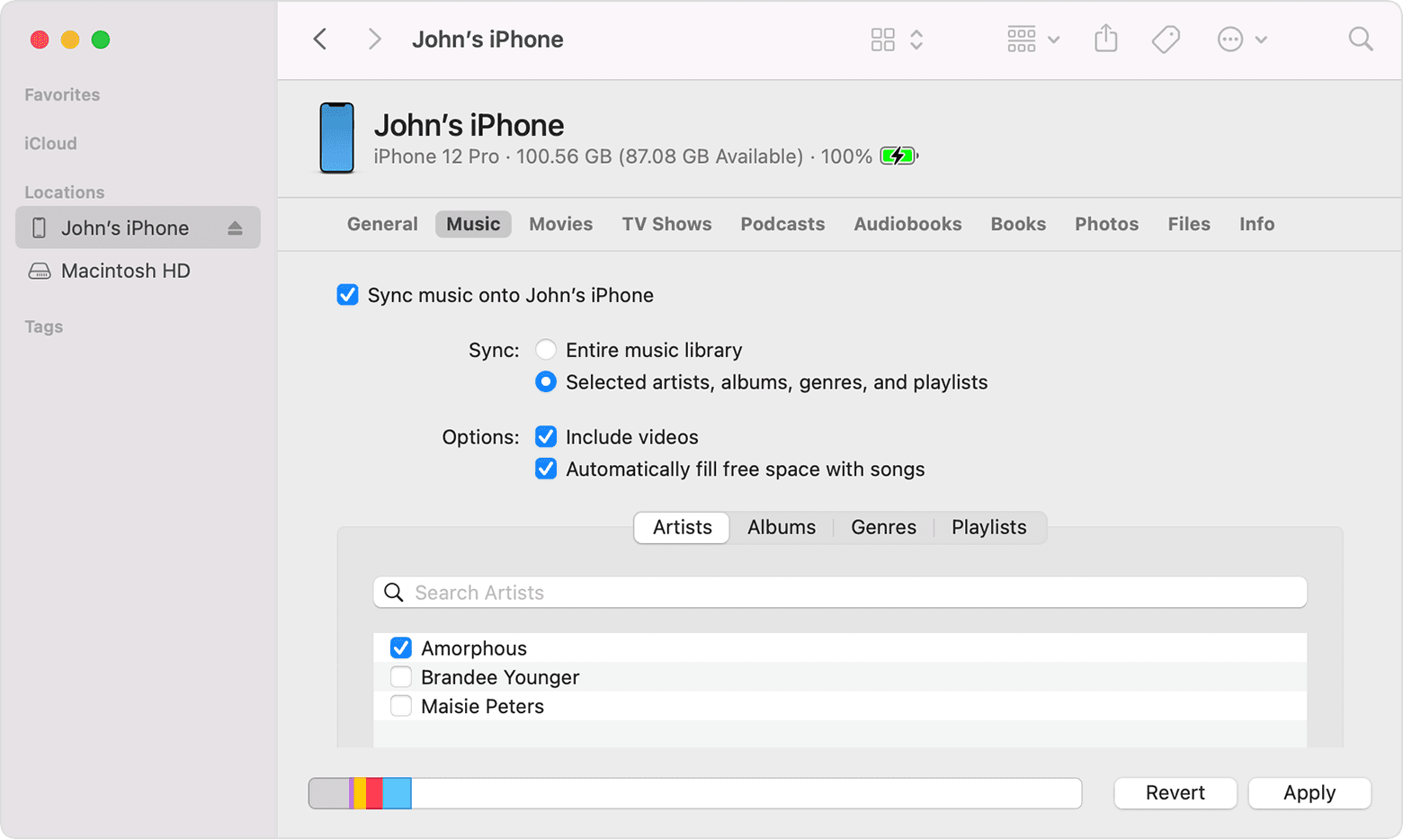

7. Click Sync. You can find your music on your iPhone, iPad, or iPod touch in the Music app.

For help moving music, contact Apple Support.


Thanks!

1 reply
Question marked as Top-ranking reply

Jan 15, 2023 4:39 PM in response to sen27

Hello sen27,


Some content needs to be moved from Android to iOS manually, such as music, books, and PDFs.


Please check out the information in this link, which explains that process and may help: Move content manually from your Android device to your iPhone, iPad, or iPod touch


Music

When you switch to an iPhone, iPad, or iPod touch, you can bring your music with you. Just use a computer to transfer the music. If you use a streaming music app, go to the App Store, get the app, then sign in with your user name and password. If you use Apple Music, just sign in on your iPhone, iPad, or iPod touch.

To move music from your Android device to your iPhone, iPad, or iPod touch using a computer:

1. Connect your Android device to your computer and find your music. On most devices, you can find these files in Music. On a Mac, install Android File Transfer, open it, then go to Music.
2. Select the songs that you want to move and drag them to a folder on your computer.
3. Disconnect your Android device and connect your iPhone, iPad, or iPod touch to your computer.
4. On a Mac with macOS Mojave or earlier, or on a PC, open iTunes and click Songs. On a Mac with macOS Catalina or later, open Music.
5. Open the folder where you put your songs and drag them to the Songs section in the Music app or iTunes Library.
6. In the Finder or iTunes, select your iPhone, iPad, or iPod touch and click Music. You can choose to sync your entire library or select only the songs or artists that you just added


7. Click Sync. You can find your music on your iPhone, iPad, or iPod touch in the Music app.

For help moving music, contact Apple Support.


Thanks!

This thread has been closed by the system or the community team. You may vote for any posts you find helpful, or search the Community for additional answers.

How do I find transferred music files in my iTunes?

Welcome to Apple Support Community
A forum where Apple customers help each other with their products. Get started with your Apple Account.