updated ipad to 16.2 and lost a passwords. fix?
No passwords after installing 16.2
iPad Air, iOS 12
No passwords after installing 16.2
iPad Air, iOS 12
Hello,
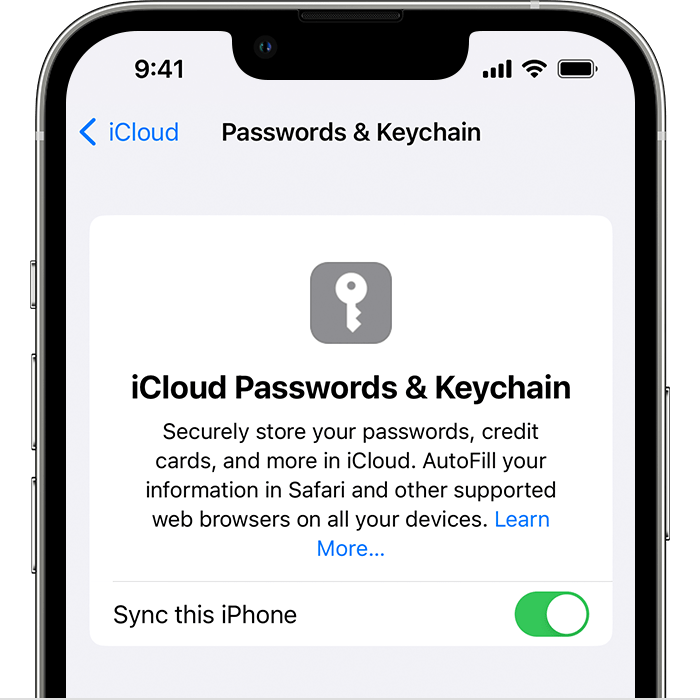
If you were syncing your passwords via iCloud previously, you'll want to use the steps below to make sure iCloud Keychain is enabled on your iPad:
1. Tap Settings, tap [your name], then choose iCloud.
2. Tap Passwords and Keychain.*
3. Turn on iCloud Keychain. You might be asked for your passcode or Apple ID password.
Find your saved passwords and passkeys on your iPhone or iPad
You can also find those steps in this resource: Set up iCloud Keychain - Apple Support
Hopefully that puts you on the path to reinstating those passwords to your iPad.
Take care.
Hello,
If you were syncing your passwords via iCloud previously, you'll want to use the steps below to make sure iCloud Keychain is enabled on your iPad:
1. Tap Settings, tap [your name], then choose iCloud.
2. Tap Passwords and Keychain.*
3. Turn on iCloud Keychain. You might be asked for your passcode or Apple ID password.
Find your saved passwords and passkeys on your iPhone or iPad
You can also find those steps in this resource: Set up iCloud Keychain - Apple Support
Hopefully that puts you on the path to reinstating those passwords to your iPad.
Take care.
updated ipad to 16.2 and lost a passwords. fix?