Swipe down only works in landscape

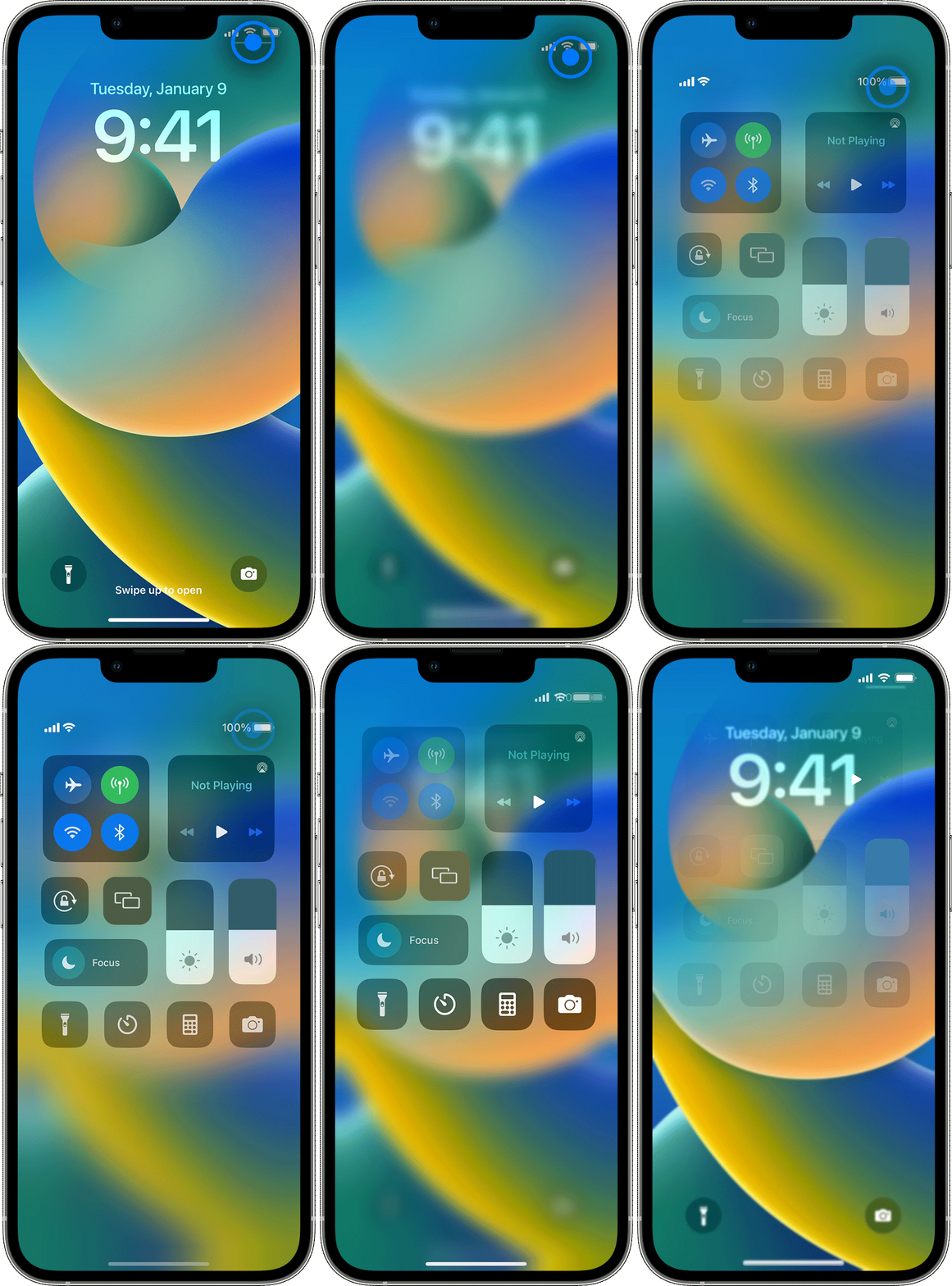
iPhone X swipe down for notifications and control center only works within an app in landscape mode. I’ve checked the settings and nothing seems off. I’ve done a hard restart. I’ve done an erase content / restore from backup. The phone is on the latest iOS (16.2). Even tried cleaning the screen out of desperation. Nothing has worked.

iPhone X

Posted on Jan 16, 2023 12:06 AM

Reply

Similar questions

2 replies

Jan 16, 2023 12:47 AM in response to Cinnarollmimi-

How to open and close Control Center

The way you open and close Control Center depends on the type of device that you have. Find your device model below, then follow the steps. Or learn how to open Control Center on your iPad.


iPhone X and later

  • To open Control Center, swipe down from the top-right corner of your screen. 
  • To close Control Center, swipe up from the bottom of the screen or tap the screen. 

If you swipe too close to the top-center of your screen, you might open Notification Center instead of Control Center.


This thread has been closed by the system or the community team. You may vote for any posts you find helpful, or search the Community for additional answers.

Swipe down only works in landscape

Welcome to Apple Support Community
A forum where Apple customers help each other with their products. Get started with your Apple Account.