Bank card not working on my iwatch
My bank card has been deleted on my iwatch but still in my wallet. I’ve tried to put it in again but it is asking to be verified. When I tried verify it’s not working.
Apple Watch Series 7, watchOS 9
My bank card has been deleted on my iwatch but still in my wallet. I’ve tried to put it in again but it is asking to be verified. When I tried verify it’s not working.
Apple Watch Series 7, watchOS 9
Hello Jimmyrobb,
You want to be sure that you are following these steps found at Set up Apple Pay on Apple Watch - Apple Support to add bank cards to Apple Pay on your Apple Watch:
Add a card to Apple Watch with your iPhone
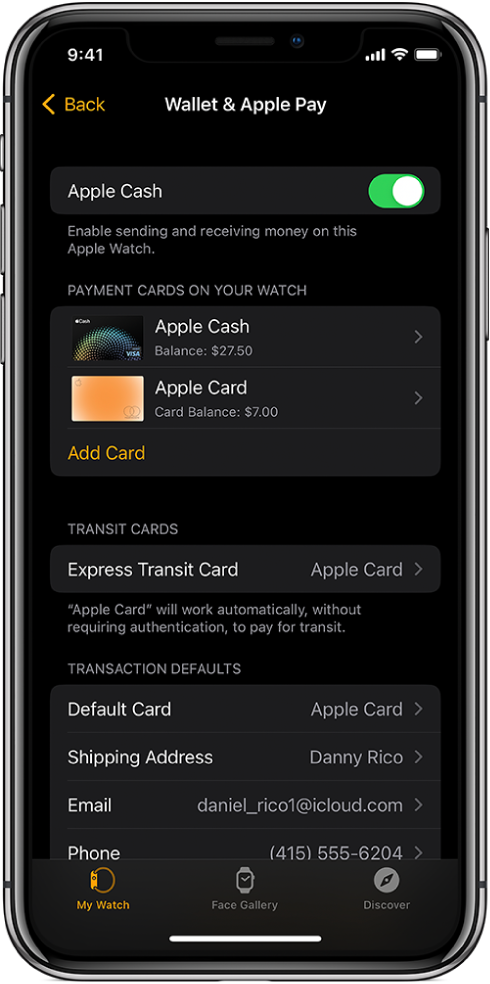
1. Open the Apple Watch app on your iPhone.
2. Tap My Watch, then tap Wallet & Apple Pay.
3. If you have cards on your other Apple devices, or cards that you recently removed, tap Add next to a card you want to add, then enter the card’s CVV.
4. For any other card, tap Add Card, then follow the onscreen instructions.
Your card issuer may require additional steps to verify your identity.
Add a card on Apple Watch
You can add Apple Account, credit, debit, and transit cards, right on Apple Watch.
1. Open the Wallet appon your Apple Watch.
2. Scroll to the bottom of the screen, then tap Add Card.
3. Choose Apple Account, Debit or Credit Card, or Transit Card; then follow the onscreen instructions.
For more information about Apple Account, see the iPhone User Guide (link to come).
If required, be sure to follow all the steps provided to verify the card with your bank.
Have a good day.
Bank card not working on my iwatch