Music playlist doesn't sync from iPhone to Mac?

We are always on the go, with our mobile devices being primary contact devices for many of us. So when I'm out and about, I like to tweak some of my music lists. I purchase additional music, but also add songs to different playlists throughout the week. I have an iPhone 14 Pro that is running the latest iOS, 16.2.


I'm not always good at sync'ing my phone with my laptop, as I'm so busy. When I did this recently, I found all my local (iphone) changes were summarily gone, replaced with older versions that exist on my Mac. I was very disappointed, frustrated.


Is there something I'm missing, a setting or a configuration directive I can tweak to avoid this happening? Has anyone else encountered this problem?


iPhone 14 Pro

Posted on Jan 17, 2023 9:03 AM

Reply
Question marked as Top-ranking reply

Posted on Jan 18, 2023 2:00 PM

Hello Forrest,


If you are an Apple Music subscriber, you can use the Sync Library option to sync your library and playlists with all your devices. That can be enabled using the steps below:


How to turn on Sync Library on your Mac

1. Open the Apple Music app.
2. In the menu bar, choose Account and make sure that you're signed in with the same Apple ID that you use with your Apple Music subscription.
3. Choose File > Library > Organize Library. Then select Consolidate files.
4. Choose Music > Settings or Music > Preferences.
5. Click the General tab.
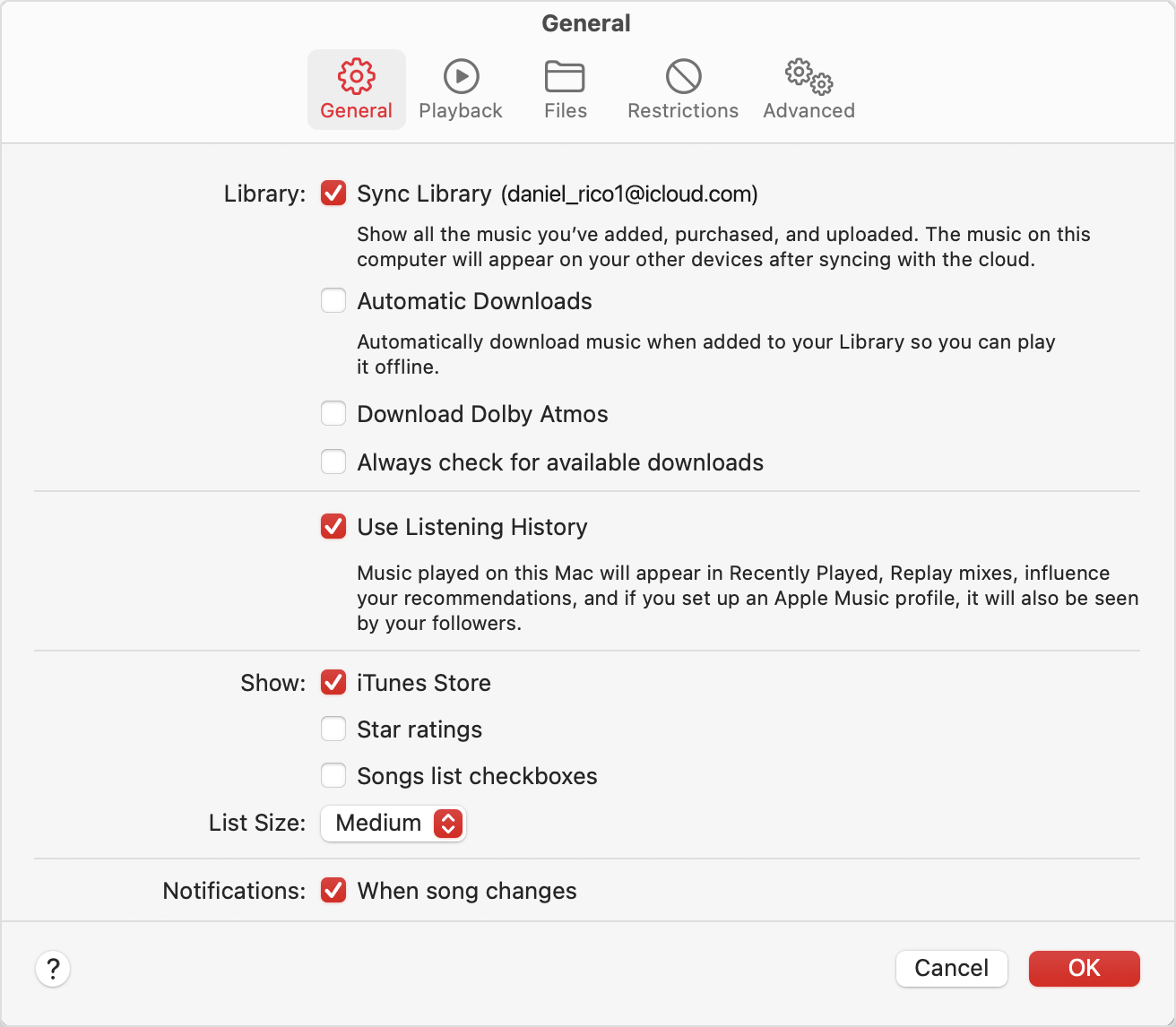
6. Select Sync Library.
Preferences showing Sync Library turned on

7. Click Ok.
8. Wait for your music library to sync. To check the status, go to the bottom of the sidebar and click Updating Cloud Library.
9. Turn on Sync Library on your other devices.

How to turn on Sync Library on your iPhone or iPad
1. Make sure that your iPhone or iPad is signed in with the same Apple ID that you use with your Apple Music subscription.
2. Go to Settings.
3. Tap Music.
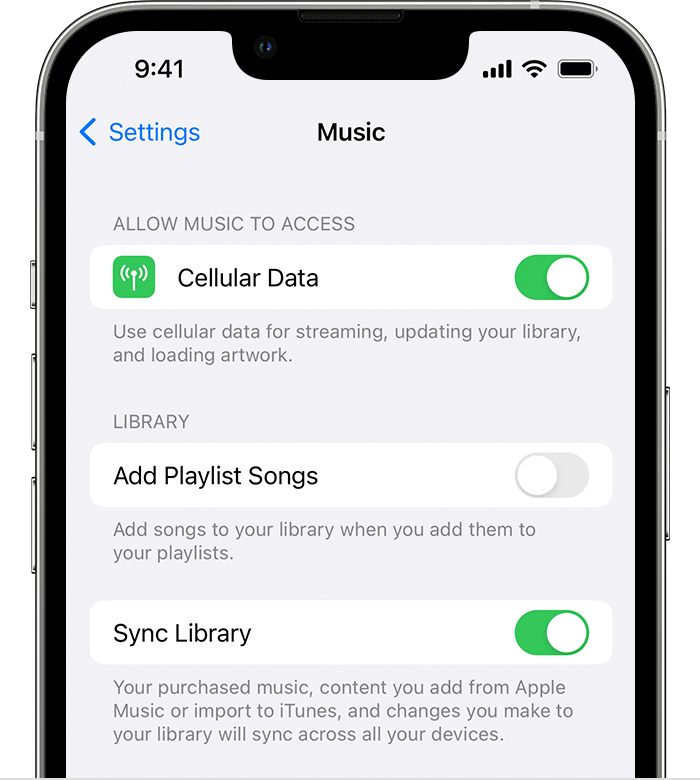
4. Turn on Sync Library.
iPhone showing Music Settings and Sync Library turned on

5. Turn on Sync Library on your other devices.


You can also find more details on that feature in this resource: Use Sync Library to access your music library across your devices - Apple Support


If you continue to experience data loss due to syncing, you'll want to reach out to Apple Support: Contact - Official Apple Support They'll be in the best position to look into this further.


Take care.

Similar questions

1 reply
Question marked as Top-ranking reply

Jan 18, 2023 2:00 PM in response to Forrest

Hello Forrest,


If you are an Apple Music subscriber, you can use the Sync Library option to sync your library and playlists with all your devices. That can be enabled using the steps below:


How to turn on Sync Library on your Mac

1. Open the Apple Music app.
2. In the menu bar, choose Account and make sure that you're signed in with the same Apple ID that you use with your Apple Music subscription.
3. Choose File > Library > Organize Library. Then select Consolidate files.
4. Choose Music > Settings or Music > Preferences.
5. Click the General tab.
6. Select Sync Library.
Preferences showing Sync Library turned on

7. Click Ok.
8. Wait for your music library to sync. To check the status, go to the bottom of the sidebar and click Updating Cloud Library.
9. Turn on Sync Library on your other devices.

How to turn on Sync Library on your iPhone or iPad
1. Make sure that your iPhone or iPad is signed in with the same Apple ID that you use with your Apple Music subscription.
2. Go to Settings.
3. Tap Music.
4. Turn on Sync Library.
iPhone showing Music Settings and Sync Library turned on

5. Turn on Sync Library on your other devices.


You can also find more details on that feature in this resource: Use Sync Library to access your music library across your devices - Apple Support


If you continue to experience data loss due to syncing, you'll want to reach out to Apple Support: Contact - Official Apple Support They'll be in the best position to look into this further.


Take care.

This thread has been closed by the system or the community team. You may vote for any posts you find helpful, or search the Community for additional answers.

Music playlist doesn't sync from iPhone to Mac?

Welcome to Apple Support Community
A forum where Apple customers help each other with their products. Get started with your Apple Account.