Hello, I used my beats pill+ speaker till the battery drained out but now I’ve been trying to charge it and it’s not coming on. Please help

Hello, I used my beats pill+ speaker till the battery drained out but now I’ve been trying to charge it and it’s not coming on. Please help

iPhone 11 Pro Max, iOS 16

Posted on Jan 19, 2023 2:55 AM

Reply
Question marked as Top-ranking reply

Posted on Jan 21, 2023 10:56 AM

Hey there BeatsPillPluss,


See if resetting your speaker helps to clear up the issue, as that can resolve unexpected behavior. Check out those steps here: Reset your Beats speakers - Apple Support


Reset Beats Pill+
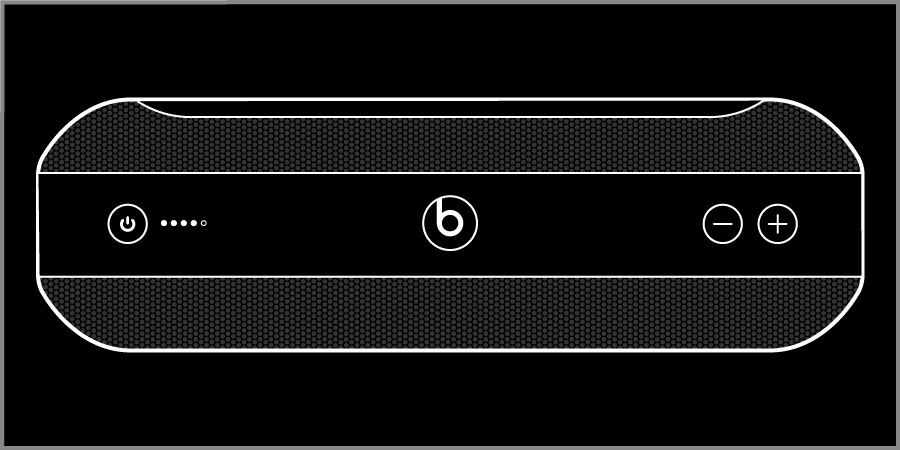
Press the power button for 8 seconds, let go, then press the power button once.
Reset and keep settings
1. Hold down the power button for eight seconds, then let go. 
2. Press the power button once. The Fuel Gauge flashes white to red three times. Your device is now reset.
Reset and delete settings
If you want to remove all paired devices, remove the custom name, and reset your Beats Pill+ to its factory settings, follow these steps.
1. Use the Lightning-to-USB cable to plug your Beats Pill+ into a power source. 
2. Turn the speaker on.
3. Hold down both the "b" button  and the power button for six seconds. The Fuel Gauge flashes red six times. Your Beats Pill+ is now restored to the settings it had when you purchased it.


Additionally, try using a different charging cable and power outlet to help narrow down possible power issues.


If the issue persists, then seek service for your Beats Pill+. You can use the following link to arrange service to have the issue resolved: Beats Repair & Service - Apple Support


Kind regards.

3 replies
Question marked as Top-ranking reply

Jan 21, 2023 10:56 AM in response to BeatsPillPluss

Hey there BeatsPillPluss,


See if resetting your speaker helps to clear up the issue, as that can resolve unexpected behavior. Check out those steps here: Reset your Beats speakers - Apple Support


Reset Beats Pill+
Press the power button for 8 seconds, let go, then press the power button once.
Reset and keep settings
1. Hold down the power button for eight seconds, then let go. 
2. Press the power button once. The Fuel Gauge flashes white to red three times. Your device is now reset.
Reset and delete settings
If you want to remove all paired devices, remove the custom name, and reset your Beats Pill+ to its factory settings, follow these steps.
1. Use the Lightning-to-USB cable to plug your Beats Pill+ into a power source. 
2. Turn the speaker on.
3. Hold down both the "b" button  and the power button for six seconds. The Fuel Gauge flashes red six times. Your Beats Pill+ is now restored to the settings it had when you purchased it.


Additionally, try using a different charging cable and power outlet to help narrow down possible power issues.


If the issue persists, then seek service for your Beats Pill+. You can use the following link to arrange service to have the issue resolved: Beats Repair & Service - Apple Support


Kind regards.

This thread has been closed by the system or the community team. You may vote for any posts you find helpful, or search the Community for additional answers.

Hello, I used my beats pill+ speaker till the battery drained out but now I’ve been trying to charge it and it’s not coming on. Please help

Welcome to Apple Support Community
A forum where Apple customers help each other with their products. Get started with your Apple Account.
