How to change activity time

I did Yoga for an hour, at the end of it, I forgot to end the activity on my iwatch, so I got a 4 hour yoga record! How do I change it to one hour? In searching for change the time,I actually deleted the whole 4 hours, how do I make one hour back?

thank you!!!

Apple Watch Series 3, watchOS 8

Posted on Jan 21, 2023 9:28 PM

Reply
Question marked as Top-ranking reply

Posted on Jan 24, 2023 10:46 AM

Hey there, and welcome to Apple Support Communities chepaw89,


We can certainly understand your concern and can help provide some insight.


We recommend checking out these steps on how to add data to your Health app. Please keep in mind, that the data added will not close out any activity rings but be a measure of tracking for future events.


" Add information about your health
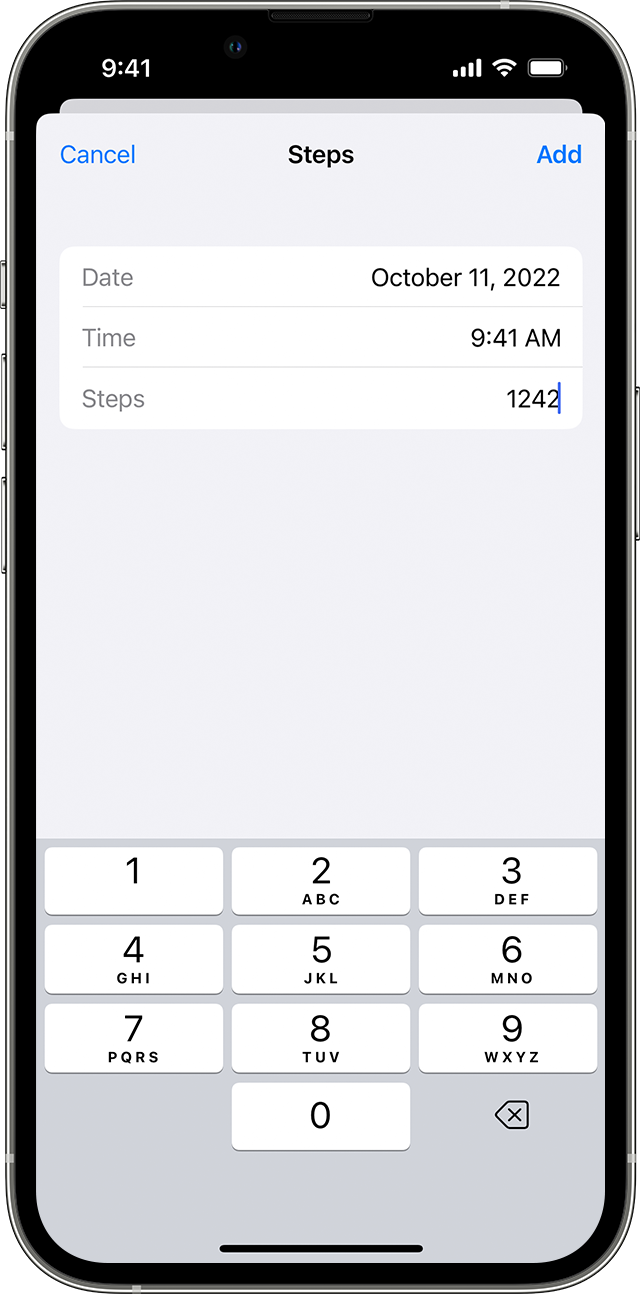


  1. Open the Health app and tap the Browse tab. 
  2. Tap a category, like Activity. 
  3. Tap a subcategory, like Steps.
  4. Tap Add Data in the upper-right corner.
  5. Enter the date, time, and data for that activity.
  6. When you're finished, tap Add. "


For additional information, check out this link: Use the Health app on your iPhone or iPod touch - Apple Support


These steps will help ensure your device is working with ease and can fix common issues like the ones you’re experiencing.


Kindest regards!


1 reply
Question marked as Top-ranking reply

Jan 24, 2023 10:46 AM in response to chepaw89

Hey there, and welcome to Apple Support Communities chepaw89,


We can certainly understand your concern and can help provide some insight.


We recommend checking out these steps on how to add data to your Health app. Please keep in mind, that the data added will not close out any activity rings but be a measure of tracking for future events.


" Add information about your health


  1. Open the Health app and tap the Browse tab. 
  2. Tap a category, like Activity. 
  3. Tap a subcategory, like Steps.
  4. Tap Add Data in the upper-right corner.
  5. Enter the date, time, and data for that activity.
  6. When you're finished, tap Add. "


For additional information, check out this link: Use the Health app on your iPhone or iPod touch - Apple Support


These steps will help ensure your device is working with ease and can fix common issues like the ones you’re experiencing.


Kindest regards!


This thread has been closed by the system or the community team. You may vote for any posts you find helpful, or search the Community for additional answers.

How to change activity time

Welcome to Apple Support Community
A forum where Apple customers help each other with their products. Get started with your Apple Account.