ventura and xerox 6022 printer

upgraded to ventura, now 13.1, but xerox 6022 printer gone and no driver found. is there a generic usb printer driver i could install to get printer working until xerox comes out with compatible driver?

MacBook Pro 14″, macOS 13.1

Posted on Jan 22, 2023 7:09 AM

Reply
Question marked as Top-ranking reply

Posted on Jan 22, 2023 8:47 AM

You could try the Gutenprint drivers.


https://gimp-print.sourceforge.net/MacOSX.php


Latest version (in the right column), version 5.3.3.


You can also try the generic drivers built into macOS. First, get the IP address your printer is using, if it's connected via Ethernet.


Open System Settings > Printers & Scanners. Click the Add Printer… button. If the printer is a straight USB connection, it should appear under the first tab. If it's using an IP address, click the center tab and enter its address. I picked a Xerox C405 printer below, but it's the same idea.
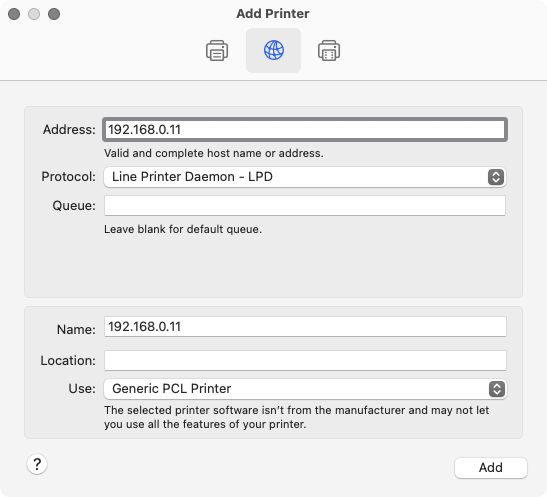


Choose Line Printer Daemon - LPD. Replace Name with something logical (the obvious being Xerox 6022). The most important part with either type of connection is to choose the Generic PCL Printer, or Generic PostScript Printer. Try both to see which may work.


8 replies
Question marked as Top-ranking reply

Jan 22, 2023 8:47 AM in response to seschafer1

You could try the Gutenprint drivers.


https://gimp-print.sourceforge.net/MacOSX.php


Latest version (in the right column), version 5.3.3.


You can also try the generic drivers built into macOS. First, get the IP address your printer is using, if it's connected via Ethernet.


Open System Settings > Printers & Scanners. Click the Add Printer… button. If the printer is a straight USB connection, it should appear under the first tab. If it's using an IP address, click the center tab and enter its address. I picked a Xerox C405 printer below, but it's the same idea.


Choose Line Printer Daemon - LPD. Replace Name with something logical (the obvious being Xerox 6022). The most important part with either type of connection is to choose the Generic PCL Printer, or Generic PostScript Printer. Try both to see which may work.

Jan 22, 2023 1:41 PM in response to seschafer1

Hi,


The following article indicates AirPrint support:

https://www.support.xerox.com/en-us/article/en/x_6130_en-O32199


See also:

https://download.support.xerox.com/pub/docs/6022/userdocs/any-os/en_GB/p6022_user_guide_en-us.pdf (page 37).


Generally speaking, an AirPrint-enabled printer is compatible with macOS (Ventura), and can be used without additional drivers, provided that the printer and the Mac are connected to the same network (Wi-Fi-router).


AirPrint works with wireless (Wi-Fi) or wired (Ethernet) network connections. If you have access to a Wi-Fi router, you may want to carry out an AirPrint test with the printer wired by Ethernet to one of the LAN ports, or wirelessly connected.


About AirPrint - Apple Support

Reset the printing system on your Mac to solve a problem – Apple Support (UK)

Add a printer to your printer list so you can use it on Mac – Apple Support (UK)

Jan 22, 2023 9:27 AM in response to seschafer1

On the first tab, direct connect USB printers and any that support Bonjour should appear. The printer, of course, must be on to be discovered.


The center tab (with the world icon) is manual. You have to tell the OS where the printer is. It's specifically Ethernet, whether wired or wireless, so you must know the printer's IP address assigned to it by your router. Usually the easiest way to get that is to have the printer on and connected to the router, then print out its setup pages. Somewhere in there, it will list the IP address. On a local connection, it will always begin with 192.168.

Jan 22, 2023 9:00 AM in response to seschafer1

The documentation says I need to install CUPS first.

For the Gutenprint drivers?


Personally, I would try Apple's built-in generic drivers first simply because you don't need to installing anything else to see if they work.


After going back to the Gutenprint page, I followed through to a list of supported printers. The 6022 isn't included, so there's a good chance they won't work anyway.

This thread has been closed by the system or the community team. You may vote for any posts you find helpful, or search the Community for additional answers.

ventura and xerox 6022 printer

Welcome to Apple Support Community
A forum where Apple customers help each other with their products. Get started with your Apple Account.