Stuck on a page

I have a page open in an app on my iPad but there is no way to get out of it. If I pull up from the bottom it closes it but as soon as i open the app again that same page is still there with no way of moving out of it. I can pull from the top half way down but as soon as I release it then that stuck out page is still there. I am going mental trying to fathom out this thing.

iPad Pro, 11-inch, 4th Gen, Wi-Fi

Posted on Jan 26, 2023 12:41 PM

Question marked as Top-ranking reply

Posted on Feb 11, 2023 4:05 AM

If any App is misbehaving, you may need to force-close the App. At next launch, the App will re-initialise.


The iPad User Guide succinctly describes the process:

Quit and reopen an app on iPad - Apple Support

10 replies

Jan 26, 2023 5:32 PM in response to Community User

Perhaps the App is malfunctioning.


To clear the problem, you may need to temporarily remove the Norton 360 App from your iPad - then perform a forced-restart prior to reinstalling the App.


Remove the Norton 360 App:

Remove apps from iPad - Apple Support


Force restart iPad (models with Face ID or with Touch ID in the top button)

If your iPad doesn’t have the Home button, do the following:

  1. Press and quickly release the volume button nearest to the top button.
  2. Press and quickly release the volume button farthest from the top button.
  3. Press and hold the top button.
  4. When the Apple logo appears, release the top button.


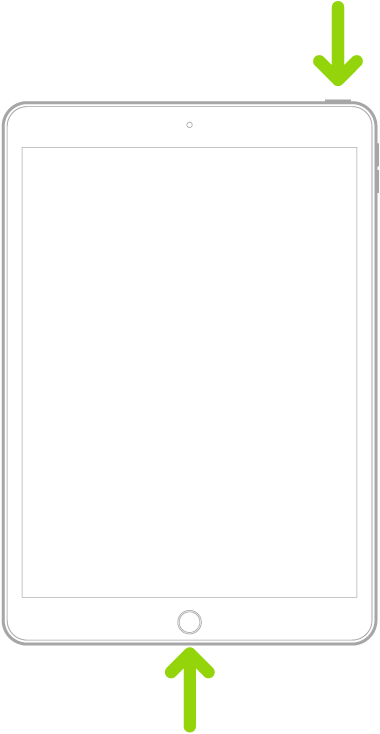
Force restart iPad (models with the Home button)

Press and hold the top button and the Home button at the same time. When the Apple logo appears, release both buttons.


After restart, reinstall the Norton 360 App from the App Store.

Jan 27, 2023 4:00 AM in response to LotusPilot

Thanks. The problem cleared itself after closing down the ipad overnight. I will try your recommendation when it happens again.

I am unable to reply to your message on the ipad for some strange reason. Signed in but just won't post, oh dear, yet another problem. Having to resort to my trusty Android to do do.

This thread has been closed by the system or the community team. You may vote for any posts you find helpful, or search the Community for additional answers.

Stuck on a page

Welcome to Apple Support Community
A forum where Apple customers help each other with their products. Get started with your Apple Account.