
Apple font size
The font size when I’m reading an Apple ebook changes from chapter to chapter without my intervention.
iPad, iPadOS 16
The font size when I’m reading an Apple ebook changes from chapter to chapter without my intervention.
iPad, iPadOS 16
Hi Fairsky66,
For help with changing the font or appearance, test resetting the theme with the steps below found in the article here: Read books in the Books app on iPad - Apple Support
"Change the text and page appearance
 at the bottom of the page, tap Themes & Settings, then do any of the following:
 to scroll continuously through a book.
 , at the top of the screen then turn on Vertical Scrolling.
 , then choose an option.
2.Tap Done to apply your changes.
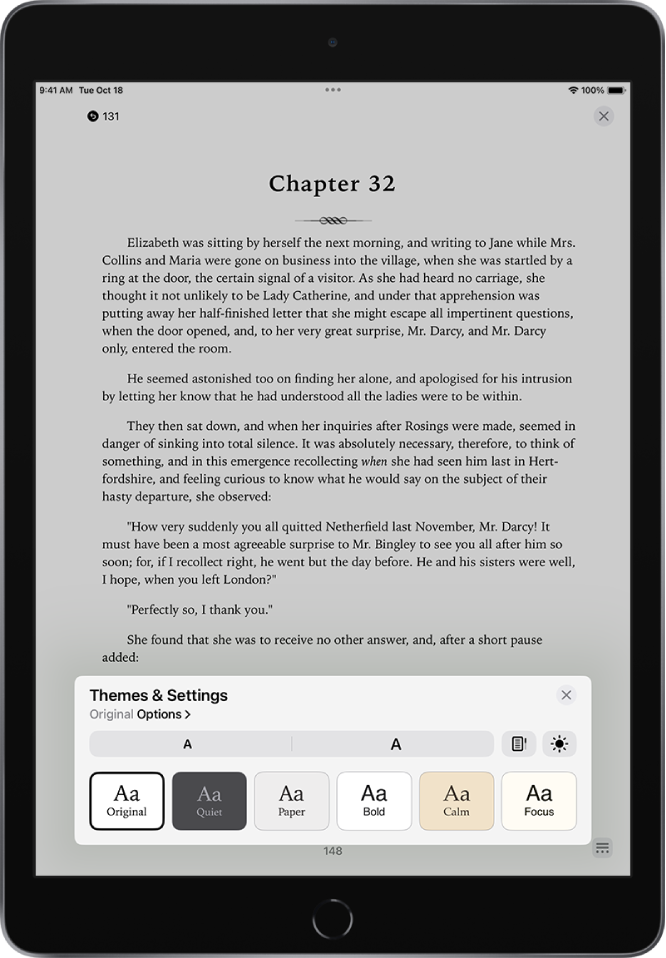
Note: You can choose on which side of the screen the menu button appears. Go to Settings  > Books, then choose Left or Right below Reading Menu Position.
To undo text and layout customizations, tap Options, tap Reset Theme, then tap Done."
You can also find helpful steps for cleaning the screen of your iPad to test here: How to clean your Apple products - Apple Support
Cheers.
Hi Fairsky66,
For help with changing the font or appearance, test resetting the theme with the steps below found in the article here: Read books in the Books app on iPad - Apple Support
"Change the text and page appearance
at the bottom of the page, tap Themes & Settings, then do any of the following: to scroll continuously through a book., at the top of the screen then turn on Vertical Scrolling., then choose an option.2.Tap Done to apply your changes.
Note: You can choose on which side of the screen the menu button appears. Go to Settings > Books, then choose Left or Right below Reading Menu Position.
To undo text and layout customizations, tap Options, tap Reset Theme, then tap Done."
You can also find helpful steps for cleaning the screen of your iPad to test here: How to clean your Apple products - Apple Support
Cheers.
Apple font size

