Help getting operator input to python shell script running from Automator

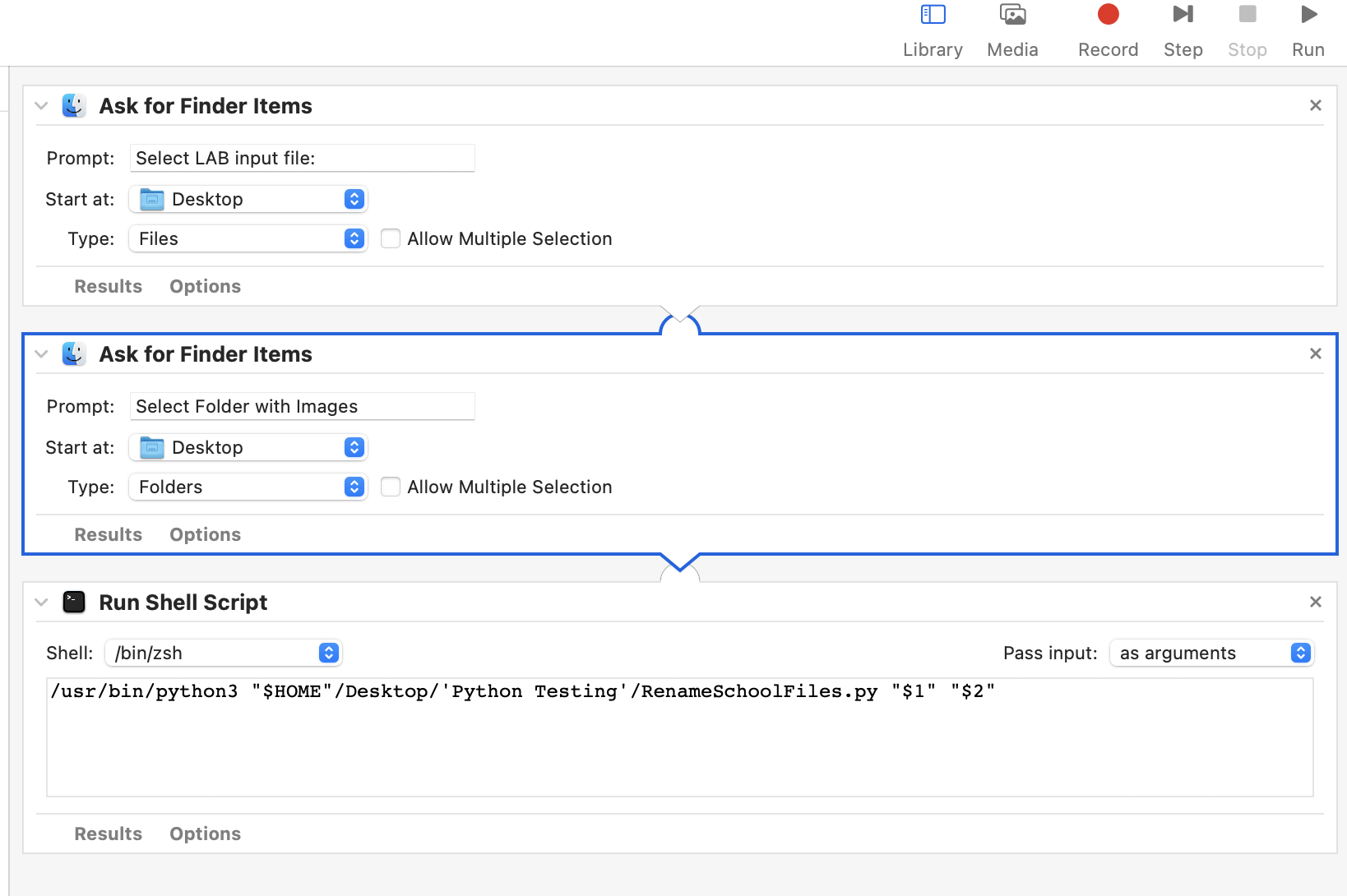
I'm running a Python script from Automator that reads a text file, renames and moves files. Automator has three steps: Ask for Finder Items (A text file) and Ask for Finder Items (Folder with images) Run Shell Script. It works perfectly. Now I find out I need to produce different outputs based on each Schools requirements - they use different school admin software. There are three possible choices: "Power School" "Infinite Campus" "ReName Only"


I have added a variable in the Python code and changed the Python code to produce a different output based on the variable value. But I can not figure out how to have the operator select the output choice and set the variable in the Python script.


I tried to bring up a list of choices as the first step in Automator -- not as easy as one would think so that was a complete failure. Then I imported tkinter to python and tried to bring up a window with radiobuttons and pass the results to a variable. The buttons work when the script is run from IDLE but when run as a shell script from automator it only brings up an empty black window. I'm lost and can use some help.

Mac OS Monterey ver 12.6.2

Python 3.10


Posted on Jan 27, 2023 6:58 AM

Reply
Question marked as Top-ranking reply

Posted on Jan 27, 2023 12:41 PM

Here is how you run python3 from Apple's Command Line tools in an Automator Run Shell Script. You sys.argv[1:] items are passed into the script via the "${@}" indicator on the python3 invocation line.


 /usr/bin/python3 <<'EOF' - "${@}"

import subprocess
import sys
import os

try:
    from subprocess import DEVNULL   # python3
except ImportError:
    DEVNULL = open(os.devnull, 'wb') # python2

ascript = '''
use scripting additions

set userCanceled to false
set school_software to {"PowerSchool", "Infinite Campus", "ReName Only"}
set this_prompt to "Select one choice for School software"

try
    set choice to (choose from list school_software¬
    with title "School Software Selection"¬
    with prompt this_prompt¬
    default items (item 1 of school_software)¬
    OK button name "Select")
on error number -128
    set userCanceled to true
end try
if not userCanceled then
    return (choice as text)
else
    return 0
end if
'''

def main():

    try:
        proc = subprocess.check_output(['osascript', '-e', ascript],
                                       shell=False, stderr=DEVNULL)

        if 'Cancel' in proc.decode('utf-8'):  # User pressed Cancel button
            raise subprocess.CalledProcessError
    except subprocess.CalledProcessError as e:
        print('Python error: [%d]\n%s\n'.format(e.returncode, e.output))
        sys.exit(e.output)
    # show valid response
    print(proc.decode('utf-8').strip())


if __name__ == '__main__':
    sys.exit(main())

EOF


Similar questions

22 replies
Question marked as Top-ranking reply

Jan 27, 2023 12:41 PM in response to JB001

Here is how you run python3 from Apple's Command Line tools in an Automator Run Shell Script. You sys.argv[1:] items are passed into the script via the "${@}" indicator on the python3 invocation line.


 /usr/bin/python3 <<'EOF' - "${@}"

import subprocess
import sys
import os

try:
    from subprocess import DEVNULL   # python3
except ImportError:
    DEVNULL = open(os.devnull, 'wb') # python2

ascript = '''
use scripting additions

set userCanceled to false
set school_software to {"PowerSchool", "Infinite Campus", "ReName Only"}
set this_prompt to "Select one choice for School software"

try
    set choice to (choose from list school_software¬
    with title "School Software Selection"¬
    with prompt this_prompt¬
    default items (item 1 of school_software)¬
    OK button name "Select")
on error number -128
    set userCanceled to true
end try
if not userCanceled then
    return (choice as text)
else
    return 0
end if
'''

def main():

    try:
        proc = subprocess.check_output(['osascript', '-e', ascript],
                                       shell=False, stderr=DEVNULL)

        if 'Cancel' in proc.decode('utf-8'):  # User pressed Cancel button
            raise subprocess.CalledProcessError
    except subprocess.CalledProcessError as e:
        print('Python error: [%d]\n%s\n'.format(e.returncode, e.output))
        sys.exit(e.output)
    # show valid response
    print(proc.decode('utf-8').strip())


if __name__ == '__main__':
    sys.exit(main())

EOF


Jan 27, 2023 11:21 AM in response to VikingOSX

I am soooo lost - it still will not run after selecting the input

Here's a screen shot of the Automator and the code thru part of the first school (5000 char limit)
#!/usr/bin/env python3

import subprocess
import sys
import os
import shutil

try:
    from subprocess import DEVNULL   # python3
except ImportError:
    DEVNULL = open(os.devnull, 'wb') # python2

ascript = '''
use scripting additions

set userCanceled to false
set school_software to {"PowerSchool", "Infinite Campus", "ReName Only"}
set this_prompt to "Select one choice for School software"

try
    set choice to (choose from list school_software¬
    with title "School Software Selection"¬
    with prompt this_prompt¬
    default items (item 1 of school_software)¬
    OK button name "Select")
on error number -128
    set userCanceled to true
end try
if not userCanceled then
    return (choice as text)
else
    return "Cancel"
end if
'''

def main():
        try:
                proc = subprocess.check_output(['osascript', '-e', ascript],
                                                                                shell=False, stderr=DEVNULL)
                print(proc.decode('utf-8').strip())
        except subprocess.CalledProcessError as e:
                print('Python error: [%d]\n%s\n'.format(e.returncode, e.output))
                sys.exit(e.output)
if __name__ == '__main__':
    sys.exit(main())


# check the length of the arguments being passed from the first two steps in Automator I'm not sure what it is doing but it works
if ((len(sys.argv) != 3)):
	exit("usage: " + os.path.basename(sys.argv[0]) + " file_containing_list" + " copy_from_folder" )

file_containing_list = sys.argv[1]           #puts the first argument passed from Automator into a variable
copy_from_folder = sys.argv[2]               #puts the second argument passed from Automator into a variable


inputPassed = "PowerSchool"  # For testing this is hardcoded -- I need to set this variable to the choice from the above operator input


#           **************************************** School Type POWER SCHOOL   ************************************************
if inputPassed == 'PowerSchool':
        # CREATE OUTPUT FOLDERS
        ErrorDir = copy_from_folder + "_errors"  # set name for new ERROR images folder  example Branford_errors
        if not os.path.exists(ErrorDir):         # check to see if a folder already exists
                os.mkdir(ErrorDir)                  # and if not then create the ERRORS folder

        ProcessedDir =  copy_from_folder + "_processed" # and now the PROCESSED images folder
        if not os.path.exists(ProcessedDir):
                os.mkdir(ProcessedDir)


        # Create name and path of the two text output files
        errors_txt = os.path.dirname(copy_from_folder) + "/" + os.path.basename(copy_from_folder) + "_errors.txt"
        processed_txt = os.path.dirname(copy_from_folder) + "/" + os.path.basename(copy_from_folder) + "_processed.txt"

        # open files
        with open(file_containing_list) as csvfile:                 # open input file
                reader = csv.DictReader(csvfile, delimiter = '\t')  #   and read it into the variable reader
                f1 = open(errors_txt, 'w')                          # open output files
                f2 = open(processed_txt, 'w')
                f1writer = csv.writer(f1,delimiter = '\t')
                f2writer = csv.writer(f2,delimiter = '\t')


        #set and write headers
                header1 = ['FirstName', 'LastName', 'StudentID', 'Grade', 'OriginalFileName', 'NewFileName'] # ERRORS Header
                f1writer.writerow(header1)

        # process the rows
                for row in reader:
                        if not row['StudentID']: # check to see if the StudentID is empty
                                newFileName = row['Grade'] + '_' + row['LastName'] + '_' + row['FirstName']+ ".JPG"  
                                oldFileNamePath = os.path.join(copy_from_folder, row['FileName'])                    
                                newFileNamePath = os.path.join(ErrorDir, newFileName)                   
                                if os.path.exists(oldFileNamePath):                                    
                                        shutil.copy(oldFileNamePath, newFileNamePath)    
        # list fields for ERRORS text file and write a row
                                        newrow = [row['FirstName'],row['LastName'],row['StudentID'],row['Grade'],row['FileName'],newFileName]
                                        f1writer.writerow(newrow)

Jan 30, 2023 8:11 AM in response to JB001


JB001 wrote:
AND, should I be trying to set this up in Shortcuts vs Automator? Seems like shortcuts is the direction Apple is going.


Hopefully you were able to get Viking's script working, however, its also good to look into alternatives, so I've adapted the python code we worked on in the prior thread ( Need Help with AppleScript - Apple Community) into Shortcuts

I've used an if/elif statement to run the same code for the choices: "Power School", "Infinite Campus", "ReName Only", so you'll need to adjust for the different outputs you need.


Apple made sharing Shortcuts easy, so you can get it here: https://www.icloud.com/shortcuts/d2c6b7c3b6b8475e8f4fabd91bc58e2f


(NOTE: I'll most likely delete this link after you get it, but the full code is printed below)


Here's what the Shortcut looks like:


....


And the python code (same for all 3 choices)


Jan 30, 2023 12:46 PM in response to JB001

First, check that the selections are what's expected.

Lets debug:

In the last action, Run Shell Script, delete the python code and replace with:

echo "$1"
echo "$2"
echo "$3"

And you should see in the Results Window

The CSV File Selected
The Folder Selected
The School Admin Software Selected


If that's what you see in the Automator Results Window, then the problem is with the python code.

Let me know what you see in the Results Window, and we can then continue


Also, the Applescript in the first action is:

on run
	
	choose from list {"Power School", "Infinite Campus", "ReName Only"} with prompt "please make your selection" without multiple selections allowed
	
end run


Jan 27, 2023 9:16 AM in response to VikingOSX

This works from Automator but my lack of Python knowledge is really going to start to show.

I added this to the front of the python script and after the selection is made nothing else happens.

I need to pass the choice to the variable inputPassed and tell python to keep on going. Here's the code I have. There is a lot more but this is the portion where I need to most help.

#!/usr/bin/python3

import subprocess
import sys
import os
import csv
import shutil

try:
    from subprocess import DEVNULL   # python3
except ImportError:
    DEVNULL = open(os.devnull, 'wb') # python2

ascript = '''
use scripting additions

set userCanceled to false
set school_software to {"PowerSchool", "Infinite Campus", "ReName Only"}
set this_prompt to "Select one choice for School software"

try
    set choice to (choose from list school_software¬
    with title "School Software Selection"¬
    with prompt this_prompt¬
    default items (item 1 of school_software)¬
    OK button name "Select")
on error number -128
    set userCanceled to true
end try
if not userCanceled then
    return (choice as text)
else
    return 0
end if
'''

def main():

    try:
        proc = subprocess.check_output(['osascript', '-e', ascript],
                                       shell=False, stderr=DEVNULL)

        if 'Cancel' in proc.decode('utf-8'):  # User pressed Cancel button
            raise subprocess.CalledProcessError
    except subprocess.CalledProcessError as e:
        print('Python error: [%d]\n%s\n'.format(e.returncode, e.output))
        sys.exit(e.output)
    # show valid response
    print(proc.decode('utf-8').strip())


if __name__ == '__main__':
    sys.exit(main())
# check the length of the arguments being passed from the first two steps in Automator I'm not sure what it is doing
if ((len(sys.argv) != 3)):
	exit("usage: " + os.path.basename(sys.argv[0]) + " file_containing_list" + " copy_from_folder" )

file_containing_list = sys.argv[1]           #puts the first argument passed from Automator into a variable
copy_from_folder = sys.argv[2]               #puts the second argument passed from Automator into a variable


inputPassed = ''  # I need to set this variable to the choice from the above operator input


#           **************************************** School Type POWER SCHOOL   ************************************************
if inputPassed == 'Power School':
        # CREATE OUTPUT FOLDERS
        ErrorDir = copy_from_folder + "_errors"  # set name for new ERROR images folder  example Branford_errors
        if not os.path.exists(ErrorDir):         # check to see if a folder already exists
                os.mkdir(ErrorDir)                  # and if not then create the ERRORS folder

        ProcessedDir =  copy_from_folder + "_processed" # and now the PROCESSED images folder
        if not os.path.exists(ProcessedDir):
                os.mkdir(ProcessedDir)


        # Create name and path of the two text output files
        errors_txt = os.path.dirname(copy_from_folder) + "/" + os.path.basename(copy_from_folder) + "_errors.txt"
        processed_txt = os.path.dirname(copy_from_folder) + "/" + os.path.basename(copy_from_folder) + "_processed.txt"

        # open files
        with open(file_containing_list) as csvfile:                 # open input file
                reader = csv.DictReader(csvfile, delimiter = '\t')  #   and read it into the variable reader
                f1 = open(errors_txt, 'w')                          # open output files
                f2 = open(processed_txt, 'w')
                f1writer = csv.writer(f1,delimiter = '\t')

f2writer = csv.writer(f2,delimiter = '\t')

Jan 27, 2023 8:04 AM in response to JB001

You can adapt this code. It will pop open an AppleScript list allowing one mandatory selection that is passed back to Python as the selected string. If the user clicks Cancel the e.output will be false and you would need to manage that event in your Python code.


This was tested with Python 3.11.1 (from Python.org) on Ventura 13.2:


Code:


#!/usr/bin/env python3

import subprocess
import sys
import os

try:
    from subprocess import DEVNULL   # python3
except ImportError:
    DEVNULL = open(os.devnull, 'wb') # python2

ascript = '''
use scripting additions

set userCanceled to false
set school_software to {"PowerSchool", "Infinite Campus", "ReName Only"}
set this_prompt to "Select one choice for School software"

try
    set choice to (choose from list school_software¬
    with title "School Software Selection"¬
    with prompt this_prompt¬
    default items (item 1 of school_software)¬
    OK button name "Select")
on error number -128
    set userCanceled to true
end try
if not userCanceled then
    return (choice as text)
else
    return 0
end if
'''

def main():

    try:
        proc = subprocess.check_output(['osascript', '-e', ascript],
                                       shell=False, stderr=DEVNULL)

        if 'Cancel' in proc.decode('utf-8'):  # User pressed Cancel button
            raise subprocess.CalledProcessError
    except subprocess.CalledProcessError as e:
        print('Python error: [%d]\n%s\n'.format(e.returncode, e.output))
        sys.exit(e.output)
    # show valid response
    print(proc.decode('utf-8').strip())


if __name__ == '__main__':
    sys.exit(main())


Jan 28, 2023 5:29 AM in response to JB001

Put your two actions that get input ahead of the Run Shell Script as you did before. Automator's pass input as arguments will deposit those inputs into Python's command-line in "${@}" and you obtain them with the usual sys.argv[1] ... sys.argv[n] references.


You can add your own Python code after what I have provided, but always prior to the EOF which closes the Python HERE script. It takes time to learn Python, and running its IDLE3 environment to experiment with code results is beneficial.


Yes, Apple's strategic direction is Shortcuts, but you would have to get a Run Shell Script working there too, so continue with your Automator efforts until you have it working, and then learn how to do it in Shortcuts.


Jan 27, 2023 10:13 AM in response to JB001

Errata:


Change the following in the AppleScript code:


return 0 becomes return "Cancel"


Update the following in the Python try/exception block which exits Python if the user clicks the Cancel button:


try:
	proc = subprocess.check_output(['osascript', '-e', ascript],
									shell=False, stderr=DEVNULL)
	print(proc.decode('utf-8').strip())
except subprocess.CalledProcessError as e:
	print('Python error: [%d]\n%s\n'.format(e.returncode, e.output))
	sys.exit(e.output)


I have never used exit(), only sys.exit().


The name of your script may be undefined when within an Automator Run Shell Script. You can use __file__ or sys.argv[0].


The perils of copy/paste. The following code will run nothing that follows it and should always appear at the end of your main() function as I provided an example above:


if __name__ == '__main__':
    sys.exit(main())


Jan 28, 2023 4:56 AM in response to VikingOSX

OK...new day, new pot of coffee and a fresh start with additional questions.

When I build the Automator workflow, do I add your code (run shell script) as the first step followed by the two Get Finder Items, and then the final run shell script with the original python code?

AND, should I be trying to set this up in Shortcuts vs Automator? Seems like shortcuts is the direction Apple is going.

Jan 30, 2023 9:53 AM in response to Tony T1

WOW - you must be a mind reader. I struggled with the Automator solution all weekend but was not able to get it working. So, I thought I would attempt a different approach. I updated the python code to add the three inputs using tkinter -- I actually was able to get it to work. What I was not able to do was find an easy way to get it to run as an application. There are some solutions out there but my head was spinning by then.


This Shortcuts solution will do exactly what we need. I know what changes I need to make to get the desired outputs. I might have a fourth option to add and from looking at the way you set up the code I'm confident I can add that when the time comes.


I'll never be a proficient coder but these examples allow me to get some very helpful programs that I can tweak and save time on tedious tasks.


Thank you so much!


Jan 30, 2023 12:10 PM in response to Tony T1

My love/hate relationship with Automator continues, but, I like options. I tried this Automator and got an error in the Action Run Shell Script "Traceback (most recent call last):

File "<stdin>", line 130, in <module>

IndexError: list index out of range

Do any of the steps have "Options" that I can't see in your image of the set-up?


This thread has been closed by the system or the community team. You may vote for any posts you find helpful, or search the Community for additional answers.

Help getting operator input to python shell script running from Automator

Welcome to Apple Support Community
A forum where Apple customers help each other with their products. Get started with your Apple Account.
