
Sleep Schedule, Sleep tracking iPhone AND Apple Watch

Do you have more tips to manage Sleep function on iPhone/watch?

Posted on Jan 27, 2023 8:19 AM

Reply
1 reply

Jan 29, 2023 3:04 PM in response to M Julie

Hi M Julie,


For help with setting up the Sleep feature test the steps below found in the article here: Track your sleep on Apple Watch and use Sleep on iPhone - Apple Support


"Set up Sleep


Getting enough sleep is important to your overall health. The Health app on iPhone can help you set a sleep goal, and track your progress over time in meeting that goal.
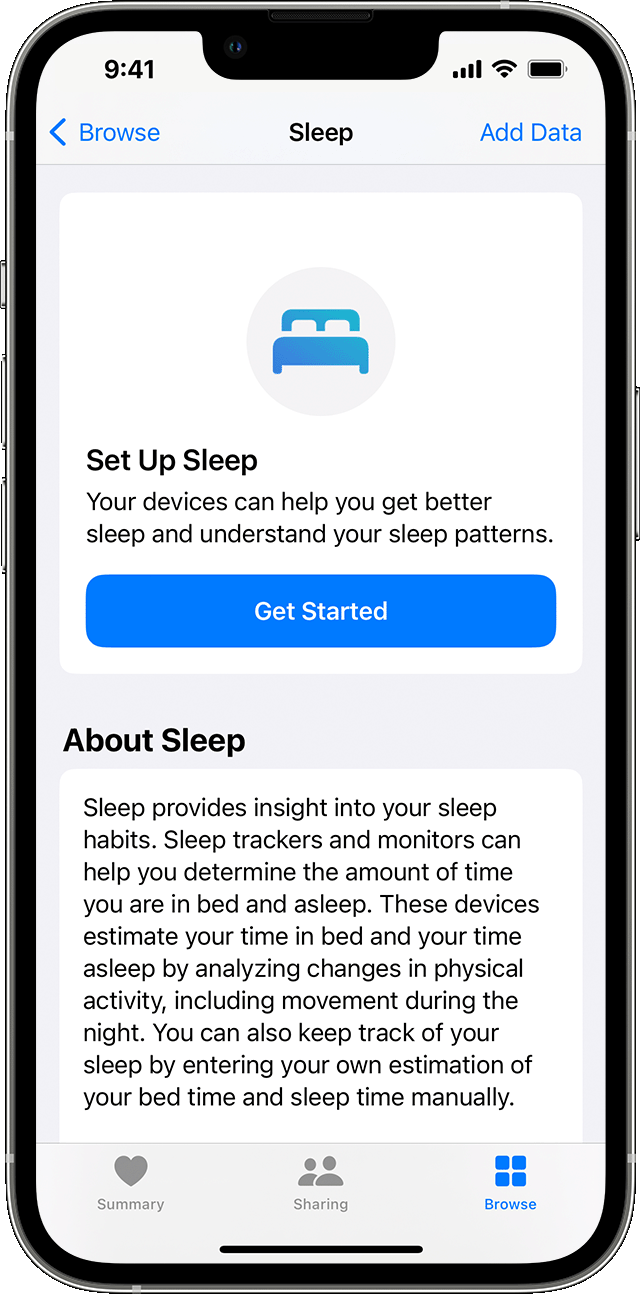
An iPhone screen showing the Set up Sleep option  

  1. Open the Health app on your iPhone.
  2. Tap Get Started under Set Up Sleep1, then tap Next.
  3. Follow the onscreen prompts to establish:
    • Sleep Goals: Set the number of hours you'd like to spend asleep.
    • Bedtime and Wake Up times: Set when you'd like to go to bed and wake up.
    • Sleep Focus: To reduce distractions, iPhone can simplify your Lock Screen and turn on Sleep Focus at your scheduled bedtime. You can also give certain people or apps permission to notify you. Learn how to customize a Focus.
    • Track Sleep with Apple Watch: Wear your watch to bed to track your sleep. This option is available during setup if you've paired your Apple Watch with your iPhone beforehand. If you pair your Apple Watch after setup, you can still turn on Track Sleep with Apple Watch later."


You can also find helpful information here: Track your sleep with Apple Watch


If you need to set up a Sleep Focus, use the steps here: Set up a schedule for a Sleep Focus in Health on iPhone


Once enabled you can edit using the steps here: Add or change sleep schedules in Health on iPhone


Cheers.


This thread has been closed by the system or the community team. You may vote for any posts you find helpful, or search the Community for additional answers.

Sleep Schedule, Sleep tracking iPhone AND Apple Watch

Welcome to Apple Support Community
A forum where Apple customers help each other with their products. Get started with your Apple Account.