
Black screen on iPhone
I enabled the accessibility option on my iPhone. Since then I’m unable to put my passcode in to open my phone and now the screen is remaining black.
I enabled the accessibility option on my iPhone. Since then I’m unable to put my passcode in to open my phone and now the screen is remaining black.
Hey there, JudyEllard.
Do you happen to know which Accessibility option you enabled? There are quite a few different potential options. Get started with accessibility features on iPhone has a full list of the options you potentially enabled. Something you may want to try if the display isn't coming on at all is to force restart your iPhone. Learn how below.
"Force restart iPhone
If iPhone isn’t responding, and you can’t turn it off then on, try forcing it to restart.
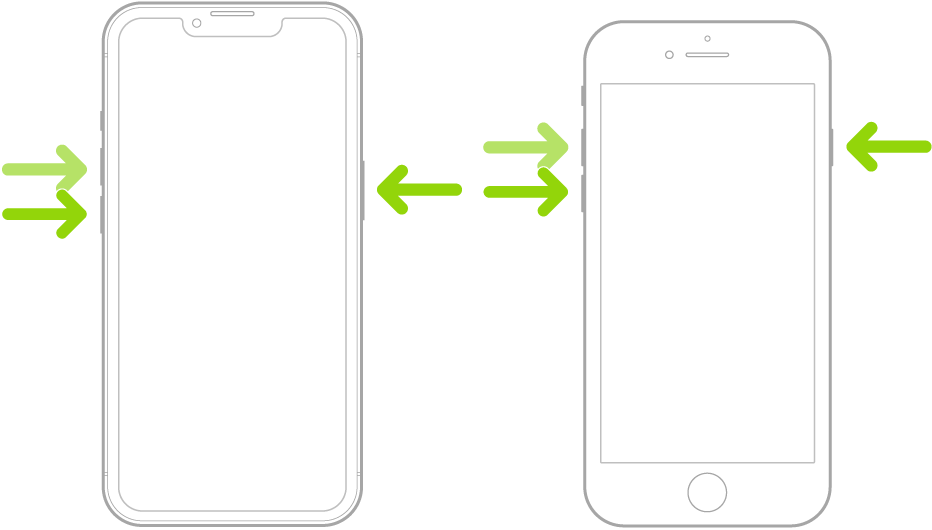
Note: For force restart instructions for iPhone 7, iPhone 6s, or iPhone SE (1st generation)—models that don’t support iOS 16—see the iOS 15 version of this page.
If iPhone doesn’t restart after you try these steps, see the Apple Support article If your iPhone won’t turn on or is frozen. Or if your iPhone isn’t working as expected after you restart it, see the iPhone Support website."
This info came from Force restart iPhone.
If that doesn't work, please let us know which of the options on the above page you enabled, and we'll go from there.
Take care.
Hey there, JudyEllard.
Do you happen to know which Accessibility option you enabled? There are quite a few different potential options. Get started with accessibility features on iPhone has a full list of the options you potentially enabled. Something you may want to try if the display isn't coming on at all is to force restart your iPhone. Learn how below.
"Force restart iPhone
If iPhone isn’t responding, and you can’t turn it off then on, try forcing it to restart.
Note: For force restart instructions for iPhone 7, iPhone 6s, or iPhone SE (1st generation)—models that don’t support iOS 16—see the iOS 15 version of this page.
If iPhone doesn’t restart after you try these steps, see the Apple Support article If your iPhone won’t turn on or is frozen. Or if your iPhone isn’t working as expected after you restart it, see the iPhone Support website."
This info came from Force restart iPhone.
If that doesn't work, please let us know which of the options on the above page you enabled, and we'll go from there.
Take care.
Black screen on iPhone

