How to turn off do no disturb (no off toggle) iPhone 11 Pro
No off toggle for do not disturb iPhone 11 Pro and I do not want to use do not disturb or focus. I’ve turned off Focus, Do No Disturb is on constantly and I have cleared schedules.
No off toggle for do not disturb iPhone 11 Pro and I do not want to use do not disturb or focus. I’ve turned off Focus, Do No Disturb is on constantly and I have cleared schedules.
Hi there Rosebud4664,
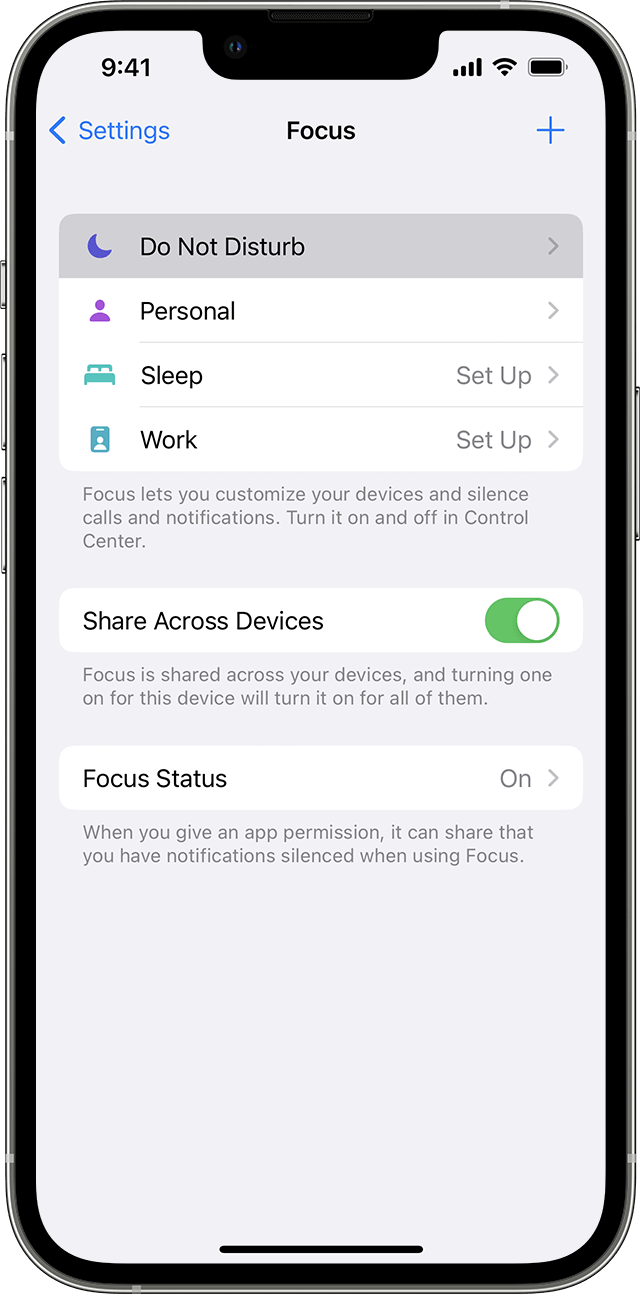
We see you came here from the resource titled Use Do Not Disturb with Focus on your iPhone or iPad. Did you have a chance to check out the guidance below? You'll want to specifically go to Settings > Focus > Do Not Disturb and make sure you don't have a schedule set there. Also, you can use Control Center to turn off Do Not Disturb.
1. Go to Settings > Focus.
2. Tap Do Not Disturb.
3. Under Turn on Automatically, set Do Not Disturb to turn on automatically at a certain time, location, or while using a certain app.
To turn on Do Not Disturb from Control Center:
1. Open Control Center on your iPhone or iPod touch, or on your iPad.
2. Touch and hold Focus, then tap Do Not Disturb.
Take care.
How to turn off do no disturb (no off toggle) iPhone 11 Pro