
Calendar events do not display before February 2021
My iPhone calendar events do not show before 01 February 2021. How can I see events I scheduled before that date?
iPhone 12 Pro Max
My iPhone calendar events do not show before 01 February 2021. How can I see events I scheduled before that date?
iPhone 12 Pro Max
Hello Jma_a,
Thanks for posting in Apple Support Communities.
To clarify, are you using iCloud Calendars? If so, we'd like to provide you with a few steps that may be able to assist you with getting your Calendar events to appear as expected:
• Be sure that your iPhone is running the latest software version. This is to ensure that it has all the latest updates. (Secure your data with a backup before proceeding): Update your iPhone
• Make sure that you're signed in to iCloud with the same Apple ID on all of your devices. Then, check that you turned on Contacts, Calendars, and Reminders in your iCloud settings.
• Check that the date and time settings on your device are correct for your current location.
• "Restart the Calendar app:
Refresh your calendars
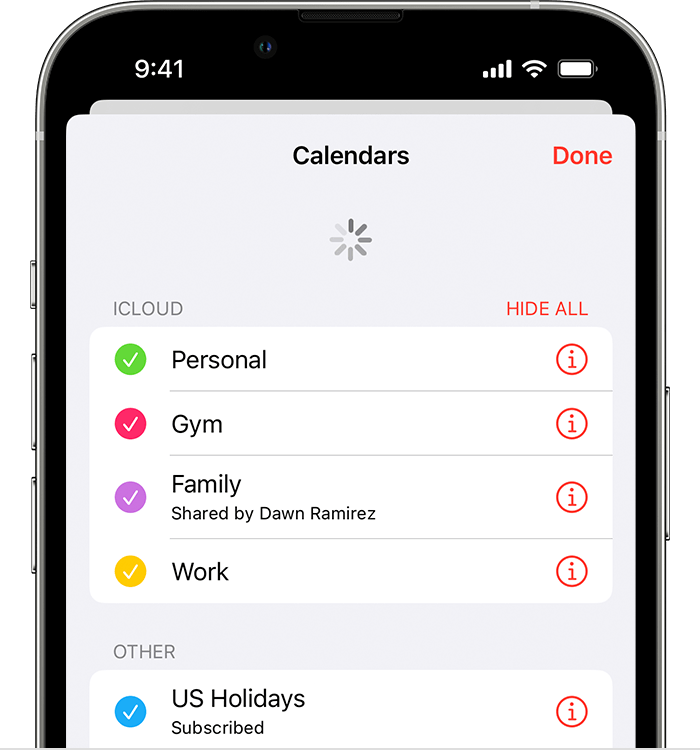
Check your app settings
If you use multiple groups or accounts in the Calendars app, make sure that your iCloud Contacts and Calendars are set to appear:
Open the Calendar app and tap the Calendars tab. Make sure that all iCloud calendars are selected.
Change how often your calendars update:
Since the iCloud Birthdays calendar updates daily, changes to birthdays might not appear in the Calendars app until the next day.
Set iCloud Calendars as your default
To check which account your calendars are in, open the Calendar app, then tap the Calendars tab.
Set an iCloud calendar as the default calendar:
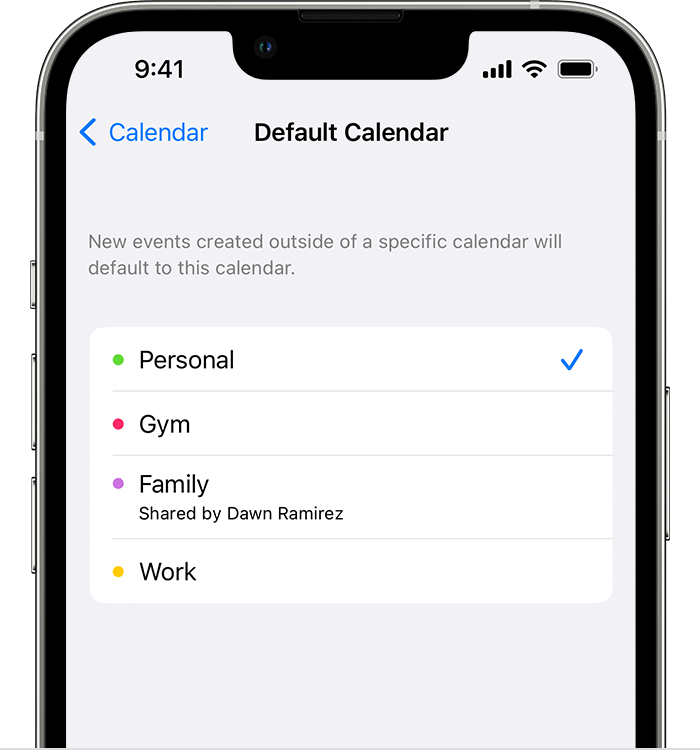
Click here for more details: If your iCloud Contacts, Calendars, or Reminders won’t sync
Let us know if this helps.
All the best.
Hello Jma_a,
Thanks for posting in Apple Support Communities.
To clarify, are you using iCloud Calendars? If so, we'd like to provide you with a few steps that may be able to assist you with getting your Calendar events to appear as expected:
• Be sure that your iPhone is running the latest software version. This is to ensure that it has all the latest updates. (Secure your data with a backup before proceeding): Update your iPhone
• Make sure that you're signed in to iCloud with the same Apple ID on all of your devices. Then, check that you turned on Contacts, Calendars, and Reminders in your iCloud settings.
• Check that the date and time settings on your device are correct for your current location.
• "Restart the Calendar app:
Refresh your calendars
Check your app settings
If you use multiple groups or accounts in the Calendars app, make sure that your iCloud Contacts and Calendars are set to appear:
Open the Calendar app and tap the Calendars tab. Make sure that all iCloud calendars are selected.
Change how often your calendars update:
Since the iCloud Birthdays calendar updates daily, changes to birthdays might not appear in the Calendars app until the next day.
Set iCloud Calendars as your default
To check which account your calendars are in, open the Calendar app, then tap the Calendars tab.
Set an iCloud calendar as the default calendar:
Click here for more details: If your iCloud Contacts, Calendars, or Reminders won’t sync
Let us know if this helps.
All the best.
Calendar events do not display before February 2021

