
Stopped tracking my AirPods pro
Oklahoma
iPhone 11, iOS 16
Oklahoma
iPhone 11, iOS 16
Hello Titto19,
Thank you for reaching out to Apple Support Communities, and we'll be happy to help in any way we can. We understand you're having issues with locating your AirPods. Try the steps here to see if they resolve the issue: Locate AirPods in Find My - Apple Support
"You can use Find My on your iPhone, iPad, Apple Watch, or Mac to help you locate your AirPods if they’re lost. You can also find your AirPods on the web at iCloud.com/find.
Intro to using Find My with AirPods
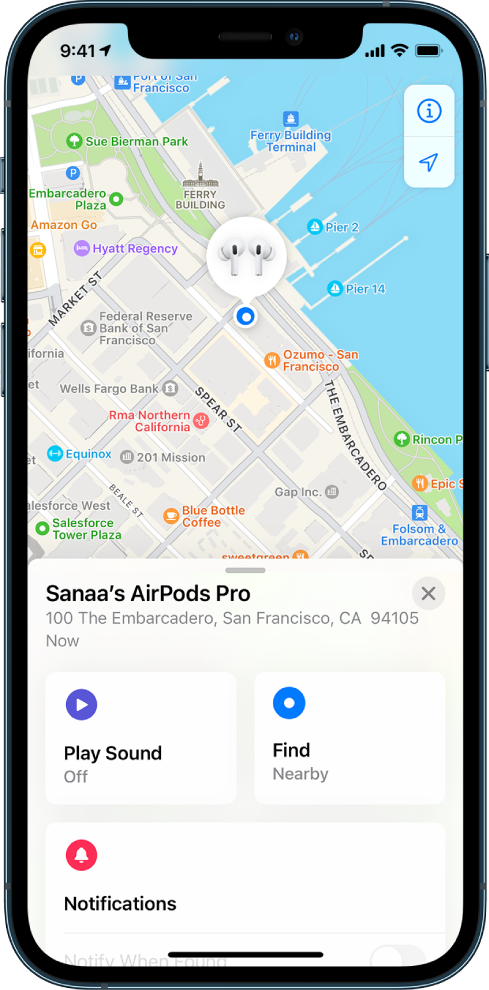
See the location of your AirPods on a map
You can see the current or last known location of your AirPods in the Find My app.
 , tap Devices, then tap your AirPods.
 , then tap your AirPods (requires a Wi-Fi or cellular connection)., click Devices, then select your AirPods.
For most AirPods models, when your AirPods are separated, you see the location of only one at a time. To find them both, first locate the one that you see on the map, put it back in its case, then refresh the map to locate the other one.
If you have AirPods Pro (2nd generation), you see the location of each of your AirPods and the charging case on the map.
Play a sound on your AirPods
You can play a sound on your AirPods to help you locate them if they’re out of their case. If you have AirPods Pro (2nd generation), you can also play a sound on the charging case.
, tap Devices, tap the name of your AirPods, then tap Play Sound., choose your AirPods, then tap Play Sound (requires a Wi-Fi or cellular connection)., click Devices, select your AirPods, click  , then click Play Sound.
Your AirPods play a sound for a few minutes to help you locate them, or until you stop the sound. If your AirPods aren’t connected to your device and you don’t have the Find My Network turned on, the sound plays the next time they connect to a Wi-Fi or cellular network.
Tip: If your AirPods are separated from each other, you can mute one to make it easier to find them one at a time. While the sound plays on your AirPods, tap or click Left or Right.
Find your AirPods nearby
If your AirPods (3rd generation), AirPods Pro (all generations), or AirPods Max are somewhere close by, like in another room in your house, your iPhone or iPad can help guide you to their location. If you have AirPods Pro (2nd generation), you can find the precise location of each of your AirPods and the charging case.
on an iPhone or iPad that you previously paired with your AirPods.This guide is for iOS 16.1, iPadOS 16.1, watchOS 9.1, tvOS 16.1, macOS Ventura, or later.
See also
Get separation alerts if you leave your AirPods behind
We hope this helps.
Cheers!
Hello Titto19,
Thank you for reaching out to Apple Support Communities, and we'll be happy to help in any way we can. We understand you're having issues with locating your AirPods. Try the steps here to see if they resolve the issue: Locate AirPods in Find My - Apple Support
"You can use Find My on your iPhone, iPad, Apple Watch, or Mac to help you locate your AirPods if they’re lost. You can also find your AirPods on the web at iCloud.com/find.
Intro to using Find My with AirPods
See the location of your AirPods on a map
You can see the current or last known location of your AirPods in the Find My app.
, tap Devices, then tap your AirPods., then tap your AirPods (requires a Wi-Fi or cellular connection)., click Devices, then select your AirPods.For most AirPods models, when your AirPods are separated, you see the location of only one at a time. To find them both, first locate the one that you see on the map, put it back in its case, then refresh the map to locate the other one.
If you have AirPods Pro (2nd generation), you see the location of each of your AirPods and the charging case on the map.
Play a sound on your AirPods
You can play a sound on your AirPods to help you locate them if they’re out of their case. If you have AirPods Pro (2nd generation), you can also play a sound on the charging case.
, tap Devices, tap the name of your AirPods, then tap Play Sound., choose your AirPods, then tap Play Sound (requires a Wi-Fi or cellular connection)., click Devices, select your AirPods, click , then click Play Sound.Your AirPods play a sound for a few minutes to help you locate them, or until you stop the sound. If your AirPods aren’t connected to your device and you don’t have the Find My Network turned on, the sound plays the next time they connect to a Wi-Fi or cellular network.
Tip: If your AirPods are separated from each other, you can mute one to make it easier to find them one at a time. While the sound plays on your AirPods, tap or click Left or Right.
Find your AirPods nearby
If your AirPods (3rd generation), AirPods Pro (all generations), or AirPods Max are somewhere close by, like in another room in your house, your iPhone or iPad can help guide you to their location. If you have AirPods Pro (2nd generation), you can find the precise location of each of your AirPods and the charging case.
on an iPhone or iPad that you previously paired with your AirPods.This guide is for iOS 16.1, iPadOS 16.1, watchOS 9.1, tvOS 16.1, macOS Ventura, or later.
See also
Get separation alerts if you leave your AirPods behind
We hope this helps.
Cheers!
Stopped tracking my AirPods pro

