I cannot sign out from my ipad
I cannot sign out from my ipad
[Image Edited by Moderator to Remove Personal Information]
I cannot sign out from my ipad
[Image Edited by Moderator to Remove Personal Information]
Hey malka130,
We’d be happy to help out. If you’re having issues signing out of iCloud on your iPad, this could be due to you not being connected to the internet via Wi-Fi. Go ahead and get connected to a reliable Wi-Fi network so you can access your iCloud account and make changes or sign out.
Once you’ve done so, complete these steps to sign out successfully:
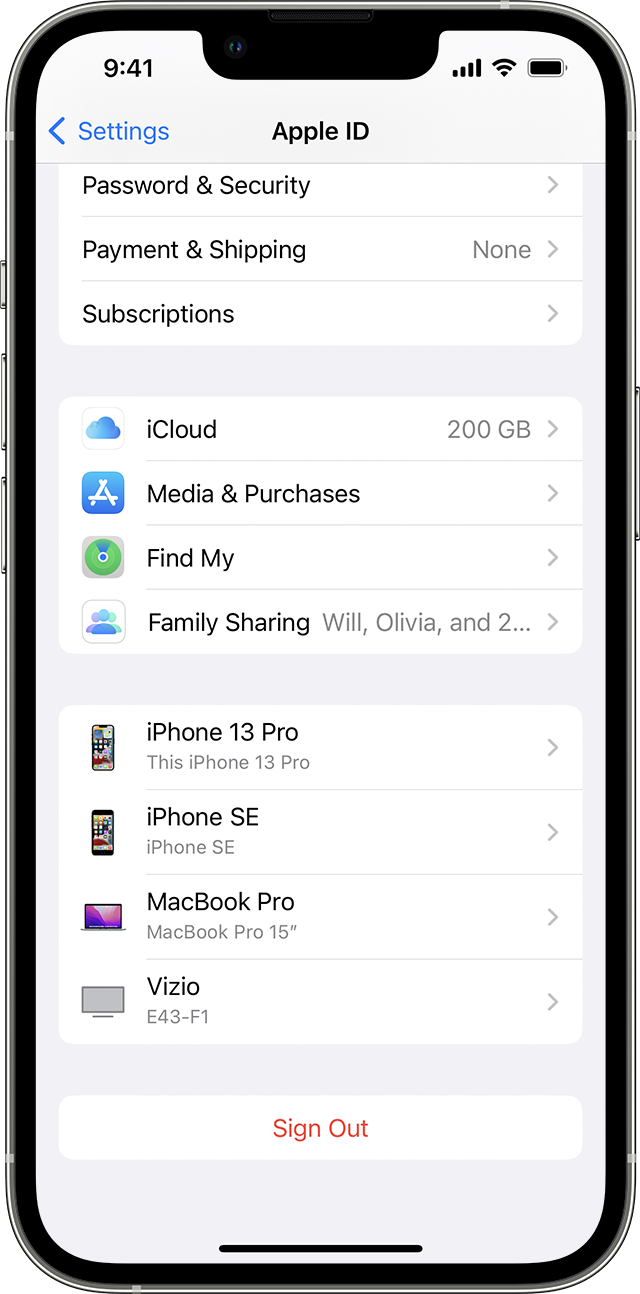
Sign out on your iPhone, iPad, or iPod touch
1. Go to Settings, then tap your name.
2. Scroll down to the bottom.
3. Tap Sign Out.
4. Enter your Apple ID password and tap Turn Off. Forgot your Apple ID password?
5. Turn on the data that you want to keep a copy of on your device.
6. Tap Sign Out.
7. Tap Sign Out again to confirm that you want to sign out of iCloud.
This is outlined in more detail here: Sign out of iCloud on your iPhone, iPad, iPod touch, Apple TV, or Mac - Apple Support
We hope this helps out.
Take care!
Hey malka130,
We’d be happy to help out. If you’re having issues signing out of iCloud on your iPad, this could be due to you not being connected to the internet via Wi-Fi. Go ahead and get connected to a reliable Wi-Fi network so you can access your iCloud account and make changes or sign out.
Once you’ve done so, complete these steps to sign out successfully:
Sign out on your iPhone, iPad, or iPod touch
1. Go to Settings, then tap your name.
2. Scroll down to the bottom.
3. Tap Sign Out.
4. Enter your Apple ID password and tap Turn Off. Forgot your Apple ID password?
5. Turn on the data that you want to keep a copy of on your device.
6. Tap Sign Out.
7. Tap Sign Out again to confirm that you want to sign out of iCloud.
This is outlined in more detail here: Sign out of iCloud on your iPhone, iPad, iPod touch, Apple TV, or Mac - Apple Support
We hope this helps out.
Take care!
I cannot sign out from my ipad