I cannot make Apple Music stop repeating songs, even when I hit the button to turn off. Why does this problem continue to be a problem?!

I’m reading comments from back in 2018, from others who were experiencing the exact problem I’m having now in 2023! It’s mind boggling that in 5 years worth of updates, apple hasn’t fixed a problem as simple as the repeat button not working/ being stuck always on. Any current 2023 suggestions for how to get my iPhones Apple Music out of Repeat Always On mode? It’s an iPhone 13 Pro. Also, any suggestions on how we can get apple to fix this reoccurring problem for good? My first guess is to just ditch Apple Music but maybe someone else has a better suggestion.

thanks

iPhone 13 Pro

Posted on Feb 8, 2023 12:55 PM

Reply
1 reply

Feb 10, 2023 1:56 PM in response to Krtaylor865

Hi Krtaylor865,


You started from a great resource: How to shuffle music on your iPhone

However, for help with repeating songs be sure to follow the steps below found in the article here: How to repeat music on your iPhone


"How to turn off repeat

  1. Open the Apple Music app.
  2. Tap the song that's playing at the bottom of the screen.
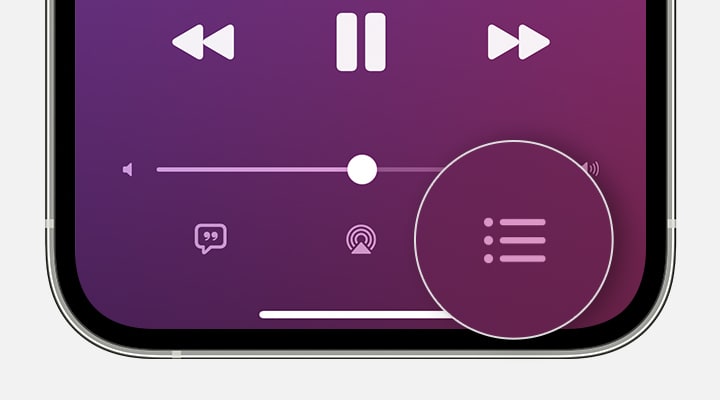
  3. In the screen that appears, tap the Playing Next button Playing Next button in the lower-right corner.

iPhone showing Playing Next button in the lower-right corner of the screen.

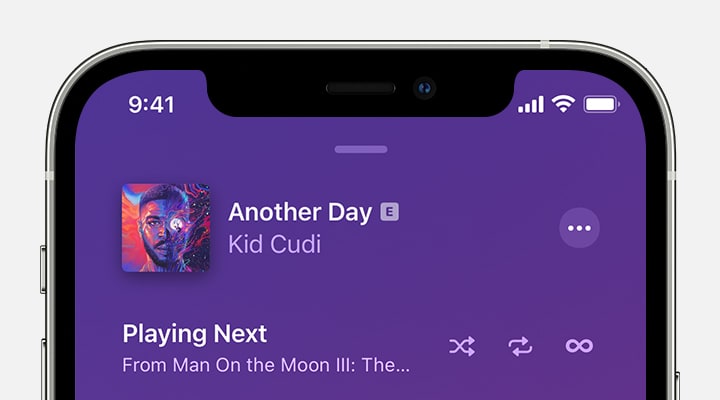
4.At the top of the Playing Next screen, tap Repeat One or Repeat All until it changes to Repeat Off. When the Repeat button isn't highlighted, repeat is turned off.

iPhone showing repeat is turned off at the top of the Playing Next screen."


Additionally it states, "If you're playing music in your Autoplay queue, the Repeat button disappears. You can't repeat songs in your Autoplay queue. If you're playing music on repeat, then only that music will play. You won't see your Autoplay queue until you turn off repeat. Learn more about Autoplay."


If these are the steps you're completing, as it's not expected behavior ensure your iOS is fully updated and test again. Update your iPhone or iPad - Apple Support


Should the issue remain, reach out to Apple Support directly to further assist.


Contact - Official Apple Support


Contact Apple for support and service - Apple Support


Best.

This thread has been closed by the system or the community team. You may vote for any posts you find helpful, or search the Community for additional answers.

I cannot make Apple Music stop repeating songs, even when I hit the button to turn off. Why does this problem continue to be a problem?!

Welcome to Apple Support Community
A forum where Apple customers help each other with their products. Get started with your Apple Account.