UI bug to Apple
I missed a call and then this red sign stuck on my screen, it irritates me. I’ve already off and on my iPhone, clear call journal, but it still visible. Please, advise how to avoid it. I have iPhone 14 pro max
iPhone 14 Pro Max, 16
I missed a call and then this red sign stuck on my screen, it irritates me. I’ve already off and on my iPhone, clear call journal, but it still visible. Please, advise how to avoid it. I have iPhone 14 pro max
iPhone 14 Pro Max, 16
Hello OlhaY,
Thanks for posting in the Apple Support Communities. We're happy to look into this with you. So, it sounds as though you've got a phantom badge notification for the Phone app. Just to clarify, did you also check for any voicemails that haven't been listened to yet?
You mentioned restarting your iPhone. Did you also try quitting the Phone app to see if that helps? If not, this is a good step to try as it takes the app out of sleep/standby mode, and completely closes it. When you reopen it, it should be refreshed and that notification removed.
Close an app on your iPhone or iPod touch - Apple Support
How to close an app
You should close an app only if it’s unresponsive. The way you close an app depends on the type of device that you have. Find your iPhone or iPod touch model below, then follow the steps. Or learn how to close an app on your iPad.
iPhone X and later
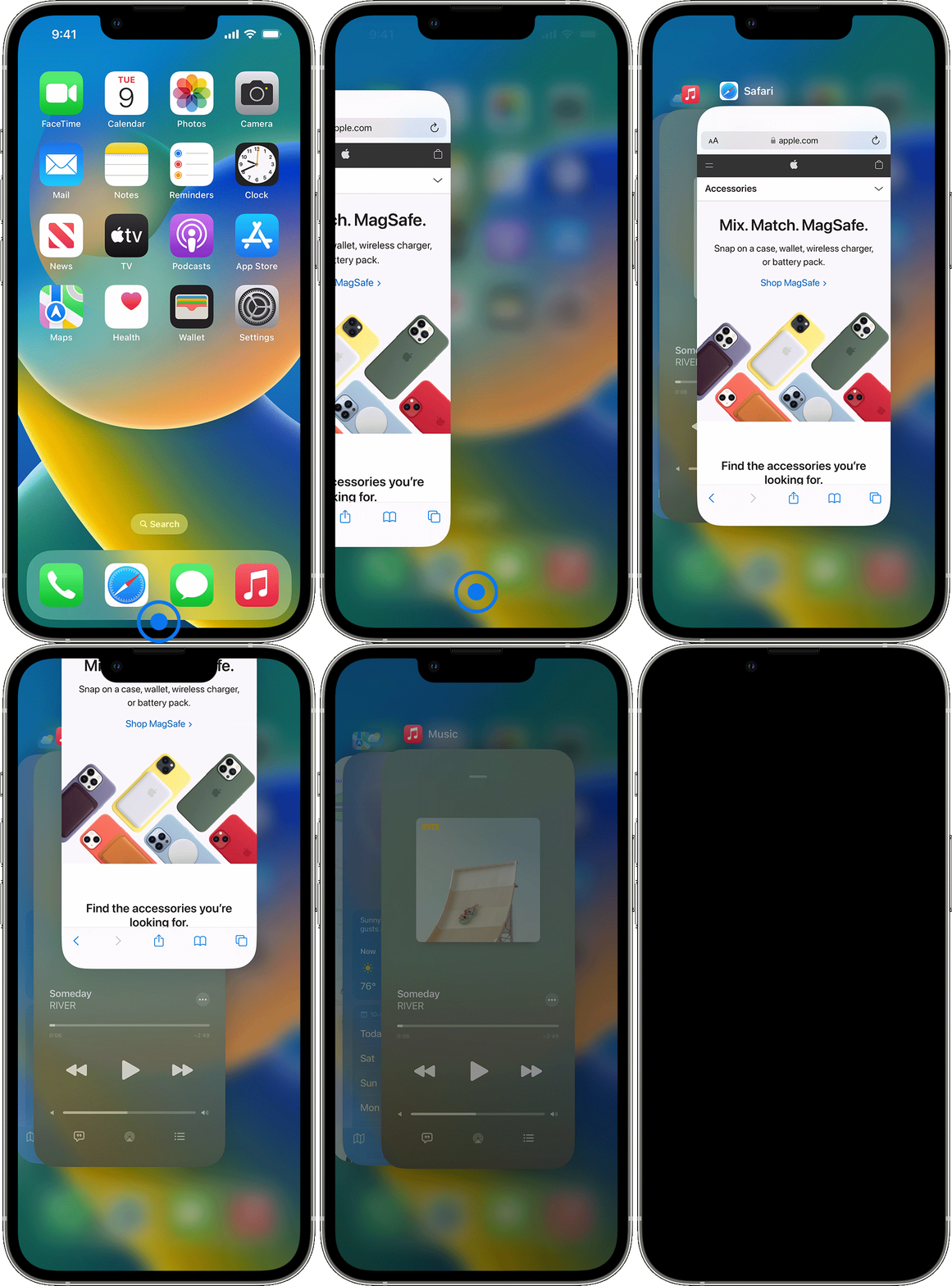
1. From the Home Screen, swipe up from the bottom of the screen and pause in the middle of the screen.
2. Swipe right or left to find the app that you want to close.
3. Swipe up on the app's preview to close the app.
Best regards.
Hello OlhaY,
Thanks for posting in the Apple Support Communities. We're happy to look into this with you. So, it sounds as though you've got a phantom badge notification for the Phone app. Just to clarify, did you also check for any voicemails that haven't been listened to yet?
You mentioned restarting your iPhone. Did you also try quitting the Phone app to see if that helps? If not, this is a good step to try as it takes the app out of sleep/standby mode, and completely closes it. When you reopen it, it should be refreshed and that notification removed.
Close an app on your iPhone or iPod touch - Apple Support
How to close an app
You should close an app only if it’s unresponsive. The way you close an app depends on the type of device that you have. Find your iPhone or iPod touch model below, then follow the steps. Or learn how to close an app on your iPad.
iPhone X and later
1. From the Home Screen, swipe up from the bottom of the screen and pause in the middle of the screen.
2. Swipe right or left to find the app that you want to close.
3. Swipe up on the app's preview to close the app.
Best regards.
Hi Melissa,
Thank you for you idea. After off lower mode, charged phone up to 90% and restart I still had the same, but I decided to investigate a bit and call and setup my voicemail. So, I setup my personal info and found that there were 2 unread voice emails, so I read them and this red sign disappeared.
Looks like issue happened with unread voice mails during unsetup voicemails function on my mobile provider.
Thank you for you time and support!
Now all is ok. Have a great day.
Hello OlhaY,
Thank you for that additional information. We notice that you have Low Power Mode turned on. Go to Settings > Battery to turn off Low Power Mode. Then restart your iPhone.
When Low Power Mode is on, your iPhone or iPad will last longer before you need to charge it, but some features might take longer to update or complete. Also, some tasks might not work until you turn off Low Power Mode, or until you charge your iPhone or iPad to 80% or higher.
Low Power Mode reduces or affects these features:
• 5G (except for video streaming) on iPhone 12 models1
• Auto-Lock (defaults to 30 seconds)
• Display brightness
• Display refresh rate (limited up to 60 Hz) on iPhone and iPad models with ProMotion display2
• Some visual effects
• iCloud Photos (temporarily paused)
• Automatic downloads
• Email fetch
• Background app refresh
Find more information here: Use Low Power Mode to save battery life on your iPhone or iPad
Take care.
Hi Missy,
Thank you for responding!
I didn’t listen missed voicemails, I cleared journals.
I was in trip and turned on Plane mode, so I didn’t get and answer to mails or calls. When I off Plane mode, I saw missed voicemails, then I didn’t listen them, I just cleared journal, and after then I’ve got this stuck. (Looks like this is detailed steps to reproduce)
Yes, I closed the program as you described.
Also I deleted all calls and mails but still have the same issue, I even update IOS to latest version 16.3 but red sign is still visible. Please have a look my screenshots
Thank you in advance!
Today I also got new voice mail, but my journal is empty🤷♀️
I can’t understand how it possible, look like this is fake voice mail, this is weird
Thanks so much for the update OlhaY!
We're so glad to hear that you were able to get the issue resolved by checking your voicemail.
Have a wonderful day!
UI bug to Apple