Watch doesn't allow me to update Apps.

I have the Apple Watch 6 with the latest WatchOS 9.3 in it. Though, I cannot update some apps such as Spotify, Shazam. I've tried many solutions proposed on website, for ex: connect it to the same wifi network, restart apple watch, connect it to the charger, even uninstall the apps and try to reinstall again (and it gets even worse because it won't reinstall the app again), so nothing worked. Since the role of spotify is so much important in my daily life, I may need help. Thank you.

Apple Watch Series 6, watchOS 9

Posted on Feb 10, 2023 7:38 PM

Reply
Question marked as Top-ranking reply

Posted on Feb 13, 2023 10:17 AM

Hi satria19,


For help with reinstalling apps on your Apple Watch, have you tried downloading the apps on the paired iPhone and syncing? If not, test the steps below found in the article here: Download apps on your Apple Watch - Apple Support


"Get apps with the iPhone that's paired with the Apple Watch

  1. On your iPhone, open the Watch app.
  2. Tap the My Watch tab.
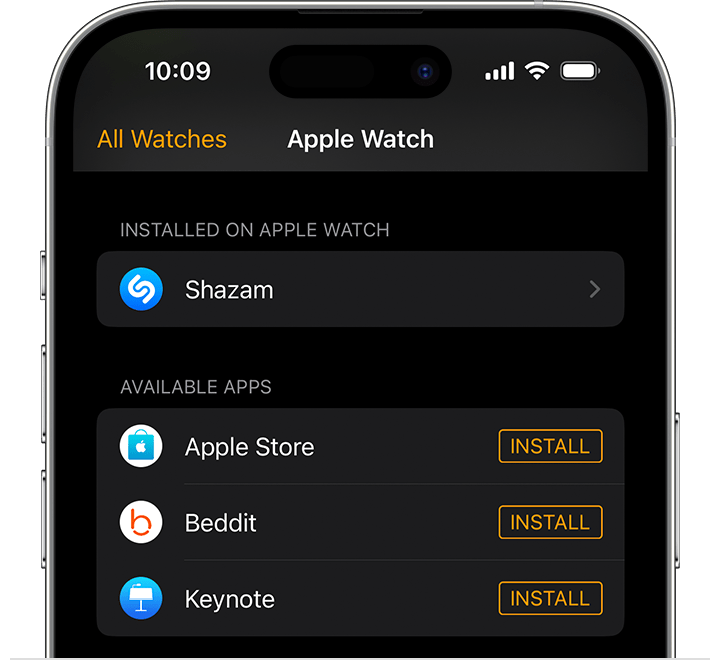
  3. Scroll to the app that you want to add. Apps that you can install appear in the Available Apps section.
  4. iPhone screen showing Watch app
  5. To add an app to your watch, tap Install."


You can also find helpful information here: If there's an issue when you redownload apps, movies, or other content from Apple


Use the steps here to ensure you have a valid payment method on file as well: If you need to change or update your Apple ID payment method


If you continue to have an issue, reach out to Apple Support directly to further assist.


Contact - Official Apple Support


Contact Apple for support and service - Apple Support


Best.


1 reply
Question marked as Top-ranking reply

Feb 13, 2023 10:17 AM in response to satria19

Hi satria19,


For help with reinstalling apps on your Apple Watch, have you tried downloading the apps on the paired iPhone and syncing? If not, test the steps below found in the article here: Download apps on your Apple Watch - Apple Support


"Get apps with the iPhone that's paired with the Apple Watch

  1. On your iPhone, open the Watch app.
  2. Tap the My Watch tab.
  3. Scroll to the app that you want to add. Apps that you can install appear in the Available Apps section.
  4. iPhone screen showing Watch app
  5. To add an app to your watch, tap Install."


You can also find helpful information here: If there's an issue when you redownload apps, movies, or other content from Apple


Use the steps here to ensure you have a valid payment method on file as well: If you need to change or update your Apple ID payment method


If you continue to have an issue, reach out to Apple Support directly to further assist.


Contact - Official Apple Support


Contact Apple for support and service - Apple Support


Best.


This thread has been closed by the system or the community team. You may vote for any posts you find helpful, or search the Community for additional answers.

Watch doesn't allow me to update Apps.

Welcome to Apple Support Community
A forum where Apple customers help each other with their products. Get started with your Apple Account.