Phone does not plays sound when I locate it via Find My Iphone

hello!


so i page my phone a lot, i misplace it all over the house and Find My Iphone app. it is a lifesaver. last week i paged it because i knew it was in the car somewhere and it did not make a sound. eventually i located it and it was connected to cell, to wifi, and the ringer was on. the app on my ipad which i use to locate it will say “PLAY SOUND: Playing” even though it is not making a sound. and it will reset within 10 seconds back to “PLAY SOUND: off” button as if asking me to push it again. i’m sitting next to my phone the entire time, and it’s not playing a sound at all. all i get is a pop up that says “FIND MY IPHONE ALERT” with 3 short vibrates, but this is not what i’m looking for. i want it to do what it used to do… i want it to page it with the high pitched sonar it used to.


i have restarted my phone, it is fully updated, i have agreed to new icloud conditions.


help please!!!

iPhone X

Posted on Feb 11, 2023 11:39 AM

Reply
Question marked as Top-ranking reply

Posted on Feb 13, 2023 2:31 PM

Hi _estrellita,


For help with using the Find My Play a Sound feature, check your iPhone silent mode settings with the steps below found in the article here: Adjust the volume on iPhone - Apple Support


"Put iPhone in silent mode

To put iPhone in silent mode , set the Ring/Silent switch so that the switch shows orange. To turn off silent mode, set the switch back.
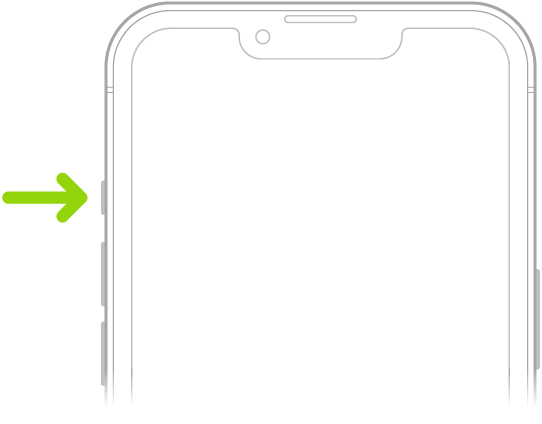
The upper portion of the front of iPhone showing the Ring/Silent switch at the top left, above the volume buttons.

When silent mode is off, iPhone plays all sounds. When silent mode is on, iPhone doesn’t ring or play alerts or other sound effects (but iPhone may still vibrate)."


As you mentioned the phone was next to you, you can also check the attention awareness features with the steps here: Turn Attention Aware features on or off on your iPhone or iPad Pro


If the issue remains even when initiating the sound from a different device or using the iCloud website: Play a sound on a device with Find Devices on iCloud.com, reach out to Apple Support to further assist.


Contact - Official Apple Support


Contact Apple for support and service - Apple Support


Best.

1 reply
Question marked as Top-ranking reply

Feb 13, 2023 2:31 PM in response to _estrellita

Hi _estrellita,


For help with using the Find My Play a Sound feature, check your iPhone silent mode settings with the steps below found in the article here: Adjust the volume on iPhone - Apple Support


"Put iPhone in silent mode

To put iPhone in silent mode , set the Ring/Silent switch so that the switch shows orange. To turn off silent mode, set the switch back.

The upper portion of the front of iPhone showing the Ring/Silent switch at the top left, above the volume buttons.

When silent mode is off, iPhone plays all sounds. When silent mode is on, iPhone doesn’t ring or play alerts or other sound effects (but iPhone may still vibrate)."


As you mentioned the phone was next to you, you can also check the attention awareness features with the steps here: Turn Attention Aware features on or off on your iPhone or iPad Pro


If the issue remains even when initiating the sound from a different device or using the iCloud website: Play a sound on a device with Find Devices on iCloud.com, reach out to Apple Support to further assist.


Contact - Official Apple Support


Contact Apple for support and service - Apple Support


Best.

This thread has been closed by the system or the community team. You may vote for any posts you find helpful, or search the Community for additional answers.

Phone does not plays sound when I locate it via Find My Iphone

Welcome to Apple Support Community
A forum where Apple customers help each other with their products. Get started with your Apple Account.