Can I stay in the family icloud group but have my own storage plan

My family members are all linked and share a family storage plan, but I use significantly more space than my other family members. Is it possible for me to remain in the family and remain in the group but not use the family storage? I still want to be connected and have all the benefits of the family group, except I want my own storage so that it frees up space for the rest of them.

Posted on Feb 11, 2023 1:41 PM

Reply
Question marked as Top-ranking reply

Posted on Feb 13, 2023 3:15 PM

Hi laurenhmassey,


Unfortunately, there isn't a way to do both. In order to have your own individual iCloud storage plan, you will need to leave the Family Sharing group. If you'd like to do this, check out the steps in the link below.


Leave Family Sharing


To perform the recommended troubleshooting steps via the link above, complete the steps in the section titled "Remove yourself from a family group."


Any family member age 13 or older* can remove themselves from a family group. If you have Screen Time turned on for your account, the family organizer must remove you

On your iPhone, iPad, or iPod touch

1) Go to Settings.
2) Tap Family. If you don't see Family, tap your name, then tap Family Sharing. 
3) Tap your name.
4) Tap Stop Using Family Sharing.
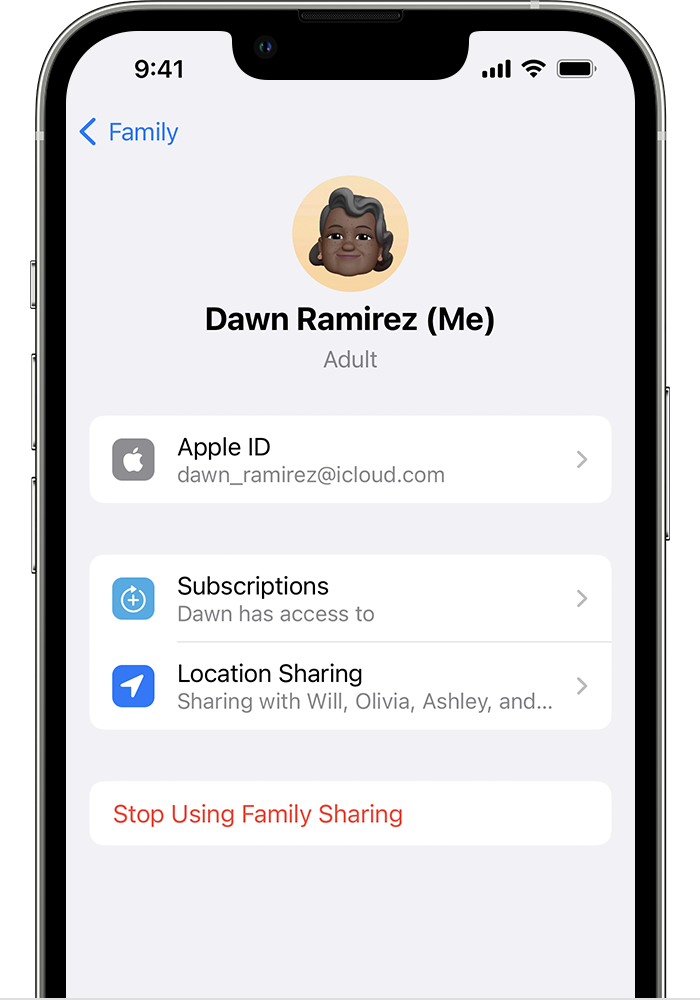
Stop Using Family Sharing is located below Location Sharing.


We recommend the steps above because they will show you how to leave Family Sharing so that you can have your own separate iCloud storage plan.


Please do not hesitate to contact us if you have other questions.


Thanks for using the Apple Support Communities.


Cheers!

Similar questions

1 reply
Question marked as Top-ranking reply

Feb 13, 2023 3:15 PM in response to laurenhmassey

Hi laurenhmassey,


Unfortunately, there isn't a way to do both. In order to have your own individual iCloud storage plan, you will need to leave the Family Sharing group. If you'd like to do this, check out the steps in the link below.


Leave Family Sharing


To perform the recommended troubleshooting steps via the link above, complete the steps in the section titled "Remove yourself from a family group."


Any family member age 13 or older* can remove themselves from a family group. If you have Screen Time turned on for your account, the family organizer must remove you

On your iPhone, iPad, or iPod touch

1) Go to Settings.
2) Tap Family. If you don't see Family, tap your name, then tap Family Sharing. 
3) Tap your name.
4) Tap Stop Using Family Sharing.
Stop Using Family Sharing is located below Location Sharing.


We recommend the steps above because they will show you how to leave Family Sharing so that you can have your own separate iCloud storage plan.


Please do not hesitate to contact us if you have other questions.


Thanks for using the Apple Support Communities.


Cheers!

This thread has been closed by the system or the community team. You may vote for any posts you find helpful, or search the Community for additional answers.

Can I stay in the family icloud group but have my own storage plan

Welcome to Apple Support Community
A forum where Apple customers help each other with their products. Get started with your Apple Account.