Hi laurenhmassey,
Unfortunately, there isn't a way to do both. In order to have your own individual iCloud storage plan, you will need to leave the Family Sharing group. If you'd like to do this, check out the steps in the link below.
Leave Family Sharing
To perform the recommended troubleshooting steps via the link above, complete the steps in the section titled "Remove yourself from a family group."
Any family member age 13 or older* can remove themselves from a family group. If you have Screen Time turned on for your account, the family organizer must remove you.
On your iPhone, iPad, or iPod touch
1) Go to Settings.
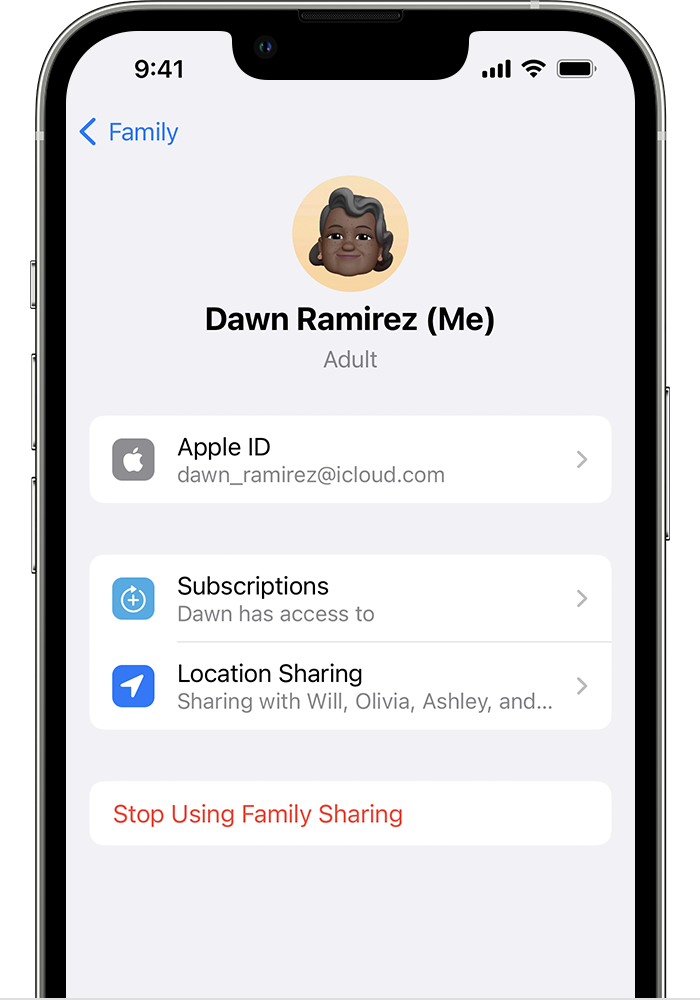
2) Tap Family. If you don't see Family, tap your name, then tap Family Sharing.
3) Tap your name.
4) Tap Stop Using Family Sharing.
We recommend the steps above because they will show you how to leave Family Sharing so that you can have your own separate iCloud storage plan.
Please do not hesitate to contact us if you have other questions.
Thanks for using the Apple Support Communities.
Cheers!


