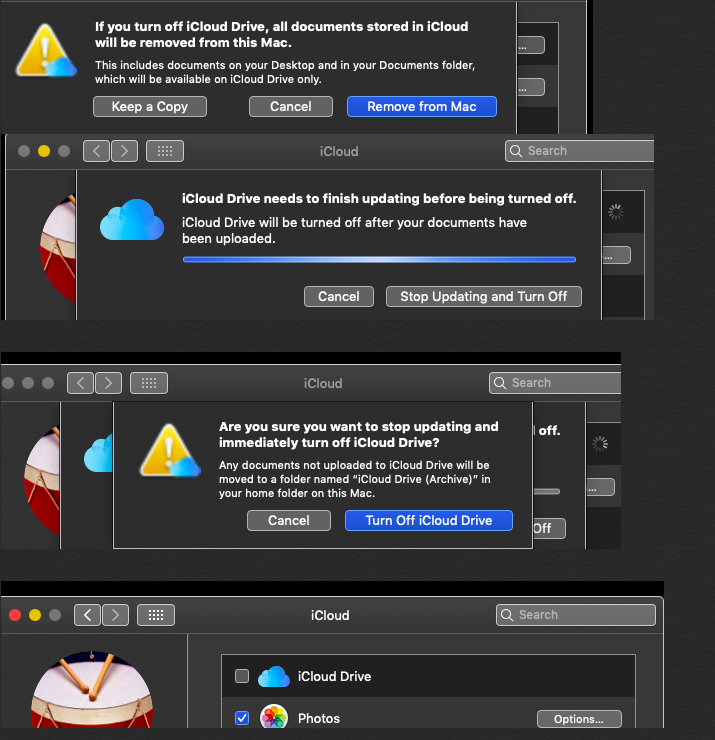
Open system preferences > iCloud and uncheck the box of iCloud Drive a pop up window appears , showing to keep a copy of documents , and remove from the Mac .
( a ) if you had clicked on keep a copy , they will be archived in home folder that can be viewed by clicking on finder in the dock , take cursor on top menu bar > Go > Home > your user name > iCloud Drive ( Archive ) .
You mentioned - It lets me transfer the big file, but it doesn't update and restore the existing iCloud files. How do I move files back to their original place?
You have to uncheck the box of optimise storage from Mac system preferences Optimise storage space on your Mac - Apple Support
The sufficient space will be created , the restoring of existing iCloud files will appear when the box of iCloud Drive is again checked see this article also Free up storage space on your Mac - Apple Support
Note : you don't need to select iCloud files from iCloud Drive ( archive ) and copy and paste again in iCloud Drive > documents in finder , these files are second copy that are stored in iCloud Drive ( archive ) .

