
Emergency call keeps popping up even after cancel
Emergency call keeps popping up even after cancel. How to turn off.
Apple Watch Series 6
Emergency call keeps popping up even after cancel. How to turn off.
Apple Watch Series 6
G'day JimK-7,
We understand you're seeing an Emergency SOS screen on your Apple Watch. We'd like to help out.
To clarify, do you want to turn off this function entirely on your Apple Watch? The steps below cover how you can disable automatic dialing if you'd like: Use Emergency SOS on your Apple Watch - Apple Support
"Turn off automatic dialing
You can change your settings so that holding the side button won't call emergency services automatically:
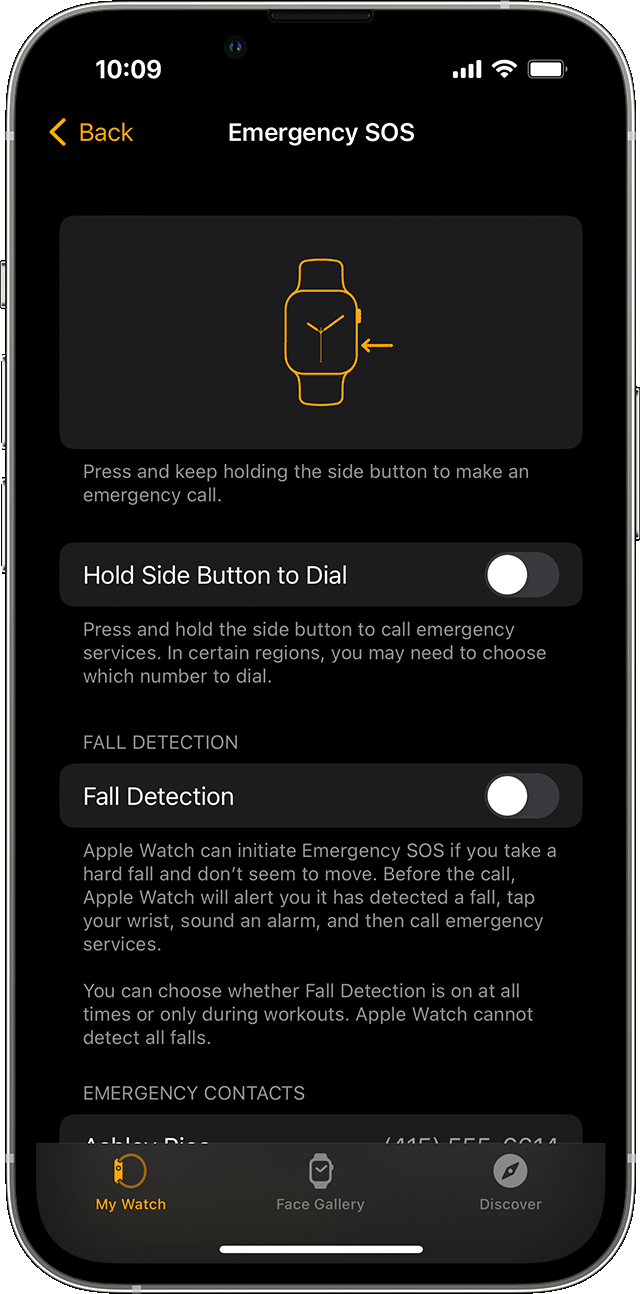
If you turn off this setting, you can still use the Emergency Call slider to make a call."
That should help if you want to turn the feature off entirely. If you have any questions about what's been happening, please let us know more about what you're experiencing. For example, does it happen after any particular actions, or is it seemingly at random? Keep us posted.
Have a good one.
G'day JimK-7,
We understand you're seeing an Emergency SOS screen on your Apple Watch. We'd like to help out.
To clarify, do you want to turn off this function entirely on your Apple Watch? The steps below cover how you can disable automatic dialing if you'd like: Use Emergency SOS on your Apple Watch - Apple Support
"Turn off automatic dialing
You can change your settings so that holding the side button won't call emergency services automatically:
If you turn off this setting, you can still use the Emergency Call slider to make a call."
That should help if you want to turn the feature off entirely. If you have any questions about what's been happening, please let us know more about what you're experiencing. For example, does it happen after any particular actions, or is it seemingly at random? Keep us posted.
Have a good one.
Emergency call keeps popping up even after cancel

