Hi hyeonmini,
Thanks for contacting Apple Support Communities!
We understand that you'd like to learn more about what iCloud backs up on your iPhone, correct?
This resource outlines what iCloud backs up as well as what remains stored in iCloud: What does iCloud back up? - Apple Support
"Here’s what iCloud Backup includes
- App data
- Apple Watch backups1
- Device settings
- Home screen and app organization
- iMessage, text (SMS), and MMS messages2
- Photos and videos on your iPhone, iPad, and iPod touch2
- Purchase history from Apple services, like your music, movies, TV shows, apps, and books3
- Ringtones
- Visual Voicemail password (requires the SIM card that was in use during backup)
Your iPhone, iPad, and iPod touch backups only include information and settings stored on your device. They do not include information already stored in iCloud such as Contacts, Calendars, Bookmarks, Notes, Reminders, Voice Memos4, Messages in iCloud, iCloud Photos, and shared photos. Some information is not included in an iCloud backup but can be added to iCloud and shared across multiple devices like Mail, Health data, call history, and files you store in iCloud Drive."
You can also reference the iCloud User Guide to help you adjust your iCloud Settings: Sign in to iCloud on all your devices - Apple Support
"Set up iCloud on your iPhone, iPad, or iPod touch
- On your iPhone, iPad, or iPod touch, go to Settings > [your name].
If you don’t see [your name], tap “Sign in to your [device],” then enter your Apple ID and password.
2. Do one of the following:
- iOS 16, iPadOS 16, or later: Tap iCloud, then turn on each app or feature you want to use. Tap Show All to see more apps.
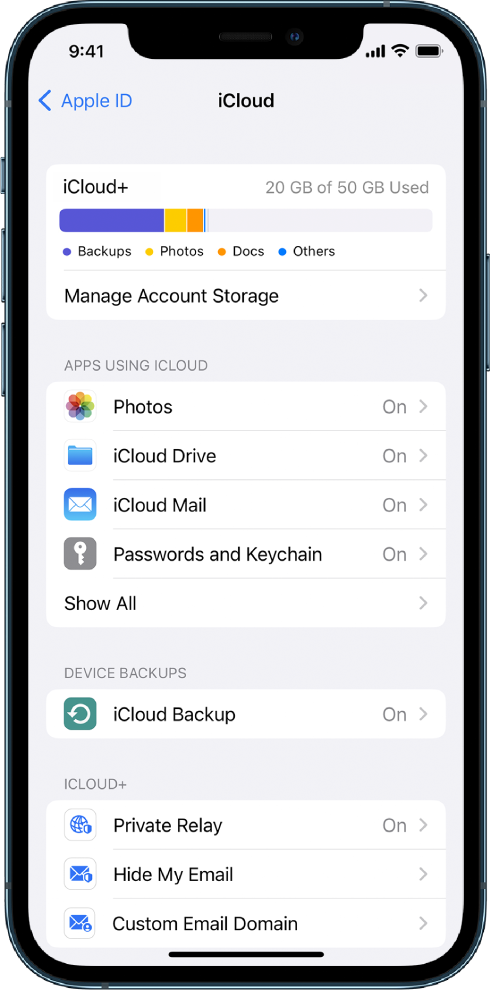
- iOS 15, iPadOS 15, or earlier: Tap iCloud, then turn on each app or feature you want to use."
Take care!


