Family sharing purchase approval for a minor is not the same thing as Itunes purchase approval both through Apple? My daughter is able to make multiple purchases and I have no recourse ?.

Family sharing purchase approval for a minor is not the same thing as Itunes purchase approval both through Apple. My daughter is able to make multiple purchases and I have no recourse. Family sharing has been turned on since I signed my daughter up for an Apple ID. She needs the approval to make purchases even if they are free apps. The first problem every time my phone updates the purchase approval reverts to being off- I now check it and the toggle is always on. Last month my daughter was able to purchase $180 worth of game tokens, I reported it and the refund was denied. I figured it was a hard lesson and that I had forgotten to check my settings after the last phone update which had been a week or so prior. I figured it was just my daughter's lucky timing and ultimately was my fault. I have been unsuccessful at reaching anyone to rectify this problem. Now just a few days ago my daughter has been able to purchase more in-game tokens. I noticed in my bank account before the receipt was even generated- I had to wait to request a refund and report an issue. I was able to check my daughter's settings and purchase approvals were turned on. while searching for someone to contact I found that there is another setting in the iTunes store for authorizing purchase approvals! why are there two places to set this up through the same platform all under apple ?- the family sharing was automatic through my daughter's age upon signing up for the apple ID. Why, if one setting is turned on can the other setting that is not turned on, override my first setting? all of my requests for refunds totaling close to $300 have been denied with no explanation, and I can't find someone to speak with. I have no recourse and who to say that now that I have two settings saying my daughter needs purchase approval, there isn't a third hidden setting that she will find her way into?

iPhone XR, iOS 15

Posted on Feb 16, 2023 7:36 AM

Reply
Question marked as Top-ranking reply

Posted on Feb 17, 2023 5:00 PM

Hello Cassandra120,


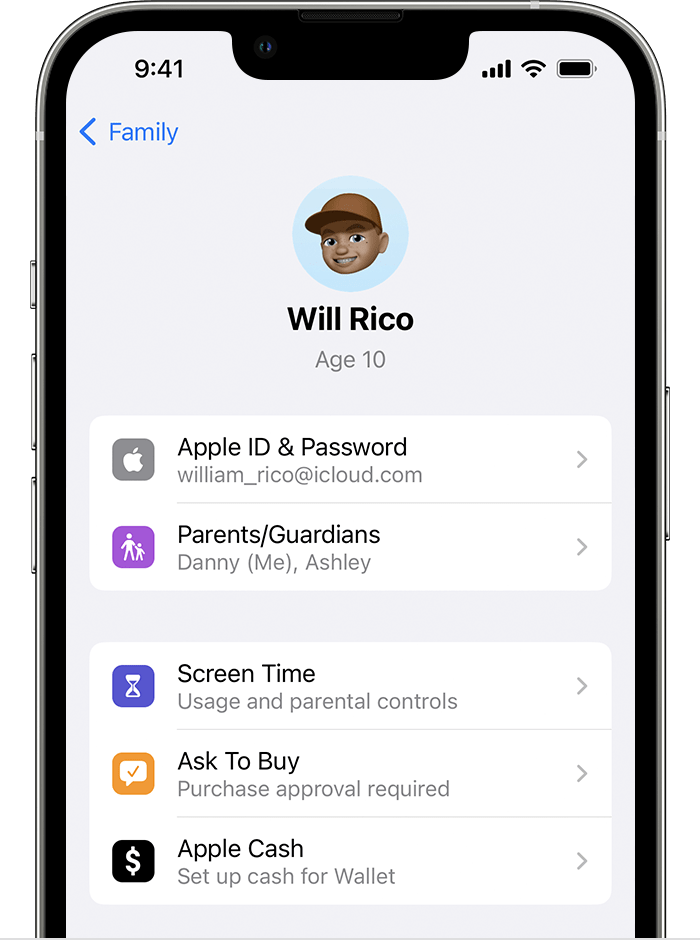
We can understand wanting to get this sorted out. However, there should not be an additional setting for Ask to buy. It should only appear as shown below:


"How to turn on or turn off Ask to Buy

If you're a parent or guardian, use your own device to turn on or turn off Ask to Buy.

On your iPhone, iPad, or iPod touch

  1. Open the Settings app.
  2. Tap your name.
  3. Tap Family Sharing.
  4. Tap your family member's name, then tap Ask to Buy. In iOS 15 or earlier, tap Ask to Buy then tap your family member's name. 

Ask to Buy is located below Screen Time.


5. Turn on or off Require Purchase Approval."


More details here: Approve what kids buy with Ask to Buy


However, with Screen Time, you can prevent unintentional or unauthorized purchases from the App Store and other Apple services. You can also require a password for purchases, prevent certain types of purchases, or disable purchasing all together. If you're concerned about unauthorized purchases, it may be best to set this up. Here's how: Prevent in-app purchases from the App Store


In the meantime, you will need to connect with Apple directly concerning these purchases. They will be able to assist you further with your account. You can follow this link to reach them: Contact Apple for support and service


Best wishes.


Similar questions

1 reply
Question marked as Top-ranking reply

Feb 17, 2023 5:00 PM in response to cassandra120

Hello Cassandra120,


We can understand wanting to get this sorted out. However, there should not be an additional setting for Ask to buy. It should only appear as shown below:


"How to turn on or turn off Ask to Buy

If you're a parent or guardian, use your own device to turn on or turn off Ask to Buy.

On your iPhone, iPad, or iPod touch

  1. Open the Settings app.
  2. Tap your name.
  3. Tap Family Sharing.
  4. Tap your family member's name, then tap Ask to Buy. In iOS 15 or earlier, tap Ask to Buy then tap your family member's name. 

Ask to Buy is located below Screen Time.


5. Turn on or off Require Purchase Approval."


More details here: Approve what kids buy with Ask to Buy


However, with Screen Time, you can prevent unintentional or unauthorized purchases from the App Store and other Apple services. You can also require a password for purchases, prevent certain types of purchases, or disable purchasing all together. If you're concerned about unauthorized purchases, it may be best to set this up. Here's how: Prevent in-app purchases from the App Store


In the meantime, you will need to connect with Apple directly concerning these purchases. They will be able to assist you further with your account. You can follow this link to reach them: Contact Apple for support and service


Best wishes.


This thread has been closed by the system or the community team. You may vote for any posts you find helpful, or search the Community for additional answers.

Family sharing purchase approval for a minor is not the same thing as Itunes purchase approval both through Apple? My daughter is able to make multiple purchases and I have no recourse ?.

Welcome to Apple Support Community
A forum where Apple customers help each other with their products. Get started with your Apple Account.