icloud files are different depending on where they were received from - either my iphone or my ipad - they are entirely different - i think i only have one icloud login

icloud files are different depending on where they were received from - either my iphone or my ipad. They are entirely different and they were sent to icloud under my Apple ID. so what happened?


iPad, iPadOS 16

Posted on Feb 16, 2023 10:11 AM

Reply
Question marked as Top-ranking reply

Posted on Feb 18, 2023 10:48 AM

Hello WatsonWayfarer,


Can you let us know what type of files they are and how they are different? Are you missing any files or data?This will help us determine our next steps.


If you were using a different Apple ID email address on the devices than this would be expected. You can use the steps here to see which ID you are signed in with on each device: Sign in to iCloud on all your devices – Apple Support


"Set up iCloud on your iPhone, iPad or iPod touch

  1. On your iPhone, iPad or iPod touch, go to Settings > [your name].
  2. If you do not see [your name], tap “Sign in to your [device]”, then enter your Apple ID and password.
  3. Do one of the following:
  • iOS 16, iPadOS 16, or later: Tap iCloud, then turn on each app or feature you want to use. Tap Show All to see more apps.
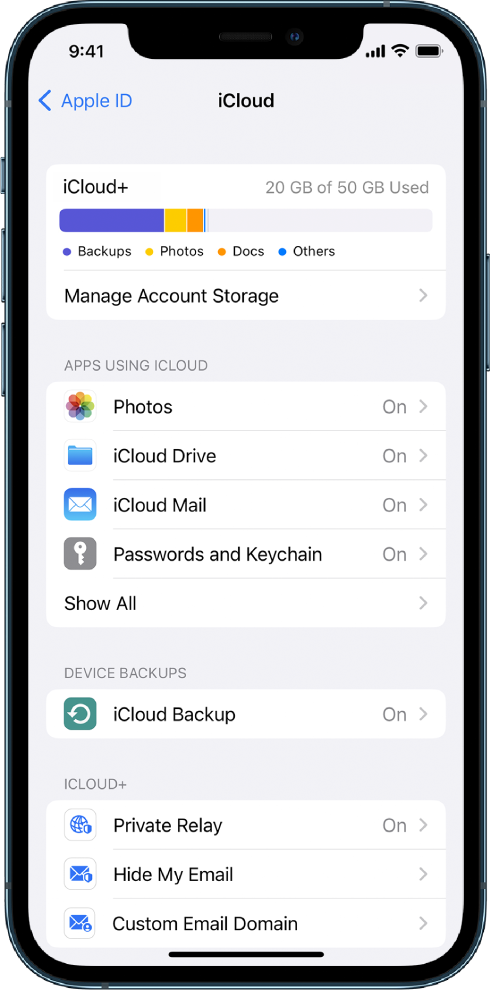
The Settings screen with iCloud features turned on.

    • iOS 15, iPadOS 15 or earlier: Tap iCloud, then turn on each app or feature you want to use."


Let us know and we will continue to work towards a solution.


Cheers!


1 reply
Question marked as Top-ranking reply

Feb 18, 2023 10:48 AM in response to WatsonWayfarer

Hello WatsonWayfarer,


Can you let us know what type of files they are and how they are different? Are you missing any files or data?This will help us determine our next steps.


If you were using a different Apple ID email address on the devices than this would be expected. You can use the steps here to see which ID you are signed in with on each device: Sign in to iCloud on all your devices – Apple Support


"Set up iCloud on your iPhone, iPad or iPod touch

  1. On your iPhone, iPad or iPod touch, go to Settings > [your name].
  2. If you do not see [your name], tap “Sign in to your [device]”, then enter your Apple ID and password.
  3. Do one of the following:
  • iOS 16, iPadOS 16, or later: Tap iCloud, then turn on each app or feature you want to use. Tap Show All to see more apps.

The Settings screen with iCloud features turned on.

    • iOS 15, iPadOS 15 or earlier: Tap iCloud, then turn on each app or feature you want to use."


Let us know and we will continue to work towards a solution.


Cheers!


This thread has been closed by the system or the community team. You may vote for any posts you find helpful, or search the Community for additional answers.

icloud files are different depending on where they were received from - either my iphone or my ipad - they are entirely different - i think i only have one icloud login

Welcome to Apple Support Community
A forum where Apple customers help each other with their products. Get started with your Apple Account.