Sycning iTunes to iPod nano

I connected my iPod nano to iTunes to sync after adding some new music and think I responded incorrectly to a question. The result is that while all my music is in iTunes, only a small number were synced to the iPod. I've tried restoring the iPod, but it still only syncs the 288 songs, not the 1500+ in my library.

Windows, Windows 6

Posted on Feb 21, 2023 3:36 PM

Reply
Question marked as Top-ranking reply

Posted on Feb 22, 2023 5:21 PM

Hey bjacks00,


Thanks for using Apple Support Communinties. We’d be happy to help out with getting your library synced over to your iPod nano.


Perhaps you’ve got it set to only sync a selection of your library instead of the entire library. For more info on this, please check out these steps:

Sync or remove content using iTunes
1. Open iTunes and connect your device to your computer with a USB cable.
2. Click the device icon in the upper-left corner of the iTunes window. Learn what to do if you don't see the icon
The device icon in the upper left corner of the iTunes window.

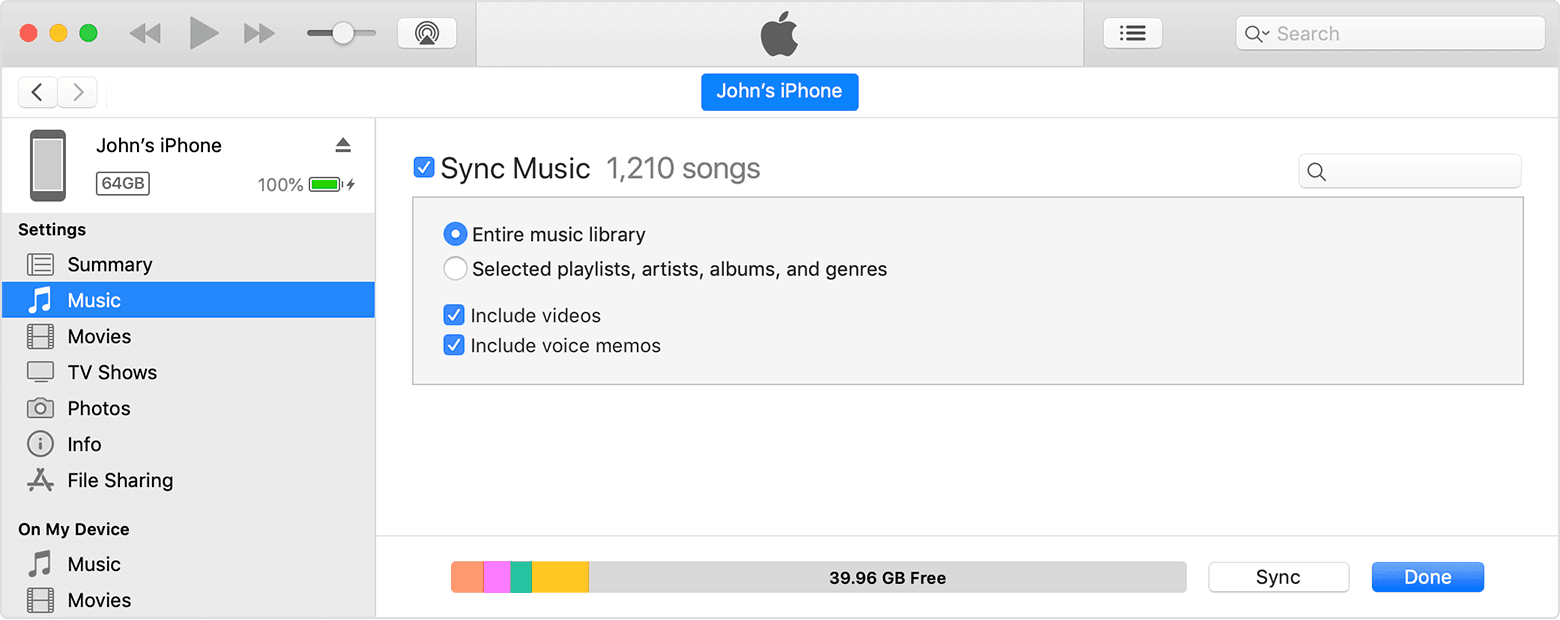
3. From the list under Settings on the left side of the iTunes window, click the type of content that you want to sync or remove.* To turn syncing on for a content type, select the checkbox next to Sync.
The checkbox next to Sync Music in iTunes.

4. Select the checkbox next to each item that you want to sync.
5. Click the Apply button in the lower-right corner of the window. If syncing doesn't start automatically, click the Sync button.

All this and more is available here: Use iTunes to sync your iPhone, iPad, or iPod with your computer - Apple Support


We hope this helps out.


Take care!

Similar questions

3 replies
Question marked as Top-ranking reply

Feb 22, 2023 5:21 PM in response to bjacks00

Hey bjacks00,


Thanks for using Apple Support Communinties. We’d be happy to help out with getting your library synced over to your iPod nano.


Perhaps you’ve got it set to only sync a selection of your library instead of the entire library. For more info on this, please check out these steps:

Sync or remove content using iTunes
1. Open iTunes and connect your device to your computer with a USB cable.
2. Click the device icon in the upper-left corner of the iTunes window. Learn what to do if you don't see the icon
The device icon in the upper left corner of the iTunes window.

3. From the list under Settings on the left side of the iTunes window, click the type of content that you want to sync or remove.* To turn syncing on for a content type, select the checkbox next to Sync.
The checkbox next to Sync Music in iTunes.

4. Select the checkbox next to each item that you want to sync.
5. Click the Apply button in the lower-right corner of the window. If syncing doesn't start automatically, click the Sync button.

All this and more is available here: Use iTunes to sync your iPhone, iPad, or iPod with your computer - Apple Support


We hope this helps out.


Take care!

Feb 25, 2023 4:27 PM in response to bjacks00

Thanks for the suggestions; I had already done all that before, but I was able to solve the problem in a roundabout way. First I realized that when I transferred my library to my new laptop using iTunes instructions, two-thirds of the songs came over in icloud status. So I downloaded all those songs and then my library went from 288 to 770, an improvement, but not close to the 1588 I had before transferring the library. So I resorted to going back to my old laptop, downloaded the new songs I'd purchased on my new laptop from the cloud and syncing my iPod on the old laptop.


Now my iPod has 1606 songs, as it should, but iTunes on my new laptop still only has 770 songs. So, if you have any suggestions on how I can make my new laptop match my old one so I don't have to keep it available for iTunes, I would appreciate hearing back from you or anyone who can help. I have never understood how Apple can make such great devices, but has always come up short with iTunes! Thanks.


Feb 25, 2023 6:07 PM in response to bjacks00

Hi bjacks00,


We are glad to hear that the iPod has the songs present now. As far as your laptop goes, there are a few questions that may help take care of that issue. Are the tracks missing from the new laptop ones that were purchased from the iTunes Store, or were they manually added to iTunes from other sources, such as from a CD or other digital media service? If they were manually added to the older laptop, then you'll likely need to import them to the newer laptop if you're not using Sync Library currently. That's a feature of Apple Music so if you're not subscribed to that, you may not know much about it. You can learn how to Use iCloud Music Library on PC here if you use Apple Music or iTunes Match.


If you just need to Import media from a computer to iTunes on PC, check out he steps here, as they go over both getting the media into iTunes or copying items from other locations.


Be well


This thread has been closed by the system or the community team. You may vote for any posts you find helpful, or search the Community for additional answers.

Sycning iTunes to iPod nano

Welcome to Apple Support Community
A forum where Apple customers help each other with their products. Get started with your Apple Account.