
How can I close out one phone and add it on the same iCloud as another
how do I close out of one apple id and sign on to another
iPhone 13 Pro Max, iOS 16
how do I close out of one apple id and sign on to another
iPhone 13 Pro Max, iOS 16
Hello Whodiddy,
The following seps can assist you with signing out of an Apple ID on your iOS device and associating it another Apple ID:
"• What happens when you sign out of iCloud on your device
You can sign out of iCloud any time to stop using iCloud and its related services on your device. These services are listed below. Before signing out, make sure that you’re comfortable having these services turned off. If you only want to stop using some iCloud features, you can change your iCloud settings instead of signing out of iCloud.
When you sign out, any data stored in iCloud will be removed from your device but will remain in iCloud. Before you sign out, you’ll be asked if you want to keep a copy of any of this information on your device.
If you have iCloud+ and you sign out of iCloud on your device, you lose access to iCloud Private Relay, Hide My Email, HomeKit Secure Video support, and custom email domain on that device.
1. Your Apple Cash and Apple Card accounts are linked to your Apple ID. They can't be transferred to a different Apple ID or accessed by a different Apple ID.
2. Not all features are available in all countries or regions.
How to keep using the App Store, iMessage, and FaceTime on your device
When you sign out of iCloud, you're also automatically signed out of the App Store, iMessage, and FaceTime.
Sign out on your iPhone, iPad, or iPod touch
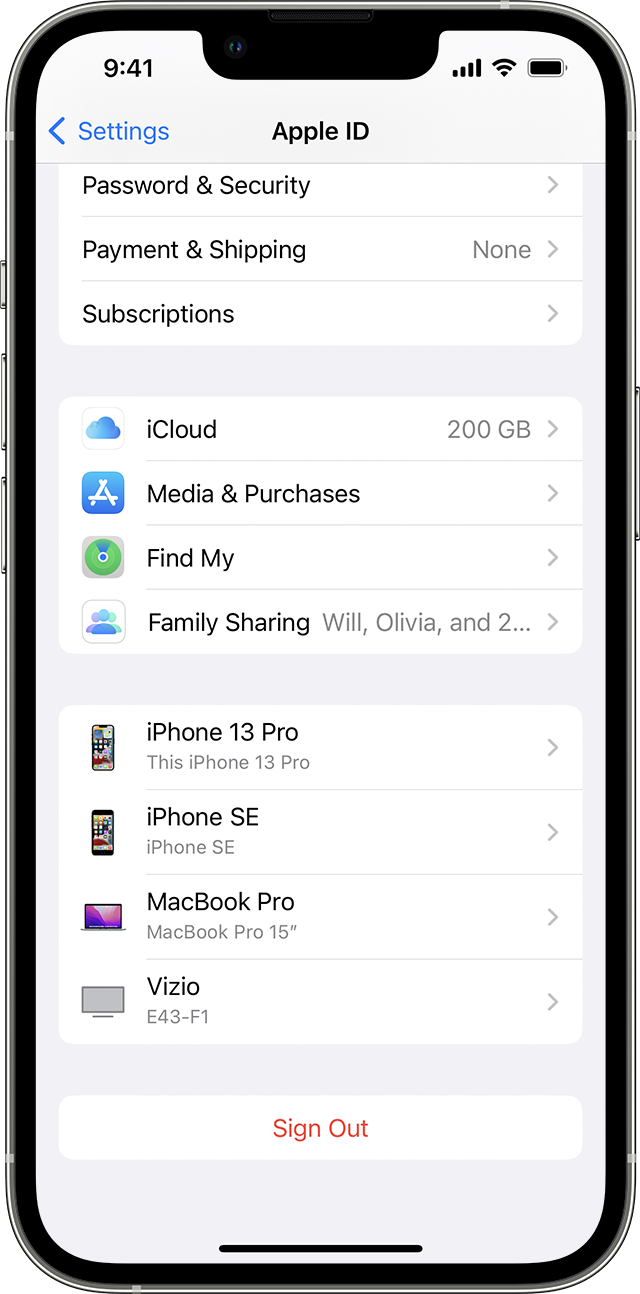
3. Tap Sign Out.
4. Enter your Apple ID password and tap Turn Off. Forgot your Apple ID password?
5. Turn on the data that you want to keep a copy of on your device.
6. Tap Sign Out.
7. Tap Sign Out again to confirm that you want to sign out of iCloud."
More details here: Sign out of iCloud on your iPhone, iPad, iPod touch, Apple TV, or Mac
1. "Open the Settings app.
2. Tap Sign in to your [device].
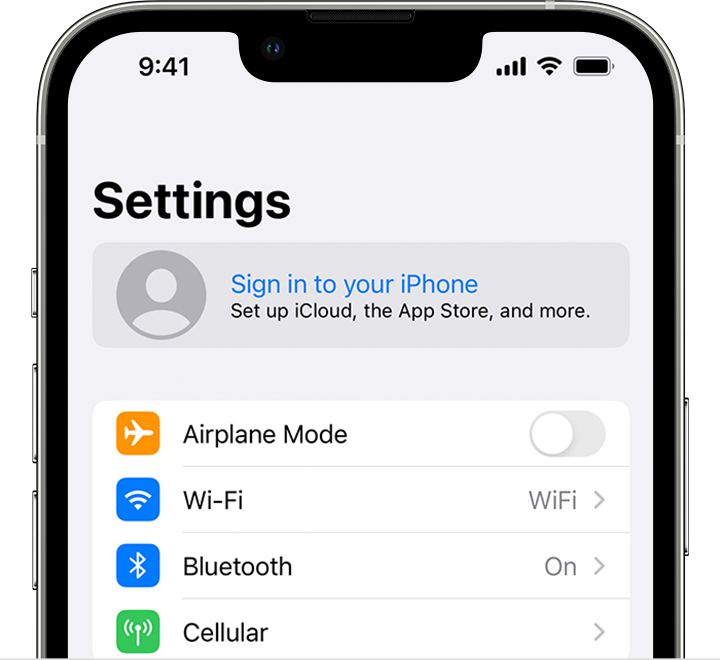
3. Enter your Apple ID and password.
4. If prompted, enter the six-digit verification code sent to your trusted device or phone number and complete sign in.
If you're already signed in to iCloud on the iPhone paired with your Apple Watch, you will automatically be signed in to that Apple ID. Learn more about how to set up and sign in to your Apple Watch."
Take care.
Hello Whodiddy,
The following seps can assist you with signing out of an Apple ID on your iOS device and associating it another Apple ID:
"• What happens when you sign out of iCloud on your device
You can sign out of iCloud any time to stop using iCloud and its related services on your device. These services are listed below. Before signing out, make sure that you’re comfortable having these services turned off. If you only want to stop using some iCloud features, you can change your iCloud settings instead of signing out of iCloud.
When you sign out, any data stored in iCloud will be removed from your device but will remain in iCloud. Before you sign out, you’ll be asked if you want to keep a copy of any of this information on your device.
If you have iCloud+ and you sign out of iCloud on your device, you lose access to iCloud Private Relay, Hide My Email, HomeKit Secure Video support, and custom email domain on that device.
1. Your Apple Cash and Apple Card accounts are linked to your Apple ID. They can't be transferred to a different Apple ID or accessed by a different Apple ID.
2. Not all features are available in all countries or regions.
How to keep using the App Store, iMessage, and FaceTime on your device
When you sign out of iCloud, you're also automatically signed out of the App Store, iMessage, and FaceTime.
Sign out on your iPhone, iPad, or iPod touch
3. Tap Sign Out.
4. Enter your Apple ID password and tap Turn Off. Forgot your Apple ID password?
5. Turn on the data that you want to keep a copy of on your device.
6. Tap Sign Out.
7. Tap Sign Out again to confirm that you want to sign out of iCloud."
More details here: Sign out of iCloud on your iPhone, iPad, iPod touch, Apple TV, or Mac
1. "Open the Settings app.
2. Tap Sign in to your [device].
3. Enter your Apple ID and password.
4. If prompted, enter the six-digit verification code sent to your trusted device or phone number and complete sign in.
If you're already signed in to iCloud on the iPhone paired with your Apple Watch, you will automatically be signed in to that Apple ID. Learn more about how to set up and sign in to your Apple Watch."
Take care.
How can I close out one phone and add it on the same iCloud as another

