find a file on mac

Spotlight does a wonderful job of finding and listing files that contain a specified word but it doesn't tell me where the files are. I want to move them all to a common folder but I need the path to find these in Finder. Any help appreciated.


Mac mini, macOS 13.2

Posted on Feb 24, 2023 6:06 PM

Reply
Question marked as Top-ranking reply

Posted on Feb 24, 2023 6:28 PM

When you have the file chosen in the Spotlight window you can depress the "Command Key" to reveal the path to the file. Search with Spotlight on Mac contains additional details/options.


Similar questions

10 replies

Feb 24, 2023 6:41 PM in response to jsage2

jsage2 wrote:

Tried selecting one of the files in the list spotlight created and then holding command key down for several seconds. Nothing happens???


Try again...


from the ref: this passage is incorrect in Ventura, [maybe Monterey too(?) somewhere it changed ]


  • Show the location of a file on your Mac: Select the file, then press and hold the Command key. The file’s location appears at the bottom of the preview.


the path is now inline with the result preview, not at the bottom.


Feb 24, 2023 7:44 PM in response to jsage2

jsage2 wrote:

Found the difference between what you're seeing and what I'm seeing...my fault in not giving you full info.

When I button in the spotlight window an use the command key..results are the same as yours.

Buttoning "search in finder" at the bottom of the spotlight window creates a new longer list in a new window. Select a file in that window and the path appears at the bottom of the window as shown in another post of mine.

Learned something today...thanks to you all!


Interesting. I never used that search in Finder option in Spotlight.


But yes, that was the complete path that used to show at the bottom of the Spotlight window— and sorely missing in this new change.


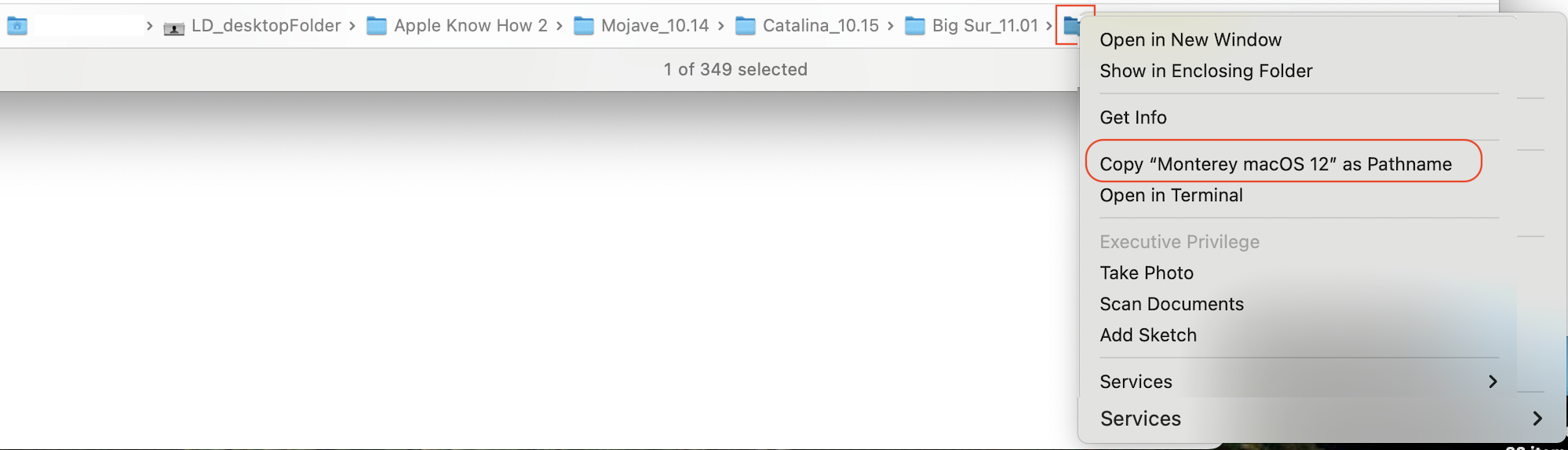
At least you can still get to it in Finder window and Control click for the "copy as pathname" feature. Can be quite handy.


The Finder>View>Show Path Bar option, has always been there...

Feb 24, 2023 6:26 PM in response to jsage2

jsage2 wrote:

Spotlight does a wonderful job of finding and listing files that contain a specified word but it doesn't tell me where the files are. I want to move them all to a common folder but I need the path to find these in Finder. Any help appreciated.


use the Command key hold down for a 2 count—it will show location...


Search with Spotlight on Mac - Apple Support


Feb 24, 2023 7:19 PM in response to leroydouglas

Found the difference between what you're seeing and what I'm seeing...my fault in not giving you full info.

When I button in the spotlight window an use the command key..results are the same as yours.

Buttoning "search in finder" at the bottom of the spotlight window creates a new longer list in a new window. Select a file in that window and the path appears at the bottom of the window as shown in another post of mine.


Learned something today...thanks to you all!

This thread has been closed by the system or the community team. You may vote for any posts you find helpful, or search the Community for additional answers.

find a file on mac

Welcome to Apple Support Community
A forum where Apple customers help each other with their products. Get started with your Apple Account.


