
Icloud
I cannot sign into my iCloud. The perilous phone I had is now disconnected and the recovery phone I can’t remember
iPhone 11, iOS 16
I cannot sign into my iCloud. The perilous phone I had is now disconnected and the recovery phone I can’t remember
iPhone 11, iOS 16
Hello estela26,
Thanks for choosing the Apple Support Communities. It sounds like you are trying to get a verification code to sign in to iCloud on a new iPhone, but you are not getting a code. In this instance, we would want to follow the steps below to resolve the issue.
Get a verification code and sign in with two-factor authentication - Apple Support
"Get a code from Settings on your trusted device
If you can’t receive a verification code on your trusted devices automatically, you can get one from Settings, even if your device is offline.
From your iPhone, iPad, or iPod touch
If your device is online:
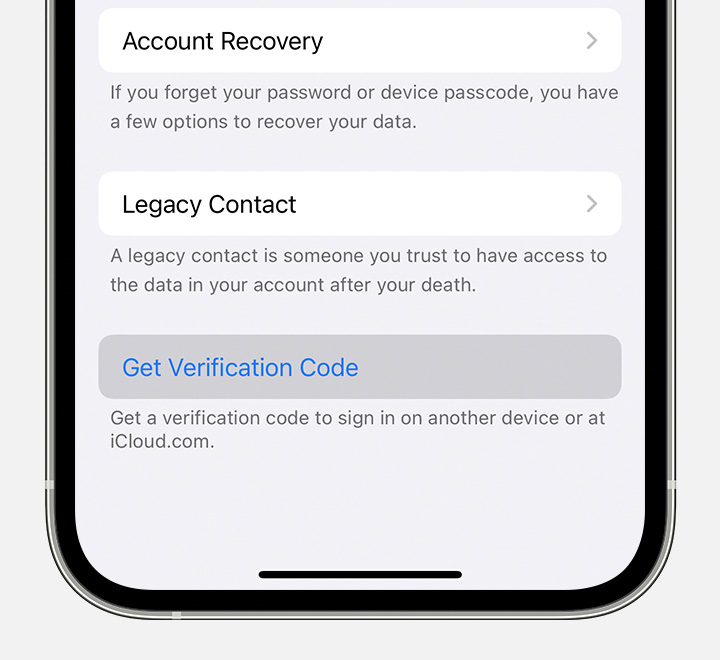
If your device is offline:
If you still can't sign in
If you can’t sign in, reset your password, or receive verification codes, you can request account recovery to regain access to your account. Account recovery might take a few days or longer, depending on the specific account information you can provide to verify your identity."
If something else is happening when you try to log in, please tell us a bit more and we will do everything we can to help.
Cheers!
Hello estela26,
Thanks for choosing the Apple Support Communities. It sounds like you are trying to get a verification code to sign in to iCloud on a new iPhone, but you are not getting a code. In this instance, we would want to follow the steps below to resolve the issue.
Get a verification code and sign in with two-factor authentication - Apple Support
"Get a code from Settings on your trusted device
If you can’t receive a verification code on your trusted devices automatically, you can get one from Settings, even if your device is offline.
From your iPhone, iPad, or iPod touch
If your device is online:
If your device is offline:
If you still can't sign in
If you can’t sign in, reset your password, or receive verification codes, you can request account recovery to regain access to your account. Account recovery might take a few days or longer, depending on the specific account information you can provide to verify your identity."
If something else is happening when you try to log in, please tell us a bit more and we will do everything we can to help.
Cheers!
Icloud

