
Unable to enable pop-up in Safari, macOs Catalina
I tried to allow pop-up for websites but it keeps defaulting to "Block and Notify". Even the "remove" button in the bottom left is grayed out.
Anyone knows how to correct this? Thanks!
iMac 21.5″
I tried to allow pop-up for websites but it keeps defaulting to "Block and Notify". Even the "remove" button in the bottom left is grayed out.
Anyone knows how to correct this? Thanks!
iMac 21.5″
Hello tay292,
We understand you're having an issue with enabling pop-ups in Safari. You're in the right place for help.
The steps below will help allow or block pop-ups in Safari on your Mac.
"Allow or block pop-ups on one website
 on your Mac, go to the website.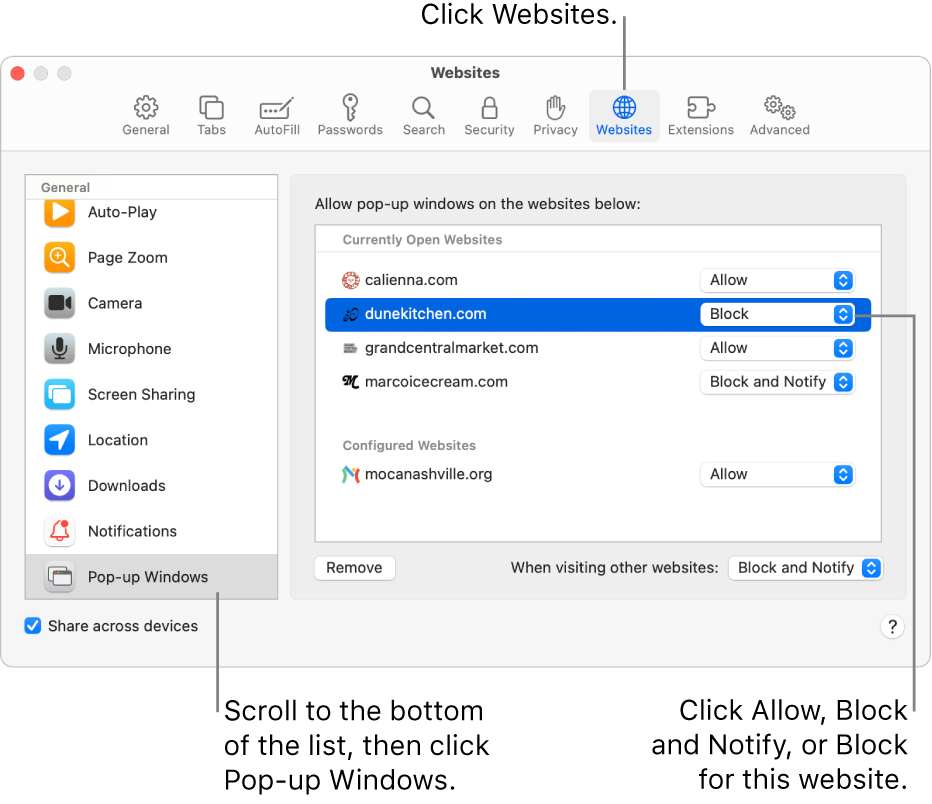
3. Click Pop-up Windows on the left.
If you don’t see Pop-up Windows, be sure to scroll to the bottom of the list.
4. In the pop-up menu for the website, choose one of the following:
 in the Smart Search field.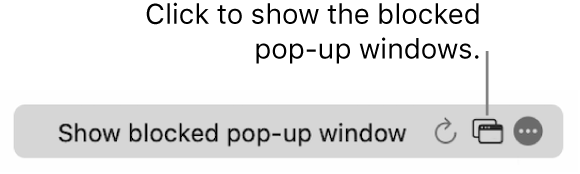
More information about allowing or blocking pop-ups can be found here: Allow or block pop-ups in Safari on Mac - Apple Support
Let us know if you have any questions.
Thank you for using Apple Support Communities.
Take care!
Why so I always get reply that isn't actually answering the question? 😫😆
Unable to enable pop-up in Safari, macOs Catalina

