Connection notification

Anyone know how to turn off the connection lost, connection restored notification? It’s CONSTANT. Sometimes I can barely type because the notification covers my keyboard. Happens probably 50-60 times a minute.

iPhone 14 Pro, iOS 16

Posted on Mar 2, 2023 11:36 AM

Reply
3 replies

Mar 4, 2023 4:00 PM in response to Ewayne_R

Hello Ewayne_R,


To help us better assist you, can you let us know more about the notification you're receiving? Is this message or notification related to a certain app? Does this happen only when connected to a specific network? That information will help us plan how to proceed.


If you want to manage notifications, please check out this link, which outlines those options and may help: Use notifications on your iPhone or iPad


Manage notifications

To manage your notifications from the Lock Screen or Notification Center:
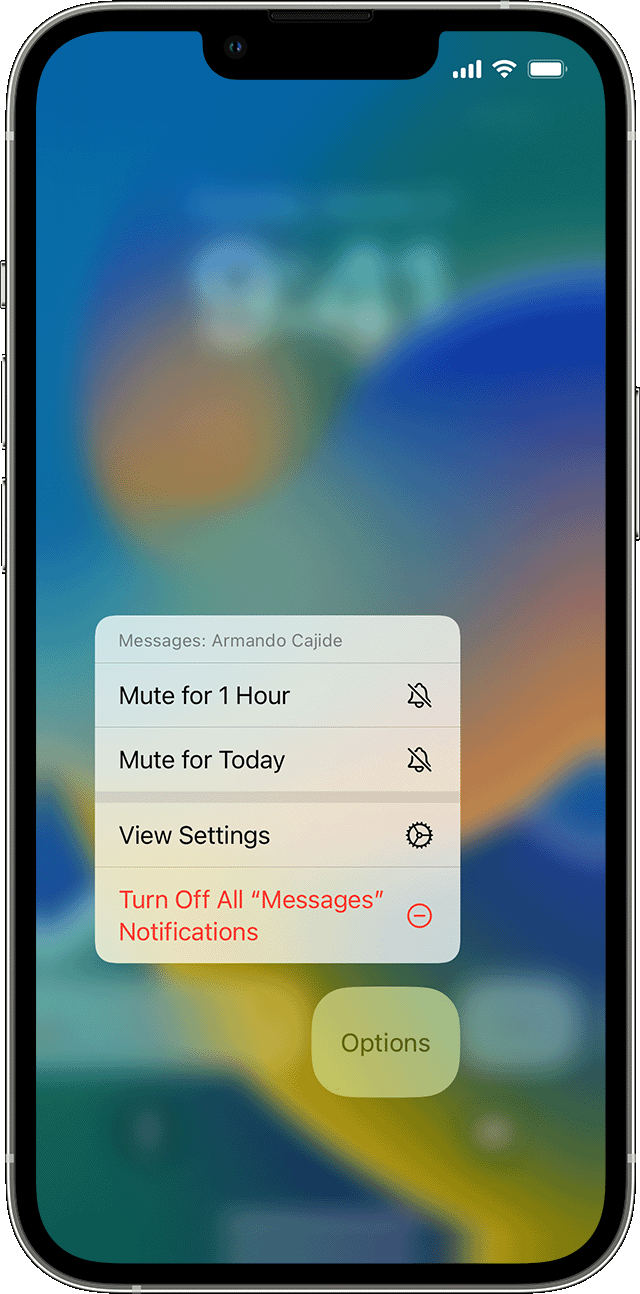
iPhone showing how to manage notifications 

1. Swipe left over an alert or group of alerts.
2. Tap Options, then select from these options: 

• Mute for 1 Hour
• Mute for Today
• View Settings
• Turn Off

You can also tap View Settings to change your alert styles or alert settings for a specific app.


Thanks!

Mar 5, 2023 8:54 AM in response to Ewayne_R

Hello Ewayne_R,


To help resolve this issue, make sure your iPhone is connected to the internet. The steps in this article can help you resolve issues with Wi-Fi connectivity:

If you see No Service, Searching, or SOS on your iPhone or iPad - Apple Support

Since your issue remains, we recommend you Contact Apple for support and service.

Thanks for using the Apple Support Communities, and have a great day!


This thread has been closed by the system or the community team. You may vote for any posts you find helpful, or search the Community for additional answers.

Connection notification

Welcome to Apple Support Community
A forum where Apple customers help each other with their products. Get started with your Apple Account.
