I can’t set my US location or a Englaccessibllity isn’t set up by me and I’ve been trying to figure this out for ab 8 months now I’ve gone through 3-4 iPhones some frozen some lost or stolen and one I lost the SIM card tray it’s really costin me.

iPhone 13, iOS 16

Posted on Mar 2, 2023 7:39 PM

Reply

Similar questions

1 reply

Mar 5, 2023 11:16 AM in response to No1Dirr72

Hi No1Dirr72,


Thank you for using the Apple Support Communities! We would like to clarify the issue you're experiencing. Are you unable to change your Apple ID region? If so, the steps below may help:


Change your Apple ID country or region

Use your iPhone or iPad to change your region
1. Open the Settings app. 
2. Tap your name, then tap Media & Purchases.
3. Tap View Account. You might be asked to sign in.
4. Tap Country/Region.
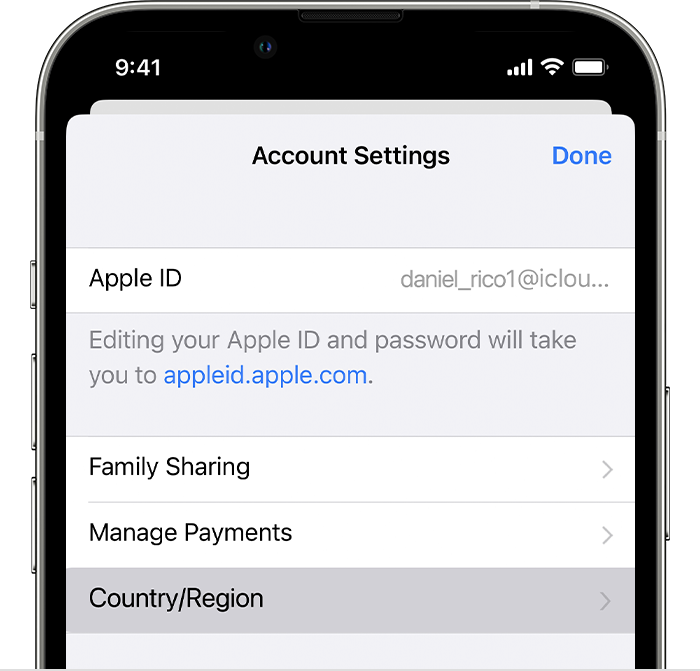
iPhone showing Country/Region in Account Settings.

5. Tap Change Country or Region.
6. Tap your new country or region, then review the Terms & Conditions.
7. Tap Agree in the upper-right corner, then tap Agree again to confirm.
8. Select a payment method and enter your new payment information and billing address, then tap Next. You must enter a valid payment method for your new country or region.*

Thank you.

This thread has been closed by the system or the community team. You may vote for any posts you find helpful, or search the Community for additional answers.

I can’t set my US location or a Englaccessibllity isn’t set up by me and I’ve been trying to figure this out for ab 8 months now I’ve gone through 3-4 iPhones some frozen some lost or stolen and one I lost the SIM card tray it’s really costin me.

Welcome to Apple Support Community
A forum where Apple customers help each other with their products. Get started with your Apple Account.