Any idea on how to disable pop-up editing menu in Pages 12.2.1?

Pages 12.2 displays a contextual menu when I select a word that prevents me from selecting more text using drag and drop. Any way to disable this? I’ve gone through every accessiblity/system/input/app setting I can think of, but no joy. The screenshot below is a little misleading as the menu is complete opaque and I can’t make use of the drag-and-drop selection

iPad Pro, iPadOS 16

Posted on Mar 4, 2023 9:23 AM

Reply

Similar questions

3 replies

Mar 6, 2023 2:41 PM in response to Buckarette

Hi Buckarette,


The proper operation of your Mac is important, and we'd like to help. Safe mode can help isolate if not resolve many issues. See the following guidance: 


"Before you begin


To start up your Mac in safe mode, you need to know what type of Mac you have.


On your Mac, choose Apple menu  > About This Mac.


Look at the information in the window to determine what type of Mac you have:


If you see an item labeled Chip, followed by the name of the chip, you have a Mac with Apple silicon.


If you see an item labeled Processor, followed by the name of an Intel processor, you have an Intel-based Mac.


Use the corresponding set of instructions below to start up your Mac in safe mode.


Start up your Mac with Apple silicon in safe mode


On your Mac, choose Apple menu  > Shut Down.


Wait for your Mac to shut down completely. A Mac is completely shut down when the screen is black and any lights (including in the Touch Bar) are off.


Press and hold the power button on your Mac until “Loading startup options” appears.


Select a volume.


Press and hold the Shift key, then click Continue in Safe Mode.


The computer restarts automatically. When the login window appears, you should see “Safe Boot” in the menu bar.


Start up your Intel-based Mac in safe mode


Turn on or restart your Mac, then immediately press and hold the Shift key until you see the login window.


Log in to your Mac.


You might be asked to log in again.


On either the first or second login window, you should see “Safe Boot” in the menu bar.


Verify your Mac started up in safe mode


If you’re unsure whether your Mac started up in safe mode, you can use the System Information app to check the mode.


On your Mac, press and hold the Option key, then choose Apple menu  > System Information.


In the System Information app, select Software in the sidebar.


In the System Software Overview, look at the value listed next to the item labeled Boot Mode.


Safe: The Mac is using safe mode.


Normal: The Mac is not using safe mode.


"

Start up your Mac in safe mode - Apple Support


Cheers. 


Mar 16, 2023 4:06 PM in response to Buckarette

Hi Buckarette,


Safe mode is a troubleshooting step that only applies on a Mac. No need to worry, there are troubleshooting steps available for Pages on the iPad.


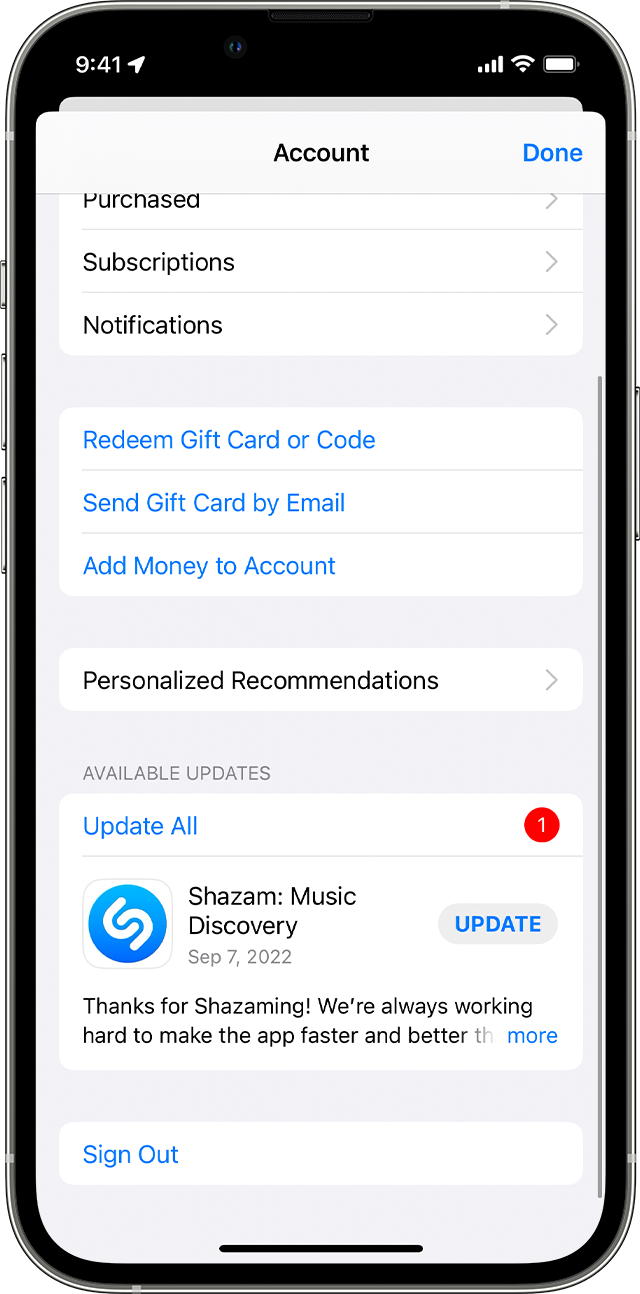
One thing we did notice is that you mentioned being on version 12.2 for Pages. There's a recent update for Pages which is 12.2.1. Our recommendation is to update Pages on your iPad as it helps provide software improvements that can help resolve unexpected behavior. Here are the steps:


How to manually update apps on your iPhone or iPad
1. Open the App Store.
2. Tap your profile icon at the top of the screen.
3. Scroll to see pending updates and release notes. Tap Update next to an app to update only that app, or tap Update All.
iPhone showing the Update All button.

Following these steps can help and is outlined in this helpful article: How to manually update apps on your Apple device - Apple Support


We look forward to hearing back from you with an update.


Kind regards.


Mar 16, 2023 3:30 PM in response to Neil22R

Thank you for taking the time to write out this quite clear and specific response.


Unfortunately, I need to know how to do this on an iPad running iOS 16.3.1, and the Mac process doesn’t really apply to iPad. I had thought I’d posted in the Pages for iOS forum but—note to self—I realize I should have made the operating environment clear in my post.

This thread has been closed by the system or the community team. You may vote for any posts you find helpful, or search the Community for additional answers.

Any idea on how to disable pop-up editing menu in Pages 12.2.1?

Welcome to Apple Support Community
A forum where Apple customers help each other with their products. Get started with your Apple Account.